

Listen & Repeat | Shadowlingo
kazuki sako Education iPhoneiPadiPod touch
Listen & Repeat | Shadowlingo is a free Education app for iPhone and iPad by kazuki sako. Requires iOS 26.0. Updated October 5, 2026.
- Price
- Free
- on the App Store
- Size
- 59 MB
- Age 4+
- Updated
- Oct 5
- 2026 · v1.3.8
Screenshots

About Listen & Repeat | Shadowlingo
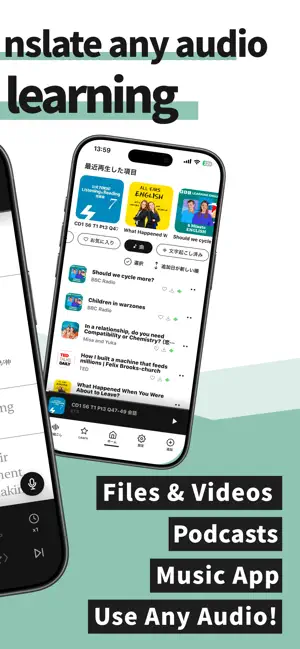
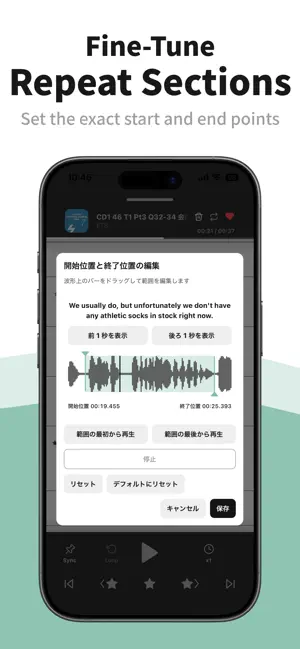
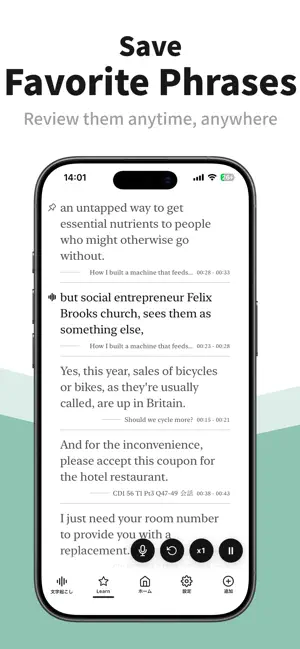
Turn your own English audio into text, repeat any phrase, and practice speaking at your own pace. ■ Key Features • On-device transcription • Translation of transcriptions • Tap subtitles to jump to any point in the audio • Repeat playback of the same phrase • Playback speed adjustment • Split and merge phrases • Record your voice and convert it to text • Save favorite phrases • ChatGPT app integration ■ Supported Audio Sources • Import audio and video files from the Files app • Import videos and screen recordings from the Photos app • Sync with your iCloud Music Library “I want to listen to just this phrase again and again.” “I want to listen at a slower speed first, then practice at normal speed.” “I want to adjust the subtitle breaks to make them easier to study.” “I want to check whether my pronunciation is correct.” ShadowLingo is designed to make detailed repetition practice during shadowing easier. You can split and merge phrases wherever you like, allowing you to practice in units that are easier for you to understand and repeat. You can try the basic features for free. The free plan supports transcription of up to 60 minutes in total, excluding bundled sample audio. Lite increases the total limit to 300 minutes, and Pro has no total transcription-duration limit. Required language models can be downloaded without a subscription. ※ Currently supported transcription languages are English, Japanese, Korean, Simplified Chinese, and Traditional Chinese. More languages are planned for future updates. ※ DRM-protected audio and tracks in your iCloud Music Library that have not been downloaded to your device may not be available for transcription. ※ Transcriptions, subtitle segmentation, and timestamps may contain errors depending on the audio quality and spoken content. Terms of Use: https://shadowlingo.tasuketesoft.com/terms-of-use/
What’s new
Version 1.3.8 · Updated October 5, 2026
【1.3.8 Bug Fix】 ■ Fixed an issue where the next track could be skipped after playback ended. ■ Fixed an issue that prevented some podcasts from downloading depending on the language or characters in their titles. 【1.3.7 New Features and Improvements】 ■ Added an option to save playback positions. Switch tracks during playback to save your place, then resume 5 seconds before that point next time. ■ Added an option to download new podcast episodes automatically only when connected to Wi-Fi. ■ Added a shortcut to iOS Settings when speech recognition permission is needed. 【1.3.6 New Features and Improvements】 ■ Added Indonesian and Vietnamese as interface languages. ■ Clarified the guidance for the initial model download. 【1.3.5 Bug Fixes】 ■ Fixed an issue where the subtitle scroll position could shift when showing or hiding translations 【1.3.4 New Features and Improvements】 ■ Automatic podcast imports now run in the background ■ Updated the Settings screen layout ■ Added an option to prevent the screen from automatically locking while playing transcribed audio, enabled by default. You can change this in Settings > Player 【1.3.3 New Features and Improvements】 ■ Added progress indicators when importing podcast episodes ■ Added a list of podcast episodes currently being imported ■ Added an option to automatically add new episodes from followed podcasts to your library ■ Reduced resource usage during startup and playback ■ Added support for iPad 【1.3.2 Minor Fixes】 ■ Revised the conditions for resetting repeat section settings when splitting a segment ■ Fixed an issue where the scroll position would shift after translating or editing text 【1.3.1 Minor Fixes】 ■ Fixed an issue that prevented the text-to-speech model from being downloaded ■ Improved performance on the Library screen ■ Fixed an issue where the latest episodes were not displayed in the podcast browser ■ UI improvements 【1.3.0 Major Update】 ■ Translation You can now translate transcribed text and display bilingual subtitles. ■ Voice Recording You can now record yourself reading aloud and transcribe your voice using speech recognition. This allows you to check whether your pronunciation is correctly recognized as the intended text. ■ Multilingual Support In addition to English transcription, Japanese, Korean, and Chinese are now supported. The app interface is also now available in Korean and Chinese. ■ Play Favorite Phrases Only You can now play only the phrases you have marked as favorites in the player. This allows you to study your favorite phrases more efficiently. ■ Text-to-Speech You can now generate audio from any text and add it to your library.
App privacy
The developer, kazuki sako, reported these privacy practices to Apple.
Data Not Linked to You
The following data, which may be collected but is not linked to your identity, may be used for the following purposes:
- Purchases: Purchase History
- Location: Coarse Location
- Identifiers: Device ID
- Usage Data: Product Interaction, Other Usage Data
- Diagnostics: Other Diagnostic Data
Used for: Analytics, App Functionality
Alternatives to Listen & Repeat | Shadowlingo
Looking for apps like Listen & Repeat | Shadowlingo? Here are 6 similar apps on the App Store.
-
 numa translate
-
 Kanji Neat Writing Master
-
 Twoネイティブ
-
 River ポーカー勝率トレーナー
-
 Loop Note: Listening Practice
-
 ダンケ中学地理
| App | Rating | Price | Last updated | Compare |
|---|---|---|---|---|
| Listen & Repeat | Shadowlingo | – | Free | October 5, 2026 | |
| numa translate | – | Free | Apr 12, 2026 | Compare |
| Kanji Neat Writing Master | – | 1.99 USD | Sep 26, 2026 | Compare |
| Twoネイティブ | – | Free | Mar 19, 2025 | Compare |
| River ポーカー勝率トレーナー | – | Free | Jun 19, 2026 | Compare |
| Loop Note: Listening Practice | – | Free | Oct 23, 2026 | Compare |
| ダンケ中学地理 | – | Free | Mar 27, 2026 | Compare |