

WristBuddy
Mario Longhi Utilities iPhoneiPadiPod touchApple Watch
WristBuddy is a free Utilities app for iPhone and iPad by Mario Longhi. Requires iOS 16.0. Updated June 11, 2026.
- Price
- Free
- on the App Store
- Size
- 3 MB
- Age 4+
- Updated
- Jun 11
- 2026 · v1.0.1
Screenshots


About WristBuddy
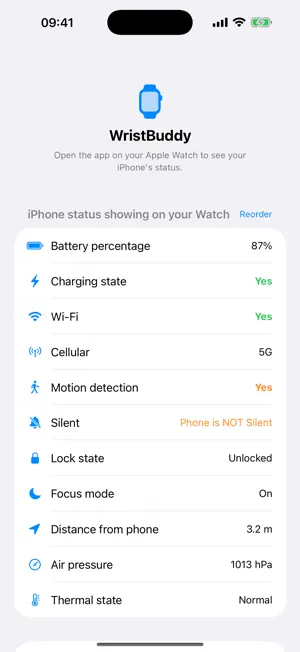
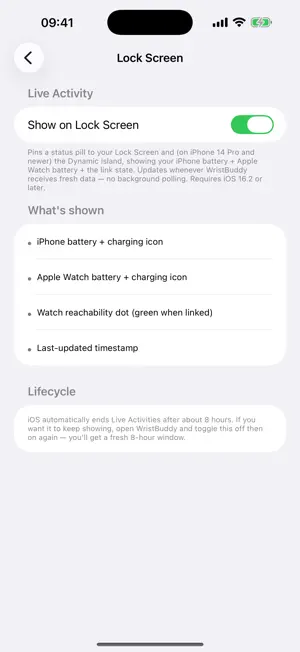
Know how your phone is doing — without picking it up. WristBuddy lives on your Apple Watch and shows what your iPhone is doing right now: battery, charging, Wi-Fi and cellular, motion, silent mode, Focus, lock state, air pressure, and thermal state — all glanceable from your wrist. SOUND FAMILIAR? • Phone charging in another room? Glance at your wrist and unplug it when it's ready. • About to walk into a meeting? Know it's really on silent without pulling it out under the table. • Charging it inside a bag, or tethering a hotspot? Keep an eye on its temperature and catch it running hot. • Left your phone away on purpose? Stay aware of anything urgent without breaking the moment. WHAT'S FREE • Battery range (Below 20% / 20-50% / 50-90% / Above 90%) • Watch dashboard with stale-snapshot indicator • "Hey Siri, ring my iPhone with WristBuddy" (beta) UNLOCK PRO (pay once, yours forever) • Exact battery percentage and charging state • Wi-Fi and Cellular connectivity (separate rows), with network generation (5G / LTE) • Motion detection — is the iPhone being touched right now? • Silent and Focus mode • Lock state — is the iPhone locked right now? • Distance from your iPhone (UWB; iPhone 11+ paired with Apple Watch S6+) • Air pressure — barometric pressure (hPa) from your iPhone's barometer • Thermal state — is your iPhone running hot while it charges or works? (Normal / Fair / Serious / Critical) • Find My Watch (beta) — buzz your Apple Watch from your iPhone • Apple Watch screen on iPhone — see your Watch's battery from your iPhone • Reorderable status rows — drag to reorder which features show on your Watch • Lock Screen Live Activity — both batteries and link state pinned to your iPhone Lock Screen and Dynamic Island • Get iPhone Status shortcut for Shortcuts automations WHY WRISTBUDDY • Pay once. Never a subscription. Never ads. • No account. No sign-up. • No cloud. No analytics. No tracking. No third-party SDKs. • Everything stays on your iPhone and Apple Watch. • Privacy nutrition label: Data Not Collected — every category unchecked. PRIVACY BY DESIGN WristBuddy uses Apple's built-in WatchConnectivity framework, so your iPhone and Apple Watch talk directly to each other over Bluetooth or local Wi-Fi. No data ever leaves your devices. There is no WristBuddy server, because there isn't one. REQUIREMENTS • iPhone running iOS 16 or later (iOS 16.1+ for the Lock Screen Live Activity) • Apple Watch running watchOS 9 or later • UWB distance feature requires iPhone 11+ and Apple Watch Series 6+ • Dynamic Island layout requires iPhone 14 Pro or newer Open the iPhone app once, then forget about it — the iPhone responds in the background. Open the Watch app to see everything at a glance.
What’s new
Version 1.0.1 · Updated June 11, 2026
1.0.1 - June 2026 - General code improvements - Hardening all features - Added link to website in the app - Fix in-app purchase possible glitch - App Store listing improvements
App privacy
The developer, Mario Longhi, reported these privacy practices to Apple.
Data Not Collected
The developer does not collect any data from this app.
Alternatives to WristBuddy
Looking for apps like WristBuddy? Here are 6 similar apps on the App Store.


| App | Rating | Price | Last updated | Compare |
|---|---|---|---|---|
| WristBuddy | – | Free | June 11, 2026 | |
| MensajeYa | – | Free | May 13, 2026 | Compare |
| MuteCue | – | Free | Sep 1, 2026 | Compare |
| Charge Glance | – | Free | Sep 25, 2026 | Compare |
| Kaime | – | Free | Mar 3, 2026 | Compare |
| EV Charge Log | – | Free | Jul 31, 2026 | Compare |
| Leash ByEase: Phone Reminder | – | Free | Oct 16, 2026 | Compare |
Compare WristBuddy with the top alternatives: ratings, updates, ASO score and keyword gaps →