

Sbooky: Book Highlighter
Logogram LC. Book iPhoneiPadiPod touch
Sbooky: Book Highlighter is a free Book app for iPhone and iPad by Logogram LC. Requires iOS 26.2. Updated October 1, 2026.
- Price
- Free
- on the App Store
- Size
- 8 MB
- Age 4+
- Updated
- Oct 1
- 2026 · v1.3.3
Screenshots

About Sbooky: Book Highlighter
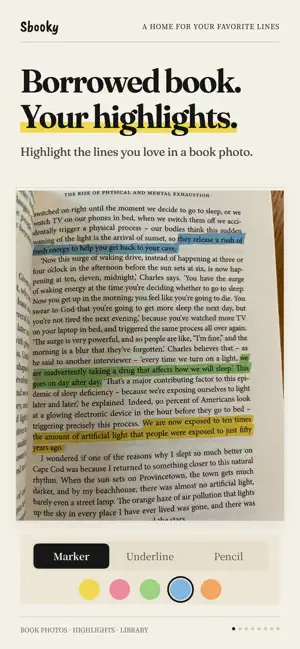
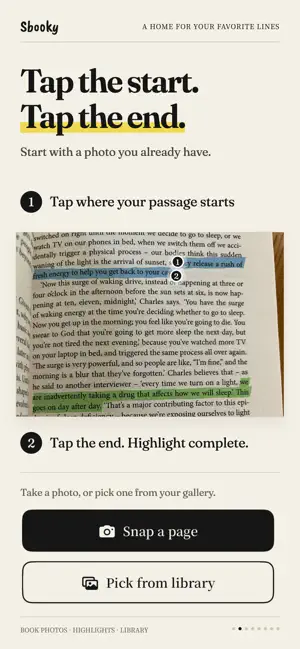
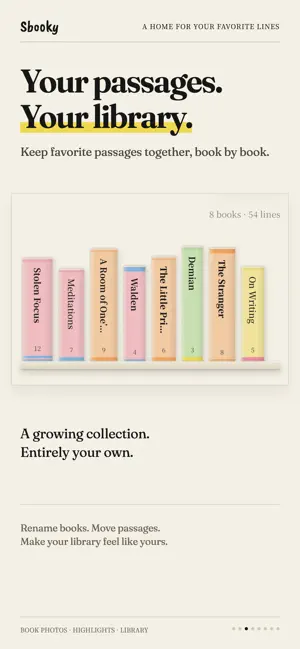
Highlight book passages in photos and collect them in your own Library. Snap a page, then tap the first and last letter of a passage. Add a textured highlight, save it by book, and copy the words or share the page to Instagram Stories. For library books, borrowed books, and books you'd rather keep unmarked. Keep the words that stay with you, without leaving a mark on the page. ◆ Highlight with two taps · Tap the first and last letter to select a passage. · Choose a highlighter, underline, or pencil, each with its own texture. · Make it yours with five soft colors. · Straighten tilted page photos and crop to the part you want. ◆ Build a Library from your reading · Keep your saved passages organized by book. · Watch each book's spine grow thicker as you collect more passages. · Fill your shelf with colorful spines and subtle paper textures. · Rename books or move passages between them. · Add page numbers so you can find your way back. ◆ Rediscover a favorite · A saved passage greets you on the app's home screen each day. · Tap to revisit the original page photo. · Remember the words—and what made you stop to keep them. ◆ Copy and share · Copy highlighted passages as text into Notes, Notion, or your reading journal. · Share directly to Instagram Stories, with the feel of the printed page intact. · Save to Photos to use wherever you like. · Prefer to keep it private? Saving to your Library is enough. ◆ A quiet place for your words · No account, no login, no ads. · Your passages and photos are stored on your device. Only anonymous usage statistics are collected. · Start free with up to 3 books in your Library. · Unlock unlimited books with a one-time purchase. No subscription. Return the book. Keep the words. Start with one passage you love.
What’s new
Version 1.3.3 · Updated October 1, 2026
A few small touches to make collecting passages smoother. · If no text is found in a photo, Sbooky now lets you know and helps you retake it or choose another photo. · If a passage can't be saved to your Library, you'll know right away, so nothing slips through. · A short question now asks what brought you back to Sbooky. Your answer helps shape what comes next. · Minor fixes and improvements. Enjoying Sbooky? Tap "Rate Sbooky" at the bottom of the home screen to leave a rating.
App privacy
The developer, Logogram LC., reported these privacy practices to Apple.
Data Not Linked to You
The following data, which may be collected but is not linked to your identity, may be used for the following purposes:
- Usage Data: Product Interaction
Used for: Analytics
Alternatives to Sbooky: Book Highlighter
Looking for apps like Sbooky: Book Highlighter? Here are 6 similar apps on the App Store. The highest rated is Slovo: Book Journal & Tracker (5.0/5), and all 6 are free to download.
-
 PlotReader
-
 Shelvd: Smart Book Tracker
3.8
Shelvd: Smart Book Tracker
3.8
-
 Slovo: Book Journal & Tracker
5.0
Slovo: Book Journal & Tracker
5.0
-
 Understory: Reading Tracker
4.9
Understory: Reading Tracker
4.9
-
 Reading Journey: Book Tracker
4.7
Reading Journey: Book Tracker
4.7
-
 Pagebound: Social Book Tracker
4.8
Pagebound: Social Book Tracker
4.8
| App | Rating | Price | Last updated | Compare |
|---|---|---|---|---|
| Sbooky: Book Highlighter | – | Free | October 1, 2026 | |
| PlotReader | – | Free | Aug 10, 2026 | Compare |
| Shelvd: Smart Book Tracker | 3.8 / 5 (10) | Free | Oct 6, 2026 | Compare |
| Slovo: Book Journal & Tracker | 5.0 / 5 (25) | Free | Sep 17, 2026 | Compare |
| Understory: Reading Tracker | 4.9 / 5 (49) | Free | Oct 9, 2026 | Compare |
| Reading Journey: Book Tracker | 4.7 / 5 (358) | Free | Oct 6, 2026 | Compare |
| Pagebound: Social Book Tracker | 4.8 / 5 (518) | Free | Oct 7, 2026 | Compare |