

NoSnooze: Wake Up Alarm Clock
Rocinante Venture Studio Health & Fitness iPhoneiPadiPod touch
NoSnooze: Wake Up Alarm Clock is a free Health & Fitness app for iPhone and iPad by Rocinante Venture Studio. Rated 4.9/5 from 16 ratings. Requires iOS 17.0.
- Rating
- 4.9
- 16 ratings
- Price
- Free
- on the App Store
- Size
- 135 MB
- Age 4+
- Updated
- Oct 13
- 2026 · v1.3.0
Screenshots



About NoSnooze: Wake Up Alarm Clock
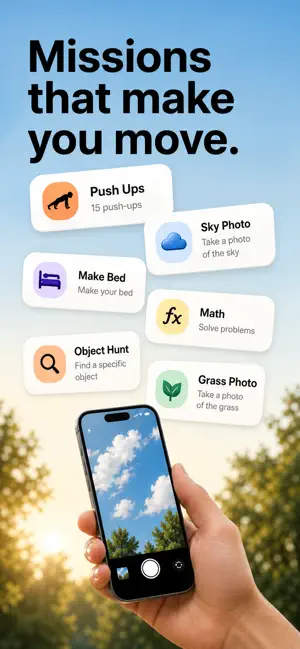
Stop Snoozing. Wake Up on Time. Take Back Your Mornings! Do you hit snooze again and again, sleep through alarms, or turn one off and fall right back asleep? Meet NoSnooze, a wake up alarm clock designed for heavy sleepers and anyone who struggles to get out of bed. NoSnooze combines loud alarm sounds with interactive wake-up missions. Instead of dismissing your alarm with one tap, solve a challenge, scan an object, or get moving. Make your first minutes awake count. ▶ WAKE-UP MISSIONS THAT MAKE YOU MOVE Choose a mission that fits your morning: • Object Scanning – Find and scan an everyday object to dismiss your alarm. • Math Alarm – Solve math problems to get your brain working. • Puzzle Alarm – Complete a brain challenge before turning off your alarm. • Walking Alarm – Get out of bed and walk to finish your mission. • Barcode Alarm – Scan a selected barcode to stop the alarm. • Photo Alarm – Take a photo to complete your wake-up task. • Shake Alarm – Shake your phone to finish the challenge. From mental puzzles to physical movement, NoSnooze offers a more active alternative to a basic alarm clock. ▶ OBJECT SCANNING ALARM: GET OUT OF BED Ever turned off an alarm without fully waking up? Object Scanning gives you a reason to leave your bed. Choose an everyday object, such as a toothbrush, coffee mug, or water bottle. When your alarm rings, find and scan that object to complete the mission. How it works: 1. Set your wake-up time and select Object Scanning. 2. Choose an object away from your bed. 3. Find and scan it when the alarm rings. Try placing your target object in the bathroom or kitchen. Instead of reaching for the snooze button, take a real first step into your morning routine. ▶ LOUD ALARM CLOCK FOR HEAVY SLEEPERS A gentle beep isn’t enough for everyone. NoSnooze is made for heavy sleepers, deep sleepers, and frequent snoozers who need an alarm that’s harder to ignore. • Choose from alarm sounds and customize your ringtone. • Pair loud sounds with interactive wake-up missions. • Select the challenge that works for your schedule. • Set alarms for early classes, work shifts, or morning plans. NoSnooze helps you move beyond a simple alarm sound and build a wake-up experience that works for you. ▶ TURN ALARMS INTO MORNING HABITS Waking up is easier when you have a clear first action. Use missions to create practical routines: • Morning walk: Choose Walking Alarm and start moving. • Morning shower: Set an object or barcode mission in the bathroom. • Brain warm-up: Start with a math problem or puzzle. • Early start: Set a mission before school, work, exercise, or study time. Whether your goal is a more consistent sleep schedule or a productive morning, small daily actions can help you build better habits. ▶ CUSTOM SOUNDS, YOUR WAY TO WAKE UP Prefer a loud ringtone or a familiar alarm sound? Personalize your alarms and combine your preferred sound with the task you want to complete. Make each alarm suit your morning instead of settling for a one-size-fits-all reminder. ▶ WHO IS NOSNOOZE FOR? • Heavy sleepers who miss regular alarms. • People who keep hitting snooze or oversleep. • Students with early classes and exams. • Night-shift and early-morning workers. • Anyone who sets multiple alarms to get up. • People building a healthier morning routine. A regular alarm tells you it’s time to wake up. NoSnooze gives you something to do next. Stop snoozing. Start moving. Make every morning count. Download NoSnooze and take control of your mornings! Camera privacy: Photo missions use your camera only for wake-up verification. Images may be processed by a third-party AI service to confirm task completion. Terms of Use: https://confused-marlin-f35.notion.site/NoSnooze-Terms-of-Service-366d9f97f3db81a19114e479df32873b Privacy Policy: https://confused-marlin-f35.notion.site/NoSnooze-Privacy-Policy-366d9f97f3db8176ae12f7371b591899
Ratings & reviews
4.9
16 ratings
What’s new
Version 1.3.0 · Updated October 13, 2026
NoSnooze now supports English, French, German, Spanish, and Brazilian Portuguese, and follows your device’s language preferences. Explore alarm sounds and your audio library with the updated sound picker.
App privacy
The developer, Rocinante Venture Studio, reported these privacy practices to Apple.
Data Linked to You
The following data, which may be collected and linked to your identity, may be used for the following purposes:
- Purchases: Purchase History
- Identifiers: User ID, Device ID
Used for: App Functionality
Data Not Linked to You
The following data, which may be collected but is not linked to your identity, may be used for the following purposes:
- User Content: Photos or Videos
Used for: App Functionality
Alternatives to NoSnooze: Wake Up Alarm Clock
Looking for apps like NoSnooze: Wake Up Alarm Clock? Here are 6 similar apps on the App Store. The highest rated is UpWake: Loud Alarm Clock (5.0/5), and all 6 are free to download.
-
 UpWake: Loud Alarm Clock
5.0
-
 So Alarmed: Anti-Snooze Alarm
4.0
-
 Risey: Alarm Buddy
4.8
-
 Snoozless: Mission Alarm Clock
4.7
-
 Peter's Gentle Alarm
5.0
-
 Wakeo: Alarm Clock to Wake Up
| App | Rating | Price | Last updated | Compare |
|---|---|---|---|---|
| NoSnooze: Wake Up Alarm Clock | 4.9 / 5 (16 ratings) | Free | October 13, 2026 | |
| UpWake: Loud Alarm Clock | 5.0 / 5 (4) | Free | Oct 16, 2026 | Compare |
| So Alarmed: Anti-Snooze Alarm | 4.0 / 5 (6) | Free | Oct 17, 2026 | Compare |
| Risey: Alarm Buddy | 4.8 / 5 (65) | Free | Oct 14, 2026 | Compare |
| Snoozless: Mission Alarm Clock | 4.7 / 5 (15) | Free | Oct 6, 2026 | Compare |
| Peter's Gentle Alarm | 5.0 / 5 (3) | Free | Jun 29, 2026 | Compare |
| Wakeo: Alarm Clock to Wake Up | – | Free | Oct 13, 2026 | Compare |