

Duo Cleaner: Clean Up Storage
TP Technology Service Company Limited Utilities iPhoneiPadiPod touch
Duo Cleaner: Clean Up Storage is a free Utilities app for iPhone and iPad by TP Technology Service Company Limited. Rated 4.5/5 from 31 ratings.
- Rating
- 4.5
- 31 ratings
- Price
- Free
- on the App Store
- Size
- 56 MB
- Age 4+
- Updated
- Oct 23
- 2026 · v1.1.1
Screenshots



About Duo Cleaner: Clean Up Storage
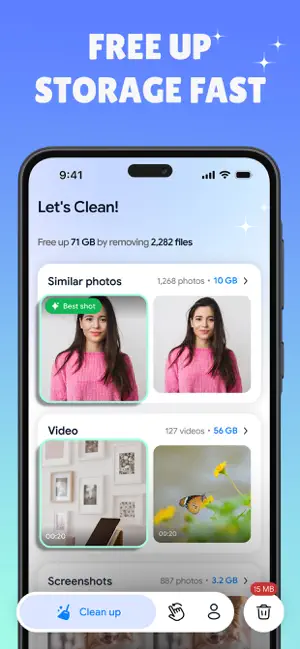
Free up space with Duo, a phone cleaner for your Photos library. Find large photos, unwanted videos, screenshots, and similar shots, then choose what to remove. Duo Cleaner: Clean Up Storage brings an AI cleaner and photo management tools together in one app. Review large files, compare similar images, or swipe through your library by month. Use the storage cleaner to clean up iPhone storage by removing media you no longer need. Duo groups images automatically, helping you review your library without searching for every photo manually. 1. WHAT DUO CLEANS: Clean Phone Storage: Large Photos & Videos Find large photos and videos taking up space in your Photos library. Review them together and select the files you no longer need, from old recordings to oversized images. The phone cleaner keeps the decision in your hands. Swipe Cleaner: Keep or Clean in One Motion Browse your Photos library month by month. Swipe right to keep, swipe left to mark a photo for removal. Review your selection before confirming deletion. Duplicate Photos Cleaner: Compare Similar Shots Duo uses an AI cleaner to scan your Photos library and group near-duplicate photos side by side. Compare similar shots, pick your favorites, and select the rest for removal. The duplicate photos cleaner helps you review each group before deleting anything. Screenshot Cleaner: Review Saved Screenshots Old receipts, memes, and random notes can accumulate over time. Duo detects and pre-selects screenshots so you can check the selection and remove those you no longer need. Social & Messaging App Images Photos saved from messaging and social apps can add clutter to your Photos library. Duo groups supported saved images separately, helping you review unwanted downloads alongside your other photos. Video Cleaner: Review Your Largest Files Duo sorts videos from largest to smallest so you can review the biggest files first. Preview each video before deciding whether to remove it. Storage Cleaner Dashboard: Follow Your Progress Track items removed, categories scanned, and the size of media selected for deletion. See your progress as you clean up iPhone storage, with a summary of each session. 2. PRIVATE & ON-DEVICE Duo processes your Photos library on your device, without uploading your photos to its servers. No account or sign-up is required. Use the AI cleaner offline to organize media available on your device. WHY CHOOSE DUO - Find large photos and videos in one place - Compare similar shots with the duplicate photos cleaner - Review screenshots and saved messaging app images - Swipe through photos by month - Check your selection before confirming deletion - View your cleaning progress in the dashboard DELETING & RECOVERING PHOTOS Deleted photos and videos move to Recently Deleted in the Photos app, where they normally remain for 30 days. You can recover them or permanently delete them there. To complete removal and reclaim space sooner, empty Recently Deleted after checking that you no longer need those items. Available storage may vary with iCloud Photos settings. Download Duo, your phone cleaner with photo and video tools. Use the storage cleaner to organize your Photos library and make room for new content. Privacy Policy: https://sites.google.com/view/unclutterprivacypolicy/home Terms of Use: https://sites.google.com/view/uncluttertermsofuse/home
Ratings & reviews
4.5
31 ratings
What’s new
Version 1.1.1 · Updated October 23, 2026
- Optimized app features and overall performance for a smoother experience.
App privacy
The developer, TP Technology Service Company Limited, reported these privacy practices to Apple.
Data Used to Track You
The following data may be used to track you across apps and websites owned by other companies:
- Usage Data: Advertising Data
Data Not Linked to You
The following data, which may be collected but is not linked to your identity, may be used for the following purposes:
- Usage Data: Advertising Data
- Diagnostics: Crash Data
Used for: Third-Party Advertising, Analytics, App Functionality
Alternatives to Duo Cleaner: Clean Up Storage
Looking for apps like Duo Cleaner: Clean Up Storage? Here are 6 similar apps on the App Store. The highest rated is Photo Organizer: Smart Album (5.0/5), and all 6 are free to download.
-
 SnapClean:Quick Clean
4.4
SnapClean:Quick Clean
4.4
-
 PhotoSure
-
 Photo Organizer: Smart Album
5.0
Photo Organizer: Smart Album
5.0
-
 Storage Cleaner Photo Cleaner
4.2
Storage Cleaner Photo Cleaner
4.2
-
 CleanLab: Cleaner & Storage
4.0
CleanLab: Cleaner & Storage
4.0
-
 ClearPeak:Smart Cleaning
| App | Rating | Price | Last updated | Compare |
|---|---|---|---|---|
| Duo Cleaner: Clean Up Storage | 4.5 / 5 (31 ratings) | Free | October 23, 2026 | |
| SnapClean:Quick Clean | 4.4 / 5 (5) | Free | Sep 28, 2026 | Compare |
| PhotoSure | – | Free | Oct 12, 2026 | Compare |
| Photo Organizer: Smart Album | 5.0 / 5 (3) | Free | Oct 17, 2026 | Compare |
| Storage Cleaner Photo Cleaner | 4.2 / 5 (45) | Free | Aug 21, 2026 | Compare |
| CleanLab: Cleaner & Storage | 4.0 / 5 (1) | Free | Sep 17, 2026 | Compare |
| ClearPeak:Smart Cleaning | – | Free | Oct 21, 2026 | Compare |