

Private Camera: Video Vault
2784951 Alberta Inc. Photo & Video iPhoneiPadiPod touch
Private Camera: Video Vault is a free Photo & Video app for iPhone and iPad by 2784951 Alberta Inc. Requires iOS 15.1. Updated October 7, 2026.
- Price
- Free
- on the App Store
- Size
- 69 MB
- Age 4+
- Updated
- Oct 7
- 2026 · v1.0.6
Screenshots

About Private Camera: Video Vault
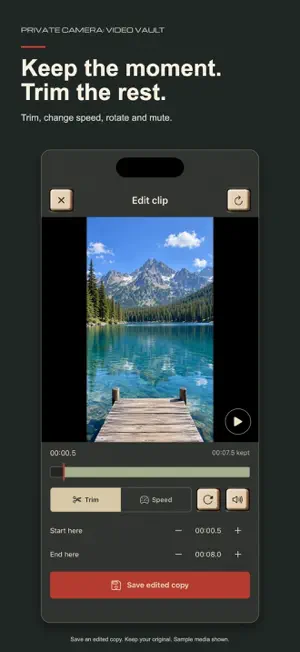
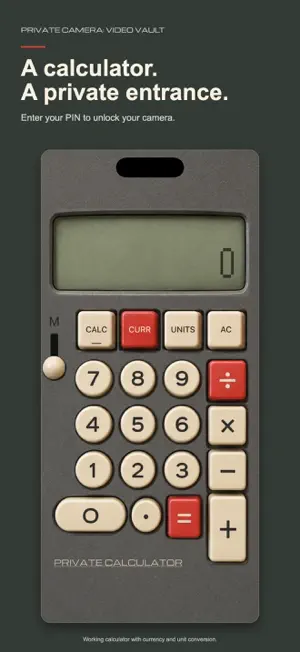
A private camera and video vault in one app. Record personal videos, import photos and videos, and keep your media separate from your everyday gallery. Start without creating an account or providing an email. RECORD STRAIGHT TO YOUR VAULT Use the front or rear camera with simple recording controls. Keep recording sessions together on your device, then return to the camera when you finish. A CALCULATOR WITH A PURPOSE Use a working retro calculator with currency and unit conversion. Enter your app PIN to unlock the camera and your private media tools. DIFFERENT PASSWORDS, DIFFERENT VAULTS Your app PIN unlocks the calculator screen. Your master password opens all your vaults. A custom vault password opens its matching recordings, so you can keep different collections separate. Keep your passwords somewhere safe. IMPORT AND ORGANIZE Bring existing photos and videos into a password-protected vault from your gallery or the file chooser. Imported originals stay in their original location until you remove them yourself. QUICK VIDEO EDITS Open a clip from your vault to trim it, change playback speed, rotate it or mute its sound. Save an edited copy and keep the original. PASSWORD-PROTECTED FILE SHARING Choose Share Encrypted File to create a download link with a separate file password. Links expire after 30 days. Anyone with the link can download the encrypted file; the password is needed to open its contents. Share the password separately. Ordinary sharing remains a separate option. CLEAR PRIVACY CONTROLS Review backup settings before recording. Camera and microphone permissions are required, and system privacy indicators remain visible. Dark-screen mode is an in-app view, not a promise of recording while your phone is locked. Record only with permission and respect other people's privacy. Some features depend on your device and plan. See the privacy policy for storage, backup and sharing details.
What’s new
Version 1.0.6 · Updated October 7, 2026
A refreshed retro calculator with PIN unlock, currency and unit conversion. Simpler setup for your master password and vault passwords. Import media and share encrypted files with separate passwords. Trim, adjust speed, rotate and mute clips from your vault. Recording returns to the camera when you finish. Recording sessions join on-device while backups use the original chunks. Expanded interface language support and reliability improvements.
App privacy
The developer, 2784951 Alberta Inc., reported these privacy practices to Apple.
Data Linked to You
The following data, which may be collected and linked to your identity, may be used for the following purposes:
- User Content: Photos or Videos
Used for: App Functionality
Data Not Linked to You
The following data, which may be collected but is not linked to your identity, may be used for the following purposes:
- Location: Coarse Location
- Contact Info: Email Address
Used for: Analytics, App Functionality
Alternatives to Private Camera: Video Vault
Looking for apps like Private Camera: Video Vault? Here are 6 similar apps on the App Store. The highest rated is Video Camera:Recording Sounds (5.0/5), and all 6 are free to download.
-
 OutVault: Private Camera
-
 Kemra - Black Screen Camera
4.7
Kemra - Black Screen Camera
4.7
-
 Save Google Map Image
-
 Video Camera:Recording Sounds
5.0
Video Camera:Recording Sounds
5.0
-
 PrivacyCam: Hide My Photos
-
 CamVerse – Live Camera Effects
| App | Rating | Price | Last updated | Compare |
|---|---|---|---|---|
| Private Camera: Video Vault | – | Free | October 7, 2026 | |
| OutVault: Private Camera | – | Free | Oct 7, 2026 | Compare |
| Kemra - Black Screen Camera | 4.7 / 5 (3) | Free | Sep 7, 2026 | Compare |
| Save Google Map Image | – | Free | Aug 25, 2026 | Compare |
| Video Camera:Recording Sounds | 5.0 / 5 (1) | Free | Aug 13, 2026 | Compare |
| PrivacyCam: Hide My Photos | – | Free | Sep 18, 2026 | Compare |
| CamVerse – Live Camera Effects | – | Free | Aug 3, 2026 | Compare |