

Loomur: AI Captions
Serhii Somok Photo & Video iPhoneiPadiPod touch
Loomur: AI Captions is a free Photo & Video app for iPhone and iPad by Serhii Somok. Requires iOS 18.0. Updated October 19, 2026.
- Price
- Free
- on the App Store
- Size
- 13 MB
- Age 4+
- Updated
- Oct 19
- 2026 · v1.1
Screenshots



About Loomur: AI Captions
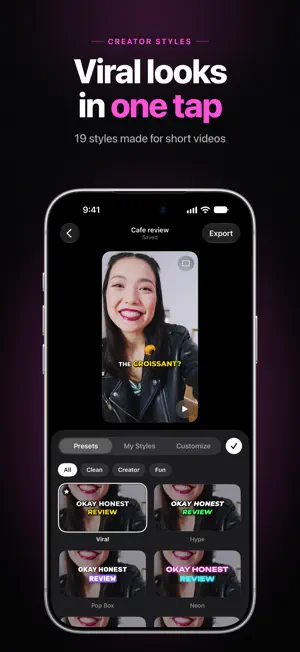
Loomur turns your talking videos into captions that pop, word by word, right on your iPhone. Pick a style, accent the key words, cut the pauses, and your video is ready to post. No account, no cloud, no watermark. Speech recognition runs on your iPhone, so your videos never leave it. CAPTIONS THAT POP • Word-by-word subtitles timed to your voice • 19 styles made for short videos, 14 creator fonts, shadows, karaoke and letter-by-letter typing • Short captions, 2–3 words at a time, or full sentences • Key words stand out in color and size, with emoji on top • A hook title over the first frames keeps viewers watching ONE-TAP MAGIC • Remove Pauses: jump cuts in one tap, subtitles stay in sync • Clean Up Voice: removes background noise • Censor Swearing: masked in the subtitles, bleeped in the audio (English, Ukrainian, Russian) • Translate: a translated line under your subtitles or instead of them • Find & Replace: fix a word everywhere, and Loomur remembers it for your next videos • Auto Edit: accents, emoji and pause removal done while the project is created EDIT YOUR WAY • Edit text and timing, split and merge subtitles • Move and resize the subtitle box, or place each word anywhere • TikTok, Reels and Shorts safe zones • Save your own styles and pick the one new projects start with • Trim the video; the export looks exactly like the editor EXPORT • Video to Photos in original quality, HDR stays HDR • Subtitle and translation files (.srt) • Transparent subtitles (.mov) for other video editors SPEAKS YOUR LANGUAGE English, Spanish, French, German, Italian, Portuguese, Dutch, Polish, Czech, Turkish, Ukrainian, Russian, Japanese, Korean and Chinese. Loomur detects the language on its own. Everything happens on your iPhone. After a one-time download of the speech model, Loomur works offline.
What’s new
Version 1.1 · Updated October 19, 2026
The biggest Loomur update yet: creator-style captions plus editing tools, so the whole video gets done in one app. NEW LOOKS • 19 styles made for short videos and 14 new fonts • Shadows, a highlight behind the spoken word, karaoke and letter-by-letter typing • Short captions, 2–3 words at a time (or full sentences, your pick in Settings) • Key words stand out in color and size, with emoji on top, in all 15 languages. Loomur learns from your edits • A hook title over the first frames MAGIC — a new menu in the editor • Remove Pauses: jump cuts in one tap, subtitles stay in sync • Clean Up Voice: removes background noise • Censor Swearing: masked in the subtitles, bleeped in the audio • Translate: a translated line under your subtitles or instead of them, right on your iPhone • Find & Replace across all subtitles. Loomur remembers your fixes for the next videos • Auto Edit when you create a project: accents, emoji and pause removal done for you EDITOR • Everything on one screen: the video stays on top, styles preview live on your footage • Resize the subtitle box by its edges, or detach words and place each one anywhere • Subtitles in the exported video match the editor exactly • TikTok, Reels and Shorts safe zones • Choose the style every new project starts with: a preset or one of your own EXPORT • Subtitle and translation files (.srt) • Transparent subtitles (.mov) for other video editors • Leaving the app no longer cancels an export or a new project Also: the model download resumes after a lost connection, steadier language detection, Chinese and Japanese subtitles without stray spaces, a new home screen and lots of fixes.
App privacy
The developer, Serhii Somok, reported these privacy practices to Apple.
Data Not Collected
The developer does not collect any data from this app.
Alternatives to Loomur: AI Captions
Looking for apps like Loomur: AI Captions? Here are 6 similar apps on the App Store.
-
 Fluxify AI Art Generator
-
 ReverseSaver
-
 Baby Sticker: Photo Cutout
-
 StampCam - Date Stamp Camera
-
 CaptionsPro: AI Captions
-
 Media Remote - Player Control
| App | Rating | Price | Last updated | Compare |
|---|---|---|---|---|
| Loomur: AI Captions | – | Free | October 19, 2026 | |
| Fluxify AI Art Generator | – | Free | Jul 9, 2026 | Compare |
| ReverseSaver | – | Free | Jun 28, 2026 | Compare |
| Baby Sticker: Photo Cutout | – | Free | Oct 12, 2026 | Compare |
| StampCam - Date Stamp Camera | – | Free | Sep 30, 2026 | Compare |
| CaptionsPro: AI Captions | – | Free | Aug 8, 2026 | Compare |
| Media Remote - Player Control | – | Free | Sep 7, 2026 | Compare |