

Photo Cleaner: Clean Gallery
Henan Yuechuan Intelligent Technology Co., Ltd. Photo & Video iPhoneiPadiPod touch
Photo Cleaner: Clean Gallery is a free Photo & Video app for iPhone and iPad by Henan Yuechuan Intelligent Technology Co., Ltd. Requires iOS 16.6.
- Price
- Free
- on the App Store
- Size
- 11 MB
- Age 4+
- Updated
- Jul 28
- 2026 · v1.3.0
Screenshots



About Photo Cleaner: Clean Gallery
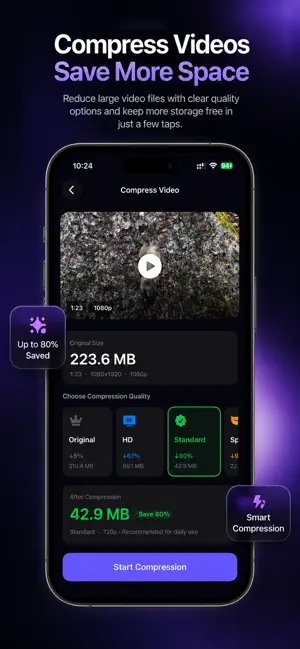
Photo Cleaner: Clean Gallery helps you clean and organize your photo library by finding duplicate photos, similar images, screenshots, and large files that may be taking up storage space. Over time, your photo library can become cluttered with repeated shots, screenshots, saved images, and large media files. Photo Cleaner: Clean Gallery provides a simple way to review these items and decide what to keep or remove. Key Features: Duplicate Photo Finder Find duplicate photos in your library and review them before deleting. Similar Photo Detection Group visually similar photos, such as repeated shots or multiple versions of the same scene. Screenshot Cleanup Quickly find screenshots so you can review and remove the ones you no longer need. Large File Finder Locate large photos or media files that may be using significant storage space. Simple Review Workflow Review items before deletion. You stay in control of what is removed. Local Photo Scanning Photo Cleaner: Clean Gallery scans your photo library on your device. Your photos are not uploaded to our servers. Privacy-Focused Design No account is required. Photo analysis is performed locally, and your personal photos remain on your device. Who Is Photo Cleaner: Clean Gallery For? Photo Cleaner: Clean Gallery is useful if you want to: - Clean up duplicate photos - Organize a large photo library - Remove unnecessary screenshots - Find large images or media files - Free up storage space - Review similar photos more efficiently Photo Cleaner: Clean Gallery is designed to make photo cleanup simple, clear, and controlled. It helps you find possible cleanup opportunities, then lets you decide what to keep and what to delete. Privacy: All photo scanning and analysis are performed locally on your device. Photo Cleaner: Clean Gallery does not upload, store, or share your photos or photo analysis results. Privacy Policy: https://www.yuechuanai.cn/apps/photosweep/privacy/en.html
What’s new
Version 1.3.0 · Updated July 28, 2026
• New AI Selection: analyzes similar photos on your device and recommends the best shots to keep. • New Smart Cleanup and Cleanup History: review a cleanup plan and track your results. • Trusted Scan 2.0: faster incremental scans with more accurate and stable photo analysis. • General improvements to the photo cleanup experience.
App privacy
The developer, Henan Yuechuan Intelligent Technology Co., Ltd., reported these privacy practices to Apple.
Data Not Collected
The developer does not collect any data from this app.
Alternatives to Photo Cleaner: Clean Gallery
Looking for apps like Photo Cleaner: Clean Gallery? Here are 6 similar apps on the App Store. The highest rated is Dupes-Duplicate Photo Cleaner (5.0/5), and all 6 are free to download.
-
 Dupes-Duplicate Photo Cleaner
5.0
Dupes-Duplicate Photo Cleaner
5.0
-
 ClearPhoto Swipe
-
 Swipic: Clean your gallery
-
 Cleanupic: Photo Cleaner App
-
 Backspace - Photo Cleaner
-
 Orene: Aesthetic Photo Editor
| App | Rating | Price | Last updated | Compare |
|---|---|---|---|---|
| Photo Cleaner: Clean Gallery | – | Free | July 28, 2026 | |
| Dupes-Duplicate Photo Cleaner | 5.0 / 5 (1) | Free | Oct 9, 2026 | Compare |
| ClearPhoto Swipe | – | Free | Jul 24, 2026 | Compare |
| Swipic: Clean your gallery | – | Free | May 17, 2026 | Compare |
| Cleanupic: Photo Cleaner App | – | Free | Oct 9, 2026 | Compare |
| Backspace - Photo Cleaner | – | Free | Aug 31, 2026 | Compare |
| Orene: Aesthetic Photo Editor | – | Free | Sep 9, 2026 | Compare |