

Genbalog - Field Photo to PDF
YANGLI CHEN Business iPhoneiPadiPod touch
Genbalog - Field Photo to PDF is a free Business app for iPhone and iPad by YANGLI CHEN. Requires iOS 17.0. Updated October 23, 2026.
- Price
- Free
- on the App Store
- Size
- 5 MB
- Age 4+
- Updated
- Oct 23
- 2026 · v1.5.0
Screenshots

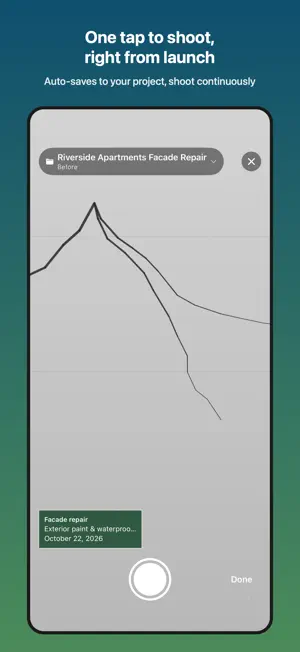


About Genbalog - Field Photo to PDF
Create professional field reports from photos in 60 seconds. Built for solo contractors, tradespeople, and field service workers. Take photos on-site, add captions, and get a polished A4 PDF report in under 60 seconds. Share instantly via email, LINE, or AirDrop. ■ PROBLEMS WE SOLVE - Reports taking 1-2 hours → Done in 60 seconds - Cloud subscriptions at $50+/month → Free to start - Photo chaos across folders → Auto-organized by section - Inconsistent layouts → Consistent professional format - No tools built for individuals → Designed for solo operators ■ KEY FEATURES [Quick Capture] Start shooting instantly from the center tab button. A flashlight and pinch zoom help in dark rooms and inside panels. Launch from the Lock Screen widget, Shortcuts, or the Action button. [Smart Photo Organization] Photos auto-sorted into template sections (Before/During/After, OK/Caution/Repair). GPS and timestamps recorded automatically. [Photo Annotation] Place arrows, circles, rectangles, number stamps, and text labels with one tap. Pinch to zoom in and annotate fine cracks and screws precisely. Freehand marking with Apple Pencil or finger is also supported. [Voice Captions] Tap the mic to convert speech to text. Preset captions like "Overview", "Close-up", and "Needs rework" insert with one tap. Capture notes hands-free on the job site. [Professional PDF Generation] A4 portrait, 2x2 grid, up to 4 photos per page. GPS, timestamp, and captions embedded automatically. Review pages with thumbnails, pick a sort order (date taken / manual), and Save to Files. 10 photos generated in under 3 seconds. [Blackboard-Style Overlay] Show project name, work type, date, location, and contractor as a construction blackboard panel on photos. Originals are never modified — the board is composited only in the PDF. Toggle per photo. [Flexible PDF Layouts] Choose one large photo per page, 2 per page, a 2x2 grid, a 2x3 grid (6 per page), or a ledger-style 3-per-page layout (Pro). Optional timestamp and GPS stamping. [Before/After Reshoot Guide] Overlay a previous photo as a translucent ghost to retake the exact same angle. [CSV Export] Export the photo list (number, section, caption, time, coordinates) as Excel-compatible CSV. [Field Mode] High-contrast display with larger text for readability in direct sunlight. [Photo Backup] Export every project with its photos as a ZIP. Keep a full copy on-device, safe against device loss or replacement, while staying fully offline. [Instant Sharing] Share via email, LINE, or AirDrop right from the job site. Save to Files app for your records. ■ FULLY OFFLINE No cloud. No sign-up. No login required. Works in basements, remote sites, and areas without cell service. All data stays on your device. ■ PRO PLAN (see pricing in App Store) - Unlimited PDF generation (Free plan: 5/month) - Company logo and name in every PDF header - Custom templates (up to 6 section tabs) - History keeps every sent report (5 on the free plan), ready to re-send - ZIP bulk export of all photos and PDFs - Remarks page at the end of the report (drafted from your captions on supported devices) - 3-day free trial on the monthly plan, cancel anytime in App Store Settings Privacy Policy: https://freetokyolabs.com/genbalog/privacy.html Terms of Service: https://freetokyolabs.com/genbalog/terms.html
What’s new
Version 1.5.0 · Updated October 23, 2026
v1.5 update ■ PDF page numbers now run through the whole report and show the total (e.g. "Page 3 of 12") ■ Photos added from your library keep the date and place they were taken, and you can edit the date in the photo editor ■ New PDF layouts: 2 per page and 2×3 (6 per page) ■ Your contact name now appears in the PDF header ■ The blackboard panel moves aside when it would cover your annotations ■ Better legibility in Dark Mode; Delete All Data now also clears custom templates and the widget
App privacy
The developer, YANGLI CHEN, reported these privacy practices to Apple.
Data Not Collected
The developer does not collect any data from this app.
Alternatives to Genbalog - Field Photo to PDF
Looking for apps like Genbalog - Field Photo to PDF? Here are 6 similar apps on the App Store.


| App | Rating | Price | Last updated | Compare |
|---|---|---|---|---|
| Genbalog - Field Photo to PDF | – | Free | October 23, 2026 | |
| Punch List: Field Report PDF | – | Free | Oct 15, 2026 | Compare |
| ObraIQ | – | Free | May 27, 2026 | Compare |
| Techdreno 360 | – | Free | Oct 21, 2026 | Compare |
| 写真番 | – | Free | Oct 27, 2026 | Compare |
| FieldProof: Site Reports | – | Free | Oct 3, 2026 | Compare |
| 現場カム - 工事写真・小黒板 | – | Free | Jul 22, 2026 | Compare |