

Roomly 3D
Hangfang Zhang Utilities iPhoneiPadiPod touch
Roomly 3D is a paid Utilities app for iPhone and iPad by Hangfang Zhang. Rated 5.0/5 from 1 ratings. Requires iOS 17.0. Updated October 20, 2026.
- Rating
- 5.0
- 1 ratings
- Price
- 1.99 USD
- on the App Store
- Size
- 8 MB
- Age 4+
- Updated
- Oct 20
- 2026 · v1.3
Screenshots



About Roomly 3D
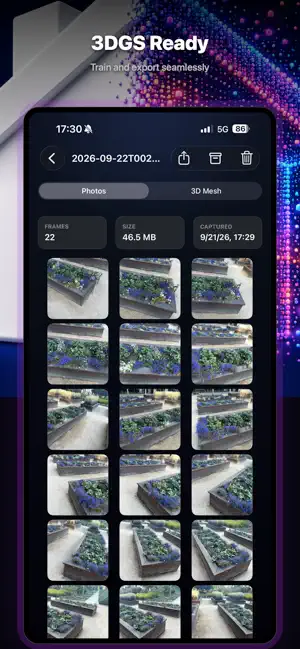
Every room. Every state. Saved. Roomly 3D turns your iPhone Pro's LiDAR sensor into a precision room scanner. Each capture preserves synchronized colour, depth, and camera pose, so the result can be turned into a photoreal 3D model for evidence, virtual tours, or comparing a space across time. WHAT IT'S FOR • Evidence preservation — insurance claims, rental move-in/move-out, property disputes • Virtual tours — remote viewing for sales or sharing • State diffing — comparing a room's state across time HOW IT WORKS • Walk through a room with your iPhone. Roomly 3D auto-captures sharp frames at the right moments — no shutter button to press. • A live coverage overlay colours the room as you scan, showing which surfaces are done and which still need a pass. • Motion and sharpness gates reject blurry or rushed frames before they are ever written, so what you take home is clean. • Stop when the room reads as fully covered. Share the result as a single archive, or save the raw scan to Files. OUTPUT • Industry-standard Nerfstudio-compatible format (transforms.json + RGB JPGs + depth EXRs + LiDAR mesh) • Drop straight into Nerfstudio, DN-Splatter, or any 3D Gaussian Splatting / NeRF pipeline that reads the Nerfstudio schema • Metric scale: one unit is one metre, no rescaling needed REQUIREMENTS • iOS 17 or later • LiDAR RGB-D capture — the full depth pipeline and the live coverage overlay — requires an iPhone Pro with a LiDAR sensor (12 Pro family and later). Without LiDAR the app still runs and captures a camera-only sequence, but depth and the coverage overlay are unavailable. PRIVACY • All processing happens on your device. • No analytics, no accounts, no third-party SDKs, no data leaves your phone.
What’s new
Version 1.3 · Updated October 20, 2026
More reliable scanning and easier access to your saved captures. • Clearer live capture guidance and scan summaries. • Improved saving when a scan is interrupted or the app moves to the background. • Faster browsing of saved scans, with safer photo deletion and export. • A clearer Done button and a Write a review option in Settings. • Added purchase verification. Confirmed refunds disable new scans; saved scans remain available to view and export.
App privacy
The developer, Hangfang Zhang, reported these privacy practices to Apple.
Data Not Collected
The developer does not collect any data from this app.
Alternatives to Roomly 3D
Looking for apps like Roomly 3D? Here are 6 similar apps on the App Store. The highest rated is Memo 3D Scanner (5.0/5), and all 6 are free to download.


| App | Rating | Price | Last updated | Compare |
|---|---|---|---|---|
| Roomly 3D | 5.0 / 5 (1 rating) | 1.99 USD | October 20, 2026 | |
| Memo 3D Scanner | 5.0 / 5 (1) | Free | Sep 5, 2026 | Compare |
| Poco AI | – | Free | Apr 22, 2025 | Compare |
| IconSaver | – | Free | May 14, 2026 | Compare |
| CantoTranslate | – | Free | Apr 23, 2024 | Compare |
| 3D Mesh Doctor | – | Free | Jun 12, 2026 | Compare |
| SealSkin | – | Free | Oct 21, 2026 | Compare |
Compare Roomly 3D with the top alternatives: ratings, updates, ASO score and keyword gaps →