

Caddy - Copy & Paste
Elmeris LLC Productivity iPhoneiPadiPod touch
Caddy - Copy & Paste is a free Productivity app for iPhone and iPad by Elmeris LLC. Rated 5.0/5 from 1 ratings. Requires iOS 13.0. Updated September 1, 2026.
- Rating
- 5.0
- 1 ratings
- Price
- Free
- on the App Store
- Size
- 20 MB
- Age 4+
- Updated
- Sep 1
- 2026 · v1.1.0
Screenshots



About Caddy - Copy & Paste
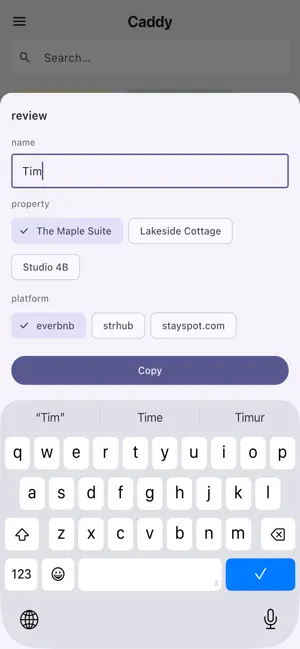
Caddy is your personal text library for mobile. Save the messages, numbers, and templates you reuse — organized, labeled, and instantly copyable. Build your text library Add the texts you reach for constantly — your name, email, phone number, address, common replies, IDs, instructions, and more. Tap the + button to add a new bit. Caddy keeps your whole library organized and always at hand. Templates that fill in the blanks Turn any bit into a template with fill-in variables. Write {name} for a free-text prompt, or {plan:Monthly;Annual} to offer quick-tap suggestion chips — Caddy asks for each variable once, then drops your answers right into place. Templates carry a distinct icon and border so they stand out from regular bits at a glance. Sorted by how you use it Your bits are ranked by how often you access them, so the bits you rely on most float to the top automatically. The more you use a bit, the bigger its pill grows — making it even faster to spot and tap. Pin anything to the very top for permanent instant access. Search in an instant A persistent search bar lets you filter your entire collection by text content or label in real time. Find any bit in seconds, no matter ho Label and color-code anything Long-press any bit to edit it: pick a color tag from a curated palette, add a short label to remind yourself what it's for, toggle pin, or delete it. Keep your bits organized by project, client, topic — whatever works for you. Works entirely offline Caddy stores everything locally on your device. No internet connection required. When you're back online, your bits sync automatically across all your iOS devices via iCloud — no extra account needed beyond your Apple ID. Clean, purposeful design Bits appear as compact pills in a flowing layout. Long text displays with middle ellipsis (start…end) so you always see both the beginning and the end of a bit at a glance. Up to 500 bits, each up to 5,000 characters. Subscription Caddy is available by subscription: • Monthly: $0.99/month • Annual: $9.99/year • 3-day free trial — no charge until the trial ends Payment is billed to your Apple ID. Subscriptions renew automatically unless canceled at least 24 hours before the current period ends. Cancel any time in Settings → Apple ID → Subscriptions. Privacy Policy: https://elmeris.com/apps/caddy/privacy/ Terms of Use: https://www.apple.com/legal/internet-services/itunes/dev/stdeula/
What’s new
Version 1.1.0 · Updated September 1, 2026
New in this release: • Templates — save reusable text with fill-in variables • Import — bring in snippets from a text file or clipboard • Export — back up or share your snippet library
App privacy
The developer, Elmeris LLC, reported these privacy practices to Apple.
Data Not Collected
The developer does not collect any data from this app.
Alternatives to Caddy - Copy & Paste
Looking for apps like Caddy - Copy & Paste? Here are 6 similar apps on the App Store. The highest rated is Never Lost Keys (5.0/5), and all 6 are free to download.
-
 ClearTangle: AI Second Brain
-
 People Map - Contact Organizer
1.0
People Map - Contact Organizer
1.0
-
 Clearin: Email Inbox Cleaner
-
 Amazing Notes: Lecture & PDF
-
 Never Lost Keys
5.0
Never Lost Keys
5.0
-
 BeeMind: Smart Work Notes
1.0
BeeMind: Smart Work Notes
1.0
| App | Rating | Price | Last updated | Compare |
|---|---|---|---|---|
| Caddy - Copy & Paste | 5.0 / 5 (1 rating) | Free | September 1, 2026 | |
| ClearTangle: AI Second Brain | – | Free | Oct 20, 2026 | Compare |
| People Map - Contact Organizer | 1.0 / 5 (1) | Free | Oct 10, 2026 | Compare |
| Clearin: Email Inbox Cleaner | – | Free | Oct 21, 2026 | Compare |
| Amazing Notes: Lecture & PDF | – | Free | Jun 25, 2026 | Compare |
| Never Lost Keys | 5.0 / 5 (1) | Free | Jun 19, 2025 | Compare |
| BeeMind: Smart Work Notes | 1.0 / 5 (1) | Free | May 20, 2026 | Compare |