

SELECT - Minimal pick launcher
Ryohei Horiuchi Productivity iPhoneiPadiPod touch
SELECT - Minimal pick launcher is a free Productivity app for iPhone and iPad by Ryohei Horiuchi. Requires iOS 17.0. Updated October 23, 2026.
- Price
- Free
- on the App Store
- Size
- 10 MB
- Age 4+
- Updated
- Oct 23
- 2026 · v1.2.2
Screenshots



About SELECT - Minimal pick launcher
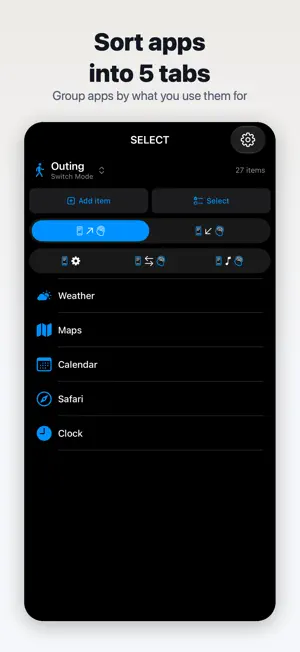
SELECT is a hyper-minimalist launcher app designed to free you from home-screen information overload and "choice fatigue". It was built to reduce cognitive load and improve daily efficiency for people with ADHD and anyone losing time to app hunting or notification surfing. ■ Why "minimalist"? The average iPhone home screen has 80+ apps lined up. "Wait, where was that one?" "I tried to open this, but got distracted by something else..." These "tiny decision fatigues that happen every time you look" quietly chip away at a day's worth of focus. SELECT solves this by surfacing only the apps you actually need right now in a widget, so you can: ・stop hunting ・stop hesitating ・stop having unnecessary icons enter your visual field ■ Designed around ADHD cognitive patterns The developer is openly an ADHD-diagnosed person and built this for their own daily-life ergonomics first. Individual experiences vary, but ADHD users and their families have found the following points especially helpful: ・Limited choices: each tab shows only the "do-it-now" apps, capping information processed at one glance ・Mode switching: switch entire app sets per situation ("Out", "Work", "Night"), making it possible to physically hide social apps during focus time ・Minimal app-to-app jump: tile tap routes directly to the target app via Shortcuts — SELECT itself never appears on screen ・Text mode: hide icons entirely for a pure text list, cutting visual noise even further * ADHD is a medical diagnosis. This app is not intended as treatment. It is positioned as a daily-life efficiency aid for users who self-identify with these traits. ■ 5 tabs to organise life scenes ・Receive: things that come to you (email, messages) ・Record: things you write or save (notes, photos, calendar) ・Communicate: things you broadcast (social, calls) ・Settings: device and service preferences ・Enjoy: entertainment (video, music, games) Create a mode that hides the "Enjoy" tab to fully shut out distractions during work hours. ■ Key features 【One-tap launch】 Tap a tile and the target app opens directly — SELECT never gets in the way. 【Bulk operations】 Select multiple items → Delete / Move / Copy. Drag-to-select works the same way as Apple's Files app. 【Per-mode display preferences】 Each mode owns its own "show app icons" and "hide Enjoy tab" toggles. Focus mode and leisure mode become fully separable. ・Light / Dark / Match-device widget colour ・Designed to remain readable under iOS 18's "Tinted" Home Screen mode ・App artwork keeps its original colour even when the system tint is applied ・Multiple modes (scene-specific home screens) ・Sub-categories (folders) ・iCloud sync (auto-syncs across your Apple devices) ■ Best for ・People overwhelmed by too many apps on the home screen ・ADHD users who struggle with searching or get distracted easily ・Anyone who wants to hide social media from view during focus time ・People who switch app sets between scenes (Out / Work / Night, etc.) ・Minimalist or digital-minimalism enthusiasts ■ Pricing ・All features are free to use ・Ads appear below the editor and when you switch tabs ・Buy "Remove Ads" once to stop seeing ads (not a subscription) ・If you got the app while it was paid, you won't see ads ■ Languages Japanese, English, Chinese (Simplified and Traditional), Arabic ■ Privacy ・No account needed. Your lineups are stored on your device and in iCloud (if you use sync) ・Firebase Authentication (anonymous) is used to count users, and Google Mobile Ads to show ads ・No analytics tools (such as Google Analytics) ■ Requirements iOS 17.0 or later, iPhone / iPad (Large home-screen widget supported). Privacy Policy: https://ryoheihoriuchi0000.github.io/Select-PRIVACY_POLICY-ios-en.md EULA: https://www.apple.com/legal/internet-services/itunes/dev/stdeula/ Terms of Service: See "Settings > Terms of Service" inside the app
What’s new
Version 1.2.2 · Updated October 23, 2026
UI update
App privacy
The developer, Ryohei Horiuchi, reported these privacy practices to Apple.
Data Used to Track You
The following data may be used to track you across apps and websites owned by other companies:
- Location: Coarse Location
- Identifiers: Device ID
- Usage Data: Product Interaction, Advertising Data
Data Not Linked to You
The following data, which may be collected but is not linked to your identity, may be used for the following purposes:
- Location: Coarse Location
- Identifiers: Device ID, User ID
- Usage Data: Product Interaction, Advertising Data
- Diagnostics: Crash Data, Performance Data, Other Diagnostic Data
Used for: Third-Party Advertising, Analytics
Alternatives to SELECT - Minimal pick launcher
Looking for apps like SELECT - Minimal pick launcher? Here are 6 similar apps on the App Store. The highest rated is Scrum Timer (5.0/5), and 5 of the 6 are free to download.
-
 Scrum Timer
5.0
Scrum Timer
5.0
-
 RoadPact
-
 HabitWing – Life Tracker
4.6
HabitWing – Life Tracker
4.6
-
 Litiva
-
 Projects Timer
-
 FavPicks:bookmarks manager
3.9
FavPicks:bookmarks manager
3.9
| App | Rating | Price | Last updated | Compare |
|---|---|---|---|---|
| SELECT - Minimal pick launcher | – | Free | October 23, 2026 | |
| Scrum Timer | 5.0 / 5 (2) | Free | Oct 30, 2026 | Compare |
| RoadPact | – | Free | Oct 17, 2026 | Compare |
| HabitWing – Life Tracker | 4.6 / 5 (5) | Free | Nov 1, 2026 | Compare |
| Litiva | – | 0.29 USD | Aug 24, 2026 | Compare |
| Projects Timer | – | Free | Aug 24, 2026 | Compare |
| FavPicks:bookmarks manager | 3.9 / 5 (7) | Free | Oct 17, 2026 | Compare |