

Scanner PDF: Scan & Edit
ARIPISER SOLUTIONS S.L.U Productivity iPhoneiPadiPod touch
Scanner PDF: Scan & Edit is a free Productivity app for iPhone and iPad by ARIPISER SOLUTIONS S.L.U. Requires iOS 18.0. Updated July 6, 2026.
- Price
- Free
- on the App Store
- Size
- 16 MB
- Age 4+
- Updated
- Jul 6
- 2026 · v1.0.2
Screenshots


About Scanner PDF: Scan & Edit
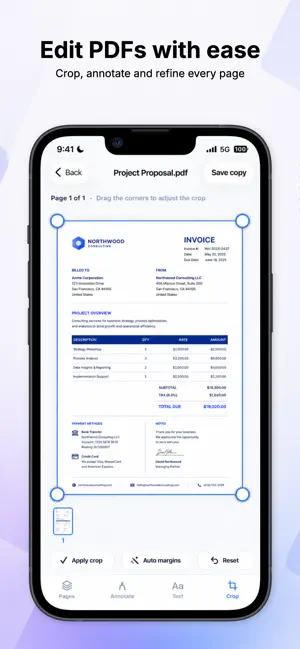
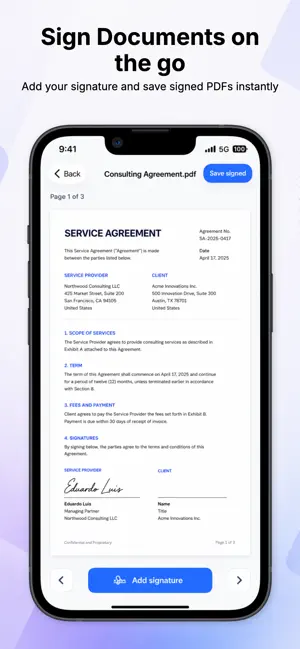
Scanner PDF: Scan & Edit is an all-in-one document scanner and PDF toolkit for iPhone. Scan documents, IDs, passports, books, receipts, notes and paperwork in seconds. Turn paper into clean PDF files, extract text with OCR, edit PDFs, sign documents, convert files and keep everything organized in one place. Main features: • Scan documents and save them as PDF • Scan IDs, passports and books • Extract text from documents with OCR • Edit PDF pages • Add text, drawings and highlights • Crop, rotate and organize pages • Sign PDF documents • Convert PDF, Word, Excel, PowerPoint, images and text files • Preview and manage your documents • Keep your files organized inside the app Scanner PDF is designed for students, professionals, freelancers and anyone who needs a fast and reliable document scanner in their pocket. Whether you need to scan a contract, sign a PDF, convert a file, save a receipt or extract text from a document, Scanner PDF gives you the tools you need in one simple app. Scanner PDF Premium unlocks all premium tools, including advanced scanning, OCR, PDF editing, PDF signing, file conversion and document management. Subscription information: • Payment will be charged to your Apple ID account at confirmation of purchase. • Subscriptions automatically renew unless canceled at least 24 hours before the end of the current period. • You can manage or cancel your subscription in your App Store account settings. • Any unused portion of a free trial, if offered, will be forfeited when you purchase a subscription. Terms of Use: https://scannerpdf-app.com/terms-of-service Privacy Policy: https://scannerpdf-app.com/privacy-policy
What’s new
Version 1.0.2 · Updated July 6, 2026
- You can now use the app without creating an account - Improved welcome experience - Performance improvements and bug fixes
App privacy
The developer, ARIPISER SOLUTIONS S.L.U, reported these privacy practices to Apple.
Data Linked to You
The following data, which may be collected and linked to your identity, may be used for the following purposes:
- Purchases: Purchase History
- Contact Info: Email Address
- User Content: Photos or Videos, Other User Content
- Identifiers: User ID
Used for: App Functionality
Data Not Linked to You
The following data, which may be collected but is not linked to your identity, may be used for the following purposes:
- Diagnostics: Crash Data, Performance Data
Used for: App Functionality
Alternatives to Scanner PDF: Scan & Edit
Looking for apps like Scanner PDF: Scan & Edit? Here are 6 similar apps on the App Store. The highest rated is Scanner App - PDF & OCR (5.0/5), and all 6 are free to download.
-
 PDF Reader - Smart Reader
4.0
PDF Reader - Smart Reader
4.0
-
 VoicePDF: Scan and Record
-
 CamVision: PDF & OCR Scanner
4.2
CamVision: PDF & OCR Scanner
4.2
-
 Sleek Calendar
4.5
Sleek Calendar
4.5
-
 AI Note Taker: Audio Summary
-
 Scanner App - PDF & OCR
5.0
Scanner App - PDF & OCR
5.0
| App | Rating | Price | Last updated | Compare |
|---|---|---|---|---|
| Scanner PDF: Scan & Edit | – | Free | July 6, 2026 | |
| PDF Reader - Smart Reader | 4.0 / 5 (4) | Free | Aug 27, 2026 | Compare |
| VoicePDF: Scan and Record | – | Free | Jul 22, 2026 | Compare |
| CamVision: PDF & OCR Scanner | 4.2 / 5 (57) | Free | Oct 22, 2026 | Compare |
| Sleek Calendar | 4.5 / 5 (46) | Free | Nov 14, 2025 | Compare |
| AI Note Taker: Audio Summary | – | Free | Oct 15, 2026 | Compare |
| Scanner App - PDF & OCR | 5.0 / 5 (1) | Free | Aug 26, 2026 | Compare |