

OnCue Stage Timer & Cue Light
Ran Moshe Productivity iPhoneiPadiPod touchApple Watch
OnCue Stage Timer & Cue Light is a free Productivity app for iPhone and iPad by Ran Moshe. Requires iOS 16.4. Updated November 2, 2026.
- Price
- Free
- on the App Store
- Size
- 70 MB
- Age 4+
- Updated
- Nov 2
- 2026 · v1.5.0
Screenshots



About OnCue Stage Timer & Cue Light
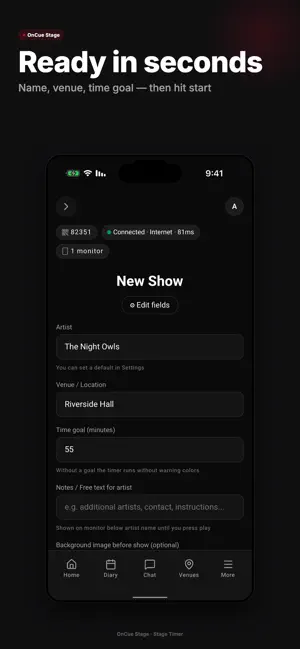
OnCue Stage is the clock the artist looks at, and the phone in your pocket that runs it. Written by a show manager who tours with his act. — THE STAGE — The big number runs on a monitor at the front of the stage — a tablet or a spare phone. Your phone drives it from anywhere in the room. • Count up, or count down to a length you set. The number warns on its own: yellow five minutes before the goal, orange at two, red at it. • It never blinks or pulses — movement on a stage monitor steals the artist's eye. • Cue lights — Standby / Go! / Hold / Clear — and a line of text: "Two minutes." To every stage screen or just one. • Nudge a running timer by 10 seconds or a minute, either way, without stopping it. • The screen locks itself when the timer starts; unlocking takes a deliberate two-second hold. • It stays lit all show, and if the network drops it keeps counting — no reset. • Live Activity: the clock keeps running on your iPhone Lock Screen and in the Dynamic Island, with the current cue and your last message. • Your own iPad connects with no code; any other device types a 5-digit code and waits for your approval. • Up to five people you approve can watch from a phone browser — no app, no account. — CUES, PROMPTER, WATCH — Write the show as cues, each starting at a minute on the clock. The stage screen shows the current cue big, "next in 4:30" under it, and moves on by itself. Or paste a script, up to 15,000 characters, and it scrolls at the speed you set. The Apple Watch app runs it from your wrist: start the show, the timer, a flash, the next cue, the prompter, ready messages, letting a screen in. Connect it once, and with its own Wi-Fi or cellular it works even with your phone off. — NO INTERNET — Basement venue, no reception. Flip the same switch on your phone and on the stage screen, type the 5-digit code once, and the two connect straight to each other, no router, no cloud. The timer, messages, cues, prompter, cue buttons and screen flash all stay in your hand. Both devices need Bluetooth and Wi-Fi on, but no network to join. One switch brings you back online. — THE VENUE — Every venue is described by the crew who worked it last: service entrance, sound position, freight elevator, parking, green room. Photos, ten-second clips and eight facility marks that appear only once someone confirmed them. Anyone can add: you photograph the room you stand in tonight, and whoever works it next arrives knowing. Free on every tier. A note can be reported and any contributor blocked; content that breaks the rules comes down within 24 hours. — THE DIARY — • Every show in one place: venue, city, time, doors, crew call, fee and kilometres, filled from your last visit to that room and the fee you set once. • Photograph the coordination sheet or upload the PDF and it fills in the show. Each row waits for your approval. • Give it the links where your shows are published and it reports what is new, what moved and what vanished. It writes nothing until you tick it. • Two-way Google Calendar, straight into the calendar you already use; Apple Calendar gets its own "OnCue Stage" calendar and syncs times back. • Every crew member gets a link to a live page, no account and no app. They tap "Got it", and confirmations reset when the show moves. The page shows no money. • An assistant you can talk to about your diary: 7 messages a day free (15 a month), 90 a month on Pro. — WHAT COSTS — Free, and staying free, all of it: timer, cue buttons, messages, Production Mode, stage screens, browser watchers, offline mode, venue database, diary, crew page, expenses and overview. OnCue Pro: 90 assistant messages a month instead of 15, and priority support. Auto-renewing, monthly or yearly at your local store price; cancel any time from your store account. New accounts get 30 days of Pro free — one tap, no card. Your crew never pays. Terms: oncue.shotaf.co.il/terms · Privacy: oncue.shotaf.co.il/privacy
What’s new
Version 1.5.0 · Updated November 2, 2026
New: with Wi-Fi or cellular, your Apple Watch controls the stage even when your phone is off. Stability and performance improvements.
App privacy
The developer, Ran Moshe, reported these privacy practices to Apple.
Data Linked to You
The following data, which may be collected and linked to your identity, may be used for the following purposes:
- Contact Info: Email Address, Name
- User Content: Photos or Videos, Other User Content
Used for: App Functionality
Alternatives to OnCue Stage Timer & Cue Light
Looking for apps like OnCue Stage Timer & Cue Light? Here are 6 similar apps on the App Store. The highest rated is ControllerApp (5.0/5), and all 6 are free to download.


| App | Rating | Price | Last updated | Compare |
|---|---|---|---|---|
| OnCue Stage Timer & Cue Light | – | Free | November 2, 2026 | |
| BbigTimer | – | Free | Jul 17, 2026 | Compare |
| ControllerApp | 5.0 / 5 (2) | Free | Dec 10, 2025 | Compare |
| OXS Manager App | – | Free | Apr 17, 2026 | Compare |
| LockWhisper | – | Free | Jul 14, 2026 | Compare |
| Event Speaker Timer | 3.0 / 5 (1) | Free | Feb 2, 2026 | Compare |
| SONICUE Control | 5.0 / 5 (2) | Free | May 15, 2026 | Compare |