

NumberingCamera
Hyunsoo Bang Utilities iPhoneiPadiPod touch
NumberingCamera is a free Utilities app for iPhone and iPad by Hyunsoo Bang. Requires iOS 17.0. Updated June 29, 2026.
- Price
- Free
- on the App Store
- Size
- 33 MB
- Age 17+
- Updated
- Jun 29
- 2026 · v1.3.0
Screenshots


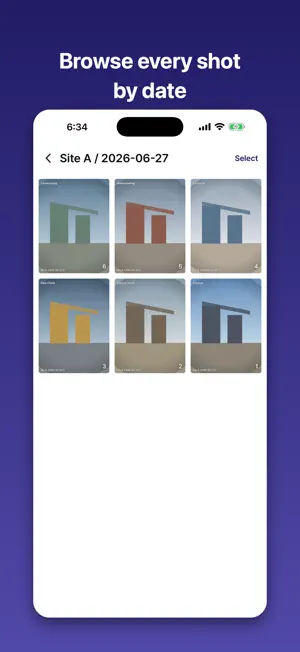
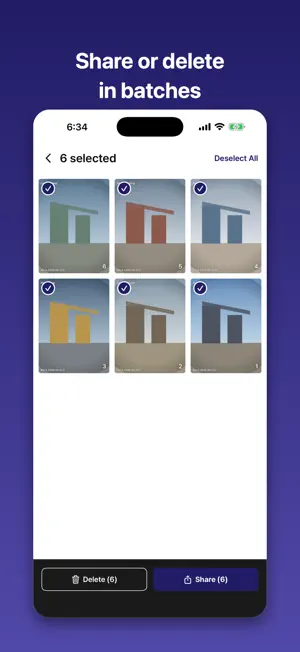
About NumberingCamera
NumberingCamera is a field-documentation camera that numbers every photo the moment you take it. No more renaming files one by one — just shoot, and your photos are organized by date and category automatically. ■ Automatic sequential numbering - Every photo is numbered 1, 2, 3… in order. - Numbering restarts each day, keeping daily records clean. ■ Organize with Prefix folders - Register a site, project, or item name as a Prefix, and photos are saved straight into that folder. - Inside each Prefix, photos are further grouped into date folders. - Reorder Prefixes anytime by dragging. ■ Customizable watermark - A “date_number” stamp (e.g. 2026-04-26_7) appears on every photo. - Choose which items show (Prefix, date, number) and their order, plus position, text size, date format, and separator — all in Settings. - Changes apply to photos you have already taken, and you can toggle the watermark anytime. ■ Pro camera controls - Choose a 4:3, 9:16, or 1:1 capture ratio, with an on-screen crop guide to preview the framing before you shoot. - Tap to focus on any point. - Long-press to lock focus and exposure. - Long-press and drag vertically to adjust exposure. - Pinch to zoom. - Front/rear switch and flash supported. ■ Review and manage fast - Tap the thumbnail right after shooting to swipe through the current session. - Browse Prefix → date → photo at a glance in the home gallery. - Select multiple photos to share or delete at once. ■ Built for - Daily progress logs on construction sites - Facility and equipment inspection records - Real-estate and interior shoots - Inventory and stock documentation - Any fieldwork that needs orderly, sequential records All photos are stored on your device, and you can start right away — no login or sign-up required.
What’s new
Version 1.3.0 · Updated June 29, 2026
This update improves the capture and photo-viewing experience. ■ Choose your capture aspect ratio - Pick 4:3, 9:16, or 1:1 right above the shutter. - An on-screen crop guide shows the exact framing before you shoot. ■ Cleaner photo viewing - The photo viewer now uses a light background, so your photos stand out. - Tap the screen to auto-hide the top bar and focus on the photo. ■ New app language setting - Choose Korean or English in Settings > App Settings > Language. - Switch the app's language instantly, independent of your system language.
App privacy
The developer, Hyunsoo Bang, reported these privacy practices to Apple.
Data Used to Track You
The following data may be used to track you across apps and websites owned by other companies:
- Location: Coarse Location
- Identifiers: Device ID
- Usage Data: Product Interaction, Advertising Data
Data Linked to You
The following data, which may be collected and linked to your identity, may be used for the following purposes:
- Location: Coarse Location
- Identifiers: Device ID
- Usage Data: Product Interaction, Advertising Data
Used for: Third-Party Advertising, Analytics
Data Not Linked to You
The following data, which may be collected but is not linked to your identity, may be used for the following purposes:
- Diagnostics: Crash Data
Used for: App Functionality
Alternatives to NumberingCamera
Looking for apps like NumberingCamera? Here are 6 similar apps on the App Store. The highest rated is GaugeWatcher (3.8/5), and all 6 are free to download.
-
 Watermark Camera - Jianyin
-
 GaugeWatcher
3.8
GaugeWatcher
3.8
-
 쁘띠포레 Petit Foret
1.8
쁘띠포레 Petit Foret
1.8
-
 Sticker Maker - Photosticker
-
 농경락
농경락
-
 ABC Wallet - Safe Web3 wallet
1.0
ABC Wallet - Safe Web3 wallet
1.0
| App | Rating | Price | Last updated | Compare |
|---|---|---|---|---|
| NumberingCamera | – | Free | June 29, 2026 | |
| Watermark Camera - Jianyin | – | Free | Aug 20, 2026 | Compare |
| GaugeWatcher | 3.8 / 5 (9) | Free | Oct 23, 2026 | Compare |
| 쁘띠포레 Petit Foret | 1.8 / 5 (8) | Free | Jun 11, 2024 | Compare |
| Sticker Maker - Photosticker | – | Free | Dec 29, 2025 | Compare |
| 농경락 | – | Free | Jul 23, 2026 | Compare |
| ABC Wallet - Safe Web3 wallet | 1.0 / 5 (1) | Free | Mar 28, 2026 | Compare |
Compare NumberingCamera with the top alternatives: ratings, updates, ASO score and keyword gaps →