

HushTalk
GoodTek LLC Productivity iPhoneiPadiPod touch
HushTalk is a free Productivity app for iPhone and iPad by GoodTek LLC. Requires iOS 17.0. Updated June 3, 2026.
- Price
- Free
- on the App Store
- Size
- 4 MB
- Age 4+
- Updated
- Jun 3
- 2026 · v1.1.0
Screenshots
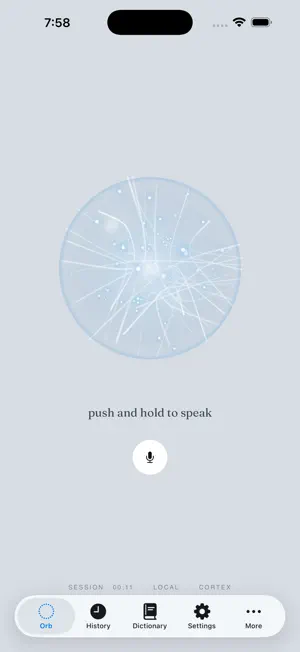
About HushTalk
HushTalk is a private dictation keyboard for iPhone. Use it anywhere iOS shows a text field. Switch to the HushTalk keyboard, tap the mic, speak, tap stop, and Hush Talk inserts the transcript into the field you were already using. HushTalk is built around a simple privacy boundary: the keyboard extension never records audio, and dictation is transcribed locally on your iPhone. Because iOS does not allow third-party keyboard extensions to access the microphone directly, the main Hush Talk app owns the real microphone session while the keyboard sends start and stop commands through Apple's App Group system. Features - Voice typing from the HushTalk keyboard in iOS text fields. - Local speech-to-text on iPhone after the one-time speech model download. - Works across apps that support custom keyboards and text input. - Clear keyboard status for ready, recording, transcribing, inserted, and failed states. - No accounts, no ads, no analytics, and no third-party tracking. - No server-side transcription. How it works 1. Install HushTalk. 2. Enable the HushTalk keyboard in Settings > General > Keyboard > Keyboards > Add New Keyboard. 3. Turn on Allow Full Access so the keyboard and app can share dictation state through the App Group. 4. Open HushTalk once and finish setup. 5. Return to any text field, switch to the HushTalk keyboard, tap the mic, speak, then tap stop. HushTalk is for people who want fast voice typing across apps while keeping speech processing on their own iPhone.
What’s new
Version 1.1.0 · Updated June 3, 2026
Hush Dictation is now HushTalk, with a smoother setup flow, refreshed keyboard access guidance, improved app icon presentation, and sharper local dictation quality.
App privacy
The developer, GoodTek LLC, reported these privacy practices to Apple.
Data Not Linked to You
The following data, which may be collected but is not linked to your identity, may be used for the following purposes:
- User Content: Other User Content
- Identifiers: User ID
Used for: App Functionality
Alternatives to HushTalk
Looking for apps like HushTalk? Here are 6 similar apps on the App Store. The highest rated is NanoVoice: AI Voice Keyboard (5.0/5), and all 6 are free to download.
-
 Voice Pad - Transcribe
-
 NanoVoice: AI Voice Keyboard
5.0
NanoVoice: AI Voice Keyboard
5.0
-
 Whispen: AI Translate Keyboard
-
 dictop: AI Voice Dictation
-
 Jot Transcribe
4.6
Jot Transcribe
4.6
-
 WHSPR – AI Voice Keyboard
| App | Rating | Price | Last updated | Compare |
|---|---|---|---|---|
| HushTalk | – | Free | June 3, 2026 | |
| Voice Pad - Transcribe | – | Free | Jul 14, 2026 | Compare |
| NanoVoice: AI Voice Keyboard | 5.0 / 5 (11) | Free | Jul 20, 2026 | Compare |
| Whispen: AI Translate Keyboard | – | Free | Jul 30, 2026 | Compare |
| dictop: AI Voice Dictation | – | Free | Oct 10, 2026 | Compare |
| Jot Transcribe | 4.6 / 5 (9) | Free | Oct 14, 2026 | Compare |
| WHSPR – AI Voice Keyboard | – | Free | Sep 11, 2026 | Compare |
Compare HushTalk with the top alternatives: ratings, updates, ASO score and keyword gaps →