

Dopodoro: ADHD Focus Timer
JEFFREY PARKER KENT JR Productivity iPhoneiPadiPod touchMacApple Watch
Dopodoro: ADHD Focus Timer is a free Productivity app for iPhone and iPad by JEFFREY PARKER KENT JR. Requires iOS 26.1. Updated October 29, 2026.
- Price
- Free
- on the App Store
- Size
- 70 MB
- Age 4+
- Updated
- Oct 29
- 2026 · v1.4.4
Screenshots


About Dopodoro: ADHD Focus Timer
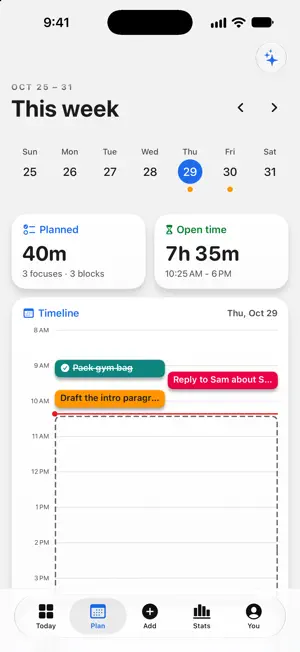
A focus timer built for ADHD brains: the one that actually gets you started. The hardest part isn't focusing. It's starting. Dopodoro is built around that: pick one thing, take five minutes, and never get punished for an off day. The AI runs entirely on your phone, and your data is never sent to us. No Apple Intelligence on your device? Every helper still works, with simple built-in versions. GET STARTED (the hard part, solved) - Pick one for me: tell it your energy; the AI chooses one task, with a reason. No more staring at a list. - Break it down: turn an overwhelming task into small, startable steps. - Just 5 minutes: when 25 feels impossible, five is a doorway. One tap and you're in. - Brain dump: type or speak a mess of thoughts; get back a clean task list. - Park a thought: capture a stray idea mid-session without breaking focus. A CALM, CAPABLE TIMER Five focus presets, from a classic 25 to a 90-minute deep-work block (Classic, Long Focus, DeskTime, Sprint, Ultradian). A timer you don't have to babysit: close the app, restart your phone, forget it exists. It keeps perfect time anyway, and it rings through Silent and Focus modes. NOW ON MAC Dopodoro is a native Mac app too, with a menu bar timer, keyboard shortcuts and a task inspector. Your tasks, history and settings sync over iCloud, so a plan you make on your phone is waiting at your desk. Turn on "Mirror the session across devices" in Settings to see a running session on your other devices and take it over. NOW ON IPAD Dopodoro runs full size, in any orientation, with a sidebar instead of the tab bar. Keyboard shortcuts and pointer support come with it. ON APPLE WATCH Your session at a glance: the ring, time remaining, when it ends, and how many focuses you've done today. Start and pause from your wrist. MAKE IT YOURS Light, dark, or system, plus ten colour themes. All ten are free. Your categories carry their own colour everywhere, from today's timeline to your stats. SOUNDSCAPES A real focus environment: brown, pink, and white noise, rain, ocean, café, and more, plus binaural and isochronic tones. Listen with or without a timer, set a sleep timer, or mix under your own audio. (Some people find these help concentration.) MOMENTUM YOU CAN SEE Every finished session ends with a spark and joins your focus history: a clear daily chart, an hour-by-weekday heatmap that shows when you focus best, and streaks counted as active days, so a gap never breaks anything. Your full history and export are free. No leaderboards, no guilt for empty days. EVERYWHERE IN THE SYSTEM On iPhone: a Live Activity on the Lock Screen and Dynamic Island, Home Screen widgets to start, pause, skip, and extend, Siri, Shortcuts, Spotlight, Control Center, and an optional Focus mode + app blocking to protect your sessions. PRIVATE BY DESIGN No accounts. No servers of ours. No ads. No third-party tracking. The AI runs on your device with Apple Intelligence; your data is never sent to us or any third party. If you use iCloud, it syncs privately across your own Apple devices. DOPODORO+ (optional) Everything you need is free: the whole timer, unlimited tasks and projects, your full focus history and export, all ten themes, the everyday AI helpers, and a starter soundscape set. Plus adds depth for people who want to support a solo developer: the full 40-sound library and custom soundscape generator, your own saved blends and focus profiles, a custom colour of your own and themes that follow the season, the advanced AI helpers (weekly review, energy prediction, and more), your calendar on your timeline with two-way sync, and custom views. $4.99/month or $29.99/year (first month free), or $69.99 once for lifetime. One purchase covers iPhone, iPad and Mac. Built by one indie developer. No VC, no investors, no growth team. If it helps you start, leave a review. That's how indie apps survive. Privacy Policy: https://dopodoro.com/privacy Terms of Use: https://dopodoro.com/terms
What’s new
Version 1.4.4 · Updated October 29, 2026
One When panel that stays open, reminders that follow it, and room to organize with folders and headings. The When panel Pick a day, then a time. Each pick saves right away and the panel stays open, so you can keep going. Choose Today, This Evening, Tomorrow or Someday, a day from the week strip or the full month, or type "Wed 8pm". Undo steps back one change. This Evening For tasks that belong after dinner. This Evening is its own When, with no set time. Type "tonight" in Quick Entry to get there. Reminders follow the When Set a time and the reminder goes with it. Change the day or the time and the reminder moves too, and the panel says so. Pick at the time, 15 min before or 1 hour before, or choose your own. Turn a reminder on after its time has passed and it's set an hour ahead. Snooze it for 15 minutes, 1 hour, 3 hours or until tomorrow. It reaches your other devices on the same iCloud account too. On a device where you closed Dopodoro from the app switcher, new reminders arrive after you next open it. Urgent alarm Urgent alarm is its own row in the editor. Turn it on and it adds a reminder if there is none. It rings like an alarm on the iPhone or iPad you set it on. A Someday task keeps its day, dimmed, and doesn't ring. Quick Entry A "Will set" line shows what Quick Entry understood from your title, so you can see it before you add. Type "remind" for a reminder, "urgent" at the end for an urgent alarm, or "tonight" for This Evening: "Call Sam tomorrow 3pm remind". More opens the full form with everything you typed or chose. Folders and headings Group projects and loose tasks into folders. Each project shows a small pie that fills as you finish its tasks. Split a project into stages with headings, and archive a heading when its stage is done: its open tasks are tucked away with it, not marked done. Move and undo Move a task into any folder or under any heading. Deleted folders and headings wait in Recently Deleted. Undo covers your task changes, including a deleted or archived heading and a deleted folder. Today The top of Today shows the task to start "Now", or what's "Up next" and when. The Done tile counts "2 of 4", and the round dots start fresh each day. Plus fixes and polish throughout.
App privacy
The developer, JEFFREY PARKER KENT JR, reported these privacy practices to Apple.
Data Not Collected
The developer does not collect any data from this app.
Alternatives to Dopodoro: ADHD Focus Timer
Looking for apps like Dopodoro: ADHD Focus Timer? Here are 6 similar apps on the App Store.
-
 Dopamine Dash
-
 IdeaSpot
-
 Smallish — ADHD Task Starter
-
 GGPomodoro
-
 Clarity AI: ADHD Brain Dump
-
 Daylit: Honest Day Planner
| App | Rating | Price | Last updated | Compare |
|---|---|---|---|---|
| Dopodoro: ADHD Focus Timer | – | Free | October 29, 2026 | |
| Dopamine Dash | – | Free | Feb 9, 2026 | Compare |
| IdeaSpot | – | Free | Dec 2, 2025 | Compare |
| Smallish — ADHD Task Starter | – | Free | Oct 7, 2026 | Compare |
| GGPomodoro | – | Free | May 25, 2026 | Compare |
| Clarity AI: ADHD Brain Dump | – | Free | Oct 18, 2026 | Compare |
| Daylit: Honest Day Planner | – | Free | Oct 19, 2026 | Compare |