

Loop English: Learn & Speak
Andrei Blokhin Education iPhoneiPadiPod touch
Loop English: Learn & Speak is a free Education app for iPhone and iPad by Andrei Blokhin. Requires iOS 15.0. Updated October 5, 2026.
- Price
- Free
- on the App Store
- Size
- 41 MB
- Age 4+
- Updated
- Oct 5
- 2026 · v1.0.11
Screenshots

About Loop English: Learn & Speak
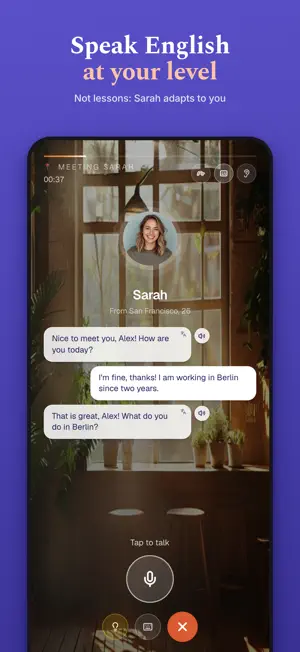
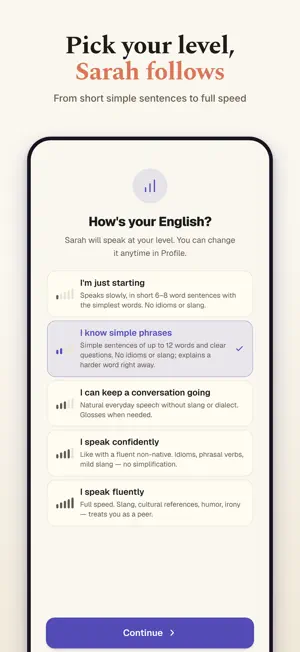
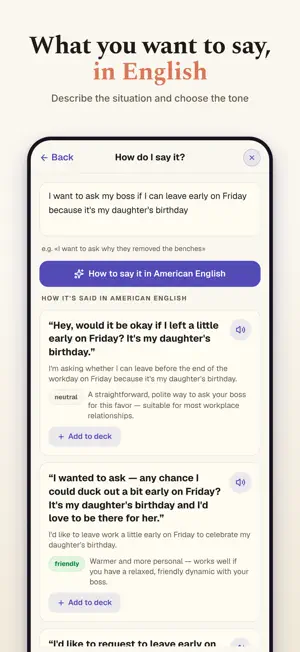
English does not stay in a textbook. You meet it in messages, work calls, menus, videos, trips, and conversations — usually at the exact moment you need to understand or say something naturally. Loop English turns those moments into a personal learning loop: MEET IT • Ask “How do I say it?” and get natural English for the situation you actually face. • Choose between neutral, friendly, and formal wording. • Paste text or capture it with the camera to understand useful English around you. • Discover expressions people use in real conversations. UNDERSTAND IT • Create rich AI cards from a word or phrase. • See pronunciation, part of speech, meaning, examples, forms, word family, related expressions, and real-life usage. • Hear the phrase and understand why it is said that way — not just its dictionary translation. REMEMBER IT • Save useful material to your personal deck. • Review it through writing, listening, matching, phrase building, and spaced practice. • Turn your own material into an audio lesson for a walk or commute. • Keep reviewing saved cards even when you are offline. USE IT • Practice real situations with AI conversation partners. • Choose a prepared scenario or describe your own. • Work on pronunciation with reference audio and detailed feedback. • Learn how to ask natural English questions step by step. FIX IT • See the sentences that need improvement after a conversation. • Understand the correction and ask why. • Save grammar explanations and turn your own mistakes into future practice. Loop English is for adults who have studied English but still hesitate when real life starts. It does not give everyone the same generic lesson. It helps you learn the English you personally meet, need, and get wrong. Meet it. Learn it. Use it. Subscriptions renew automatically unless canceled at least 24 hours before the end of the current period. Manage or cancel your subscription in your Apple Account settings. Terms of Use and Privacy Policy are available inside the app and on loopenglish.app. Terms of Use (Apple Standard EULA): https://www.apple.com/legal/internet-services/itunes/dev/stdeula/ Loop English Terms: https://loopenglish.app/terms Privacy Policy: https://loopenglish.app/privacy
What’s new
Version 1.0.11 · Updated October 5, 2026
Saved a phrase from “How do I say it?”? Tap “Details” on its card: the same phrase in the past and future, a shorter way to say it, and what people usually answer — each with audio and a “+” to save it. Plus wording fixes across the app.
App privacy
The developer, Andrei Blokhin, reported these privacy practices to Apple.
Data Linked to You
The following data, which may be collected and linked to your identity, may be used for the following purposes:
- Usage Data: Product Interaction
- Contact Info: Email Address, Name
- User Content: Audio Data, Other User Content
- Identifiers: User ID, Device ID
Used for: Analytics, App Functionality
Alternatives to Loop English: Learn & Speak
Looking for apps like Loop English: Learn & Speak? Here are 6 similar apps on the App Store. The highest rated is Lingo Cambridge (5.0/5), and all 6 are free to download.
-
 Liddo: Learn Languages
-
 Lingua Nokta
-
 fastread - Understand More
-
 LanguageLoL
-
 Lingo Cambridge
5.0
Lingo Cambridge
5.0
-
 EDUCAPP FLEX
| App | Rating | Price | Last updated | Compare |
|---|---|---|---|---|
| Loop English: Learn & Speak | – | Free | October 5, 2026 | |
| Liddo: Learn Languages | – | Free | Sep 14, 2026 | Compare |
| Lingua Nokta | – | Free | May 29, 2026 | Compare |
| fastread - Understand More | – | Free | Aug 6, 2026 | Compare |
| LanguageLoL | – | Free | Jan 16, 2024 | Compare |
| Lingo Cambridge | 5.0 / 5 (1) | Free | Sep 26, 2026 | Compare |
| EDUCAPP FLEX | – | Free | Sep 11, 2026 | Compare |