

PromoShot App
Alexander Garmash Photo & Video iPhoneiPadiPod touchMac
PromoShot App is a free Photo & Video app for iPhone and iPad by Alexander Garmash. Requires iOS 26.0. Updated October 11, 2026.
- Price
- Free
- on the App Store
- Size
- 29 MB
- Age 4+
- Updated
- Oct 11
- 2026 · v3.2
Screenshots


About PromoShot App
PromoShot turns screen recordings, videos, photos, captions and drawings into polished promo assets — and animates them. Build product videos and image sets in a visual layer editor. Record your screen or import media, arrange layers on a timeline, then keyframe anything that moves: position, scale, rotation, opacity, colour and more. Preview as you edit, and export video, stills or GIF. Made for app makers, creators, founders and marketers who need clean product visuals without opening a desktop editor. ANIMATE • Keyframe position, zoom, rotation, opacity and colour — each on its own lane, with its own timing and its own easing • Bend a move along a curve you draw, with motion paths • Motion blur from a camera shutter you set per layer • Play any clip at the speed you want COMPOSE • Video, image, drawing, caption, audio and background layers • Masks — window a layer with a shape you draw, then move, scale and spin that window on its own clock • Colour grade per layer: saturation, contrast, brightness and tint, plus one-tap filters • Blend modes — screen, multiply and add • Viewports — pan and zoom inside a layer without moving it on the canvas • Sprite sheets, gradient backgrounds and a reusable project palette TEXT • Captions with custom fonts, colours, alignment, padding, outline and shadow • Text that arrives: types on letter by letter, or assembles word by word • Record voice clips, or have typed lines spoken — bring your own OpenAI or ElevenLabs account SOURCES • Capture screen recordings, or import videos and images • Trim a video before you place it, and name sub-ranges to reuse as separate clips • Create image cuts from one photo and reuse them as separate layers TIMELINE • Set layer start times, durations, order, visibility, position, scale and style • Anchor a layer to its neighbour — "start when the clip below ends" — and it stays true when you retrim • Zoom the timeline to 10s, 30s, 1m, 5m, or fit the whole project • In wide layouts, a Lanes view packs layers that never overlap onto shared rows, so a long slideshow reads as a few rows instead of hundreds EXPORT • Finished videos, selected frames as image sets, or GIF • Share and import .promo project packages between devices Free exports carry a small watermark. A one-time PromoShot Pro purchase removes it — nothing else is locked. Use PromoShot for app demos, launch videos, social posts, product updates, App Store visuals and quick promotional content.
What’s new
Version 3.2 · Updated October 11, 2026
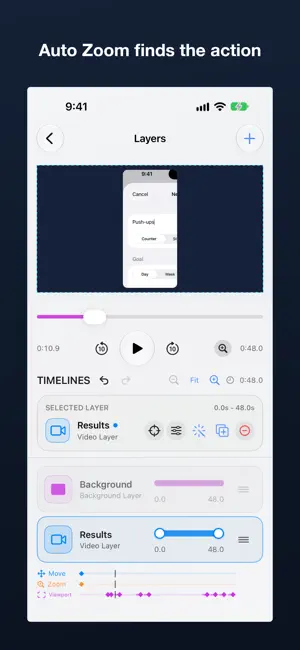
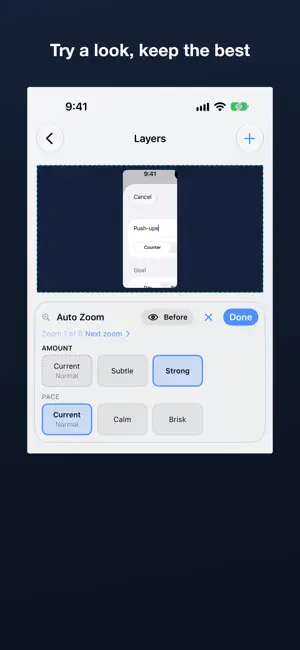
Auto Zoom Screen recordings now zoom in on the action by themselves. PromoShot finds where things change on screen — a tap, a menu, a field you type in — eases in, holds, and eases back out, or pans straight to the next moment when it comes soon. Screen changes, scrolling and the status bar are left alone. It is on for recordings you make in PromoShot, and one tap away in the Motion menu for any video. Choose how far in and how brisk, remove a single zoom, or adjust its framing: every zoom is an ordinary keyframe you can edit. Try variations Not sure which looks best? Tap Try beside Auto Zoom, a transition or a caption’s reveal, and the choices appear under the canvas. Tap one and it plays at once; tap another to swap. Done keeps it, the close button puts everything back as it was, and hold Before to compare. The whole try is a single undo. Sharper recordings Screen recordings are captured at your iPhone’s full resolution, so zooms stay crisp. Liquid Glass PromoShot takes on iOS 26’s look. Toolbars, the back button and the playback controls are glass; Done and Cancel are the system’s checkmark and close buttons; the create buttons float over your projects; and the image and drawing editors run edge to edge beneath the system bar. Swipe back from anywhere on a screen — the canvas keeps its gestures for editing. Light and dark The app follows your iPhone’s appearance. Pictures, video and the editing canvas keep their own colours in both. Narration before you have a voice Type a narration script and tap Generate without a voice key: PromoShot adds a silent placeholder as long as the script will take to say, so you can time captions and cuts today. Add a key later and the same script is voiced at nearly the same length. Also - Opening a project no longer changes it, and the projects list shows each project’s real length. - Applying a motion keeps the closeups already on a video. - The narration editor no longer overlaps on iPhone, and its keyboard has a Done button. - Rounded text is drawn in the weight you choose. - Captions an assistant restyles show their new style. - Requires iOS 26 or later.
App privacy
The developer, Alexander Garmash, reported these privacy practices to Apple.
Data Not Collected
The developer does not collect any data from this app.
Alternatives to PromoShot App
Looking for apps like PromoShot App? Here are 6 similar apps on the App Store. The highest rated is Scrollio: Skript Teleprompter (5.0/5), and all 6 are free to download.
-
 AI Image Converter
-
 Photo Editor - Magic、Editor
1.0
Photo Editor - Magic、Editor
1.0
-
 Scrollio: Skript Teleprompter
5.0
Scrollio: Skript Teleprompter
5.0
-
 Screenshots & Mockups for All
-
 AV Manager : Audio Video
-
 Video Skript: Teleprompter
| App | Rating | Price | Last updated | Compare |
|---|---|---|---|---|
| PromoShot App | – | Free | October 11, 2026 | |
| AI Image Converter | – | Free | Jul 28, 2026 | Compare |
| Photo Editor - Magic、Editor | 1.0 / 5 (1) | Free | Jun 2, 2026 | Compare |
| Scrollio: Skript Teleprompter | 5.0 / 5 (1) | Free | May 21, 2026 | Compare |
| Screenshots & Mockups for All | – | Free | Feb 3, 2026 | Compare |
| AV Manager : Audio Video | – | Free | Oct 31, 2023 | Compare |
| Video Skript: Teleprompter | – | Free | Sep 25, 2026 | Compare |
Compare PromoShot App with the top alternatives: ratings, updates, ASO score and keyword gaps →