

Scanner PDF : Convert and sign
Vertigo SL Utilities iPhoneiPadiPod touch
Scanner PDF : Convert and sign is a free Utilities app for iPhone and iPad by Vertigo SL. Rated 4.9/5 from 7 ratings. Requires iOS 18.0.
- Rating
- 4.9
- 7 ratings
- Price
- Free
- on the App Store
- Size
- 23 MB
- Age 4+
- Updated
- May 27
- 2026 · v1.0.1
Screenshots


About Scanner PDF : Convert and sign
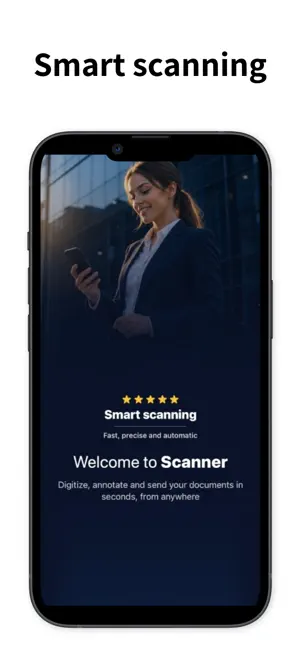
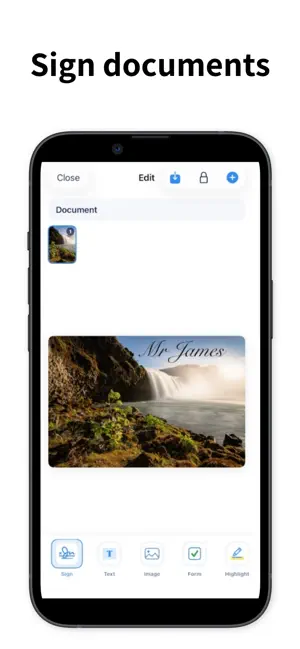
Scanner PDF: Convert and Sign helps you digitize, organize, edit and share documents directly from your iPhone. Turn paper documents into clean digital files, scan IDs, passports, books, QR codes and multi-page documents, then save everything in one organized document hub. Whether you need to sign a contract, extract text, convert a file, protect private documents or quickly share a PDF, Scanner gives you the essential tools in one simple app. Scan documents with your camera, import files or photos, edit them with useful tools, and export in the format you need. Key features: • Scan documents, IDs, passports and books • Create multi-page scans • Extract text with OCR • Scan QR codes • Sign documents directly on your phone • Add text, images, highlights and watermarks • Blur or hide sensitive information • Add page numbers and form elements • Merge documents • Convert files to PDF, JPG, PNG, DOCX and XLSX • Organize documents in My Documents • Mark files as favorites • Compress files before sharing • Share documents using the iOS share sheet • Protect private files with Secure Vault and PIN • Restore recently deleted files from Trash Scanner is designed for everyday paperwork: receipts, contracts, notes, IDs, invoices, forms, school documents and business files. Some features may require a subscription. Subscription details, renewal terms and cancellation options are shown before purchase. Terms of Service: https://www.apple.com/legal/internet-services/itunes/dev/stdeula/ Privacy Policy: https://sites.google.com/view/privacyvrtg/inicio
Ratings & reviews
4.9
7 ratings
What’s new
Version 1.0.1 · Updated May 27, 2026
Fixed memory crash.
App privacy
The developer, Vertigo SL, reported these privacy practices to Apple.
Data Used to Track You
The following data may be used to track you across apps and websites owned by other companies:
- Location: Coarse Location
- Identifiers: Device ID
- Usage Data: Product Interaction, Advertising Data
- Diagnostics: Crash Data
Data Linked to You
The following data, which may be collected and linked to your identity, may be used for the following purposes:
- Location: Coarse Location
- Identifiers: Device ID
- Usage Data: Advertising Data, Product Interaction
- Diagnostics: Crash Data
Used for: Third-Party Advertising, App Functionality
Alternatives to Scanner PDF : Convert and sign
Looking for apps like Scanner PDF : Convert and sign? Here are 6 similar apps on the App Store. The highest rated is PDF Editor & Scanner: DocKit (5.0/5), and all 6 are free to download.
-
 PDF Editor & Scanner: DocKit
5.0
PDF Editor & Scanner: DocKit
5.0
-
 Free PDF Converter PDF to Word
4.5
Free PDF Converter PDF to Word
4.5
-
 Document PDF Scanner.
4.4
Document PDF Scanner.
4.4
-
 CamScan: Scan Documents
5.0
CamScan: Scan Documents
5.0
-
 QR & Barcode Scan
4.9
QR & Barcode Scan
4.9
-
 Easy Camera Scanner - PDF
4.5
Easy Camera Scanner - PDF
4.5
| App | Rating | Price | Last updated | Compare |
|---|---|---|---|---|
| Scanner PDF : Convert and sign | 4.9 / 5 (7 ratings) | Free | May 27, 2026 | |
| PDF Editor & Scanner: DocKit | 5.0 / 5 (5) | Free | Oct 1, 2026 | Compare |
| Free PDF Converter PDF to Word | 4.5 / 5 (13) | Free | Jul 20, 2026 | Compare |
| Document PDF Scanner. | 4.4 / 5 (41) | Free | Mar 26, 2026 | Compare |
| CamScan: Scan Documents | 5.0 / 5 (1) | Free | Apr 17, 2026 | Compare |
| QR & Barcode Scan | 4.9 / 5 (25) | Free | Jul 14, 2026 | Compare |
| Easy Camera Scanner - PDF | 4.5 / 5 (44) | Free | Jul 18, 2026 | Compare |