

ClipCode – Connect & Transfer
Karan Soni Productivity iPhoneiPadiPod touch
ClipCode – Connect & Transfer is a free Productivity app for iPhone and iPad by Karan Soni. Requires iOS 16.0. Updated June 16, 2026.
- Price
- Free
- on the App Store
- Size
- 75 MB
- Age 4+
- Updated
- Jun 16
- 2026 · v1.0.1
Screenshots


About ClipCode – Connect & Transfer
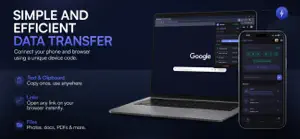
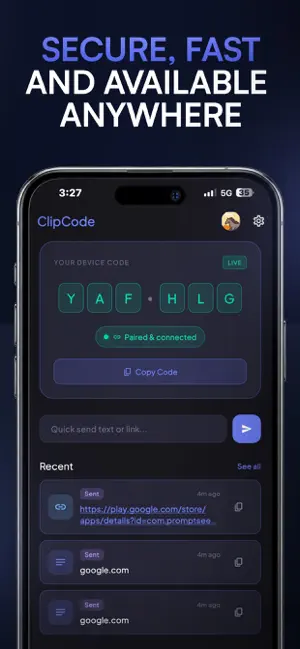
ClipCode is the fastest way to move anything between your phone and your browser. Open the app, get a 6-digit pairing code. Type it into the ClipCode browser extension on your PC or Mac. You're connected in seconds - no cables, no Bluetooth, no accounts required to get started. WHAT YOU CAN DO - Send text and links from your phone to your browser (and back) - Share files both ways - images, videos, documents, anything - See your full transfer history in real time - Tap a link to open it instantly in your browser - Download files directly to your Downloads folder HOW IT WORKS 1. Open ClipCode on your phone - you will see your 6-digit pairing code 2. Install the ClipCode extension in Chrome, Edge, or Firefox on your PC 3. Enter your code in the extension - paired instantly 4. Send anything, both ways, in real time PLANS Free - Send text and links - Share files up to 10 MB - 50 MB daily upload limit - 1-day transfer history Pro (Rs. 199/month or Rs. 1,990/year) - Files up to 100 MB - 500 MB daily upload limit - 7-day transfer history Premium (Rs. 499/month or Rs. 4,990/year) - Files up to 1 GB - 2 GB daily upload limit - 30-day transfer history PRIVACY Your data is stored securely on Google Firebase. We do not read your clipboard without your action, track your location, or share your data with advertisers. Guest mode requires no account and data is deleted after 48 hours. SIGN IN OPTIONS - Email and password - Google Sign-In - Sign in with Apple - Continue as Guest (no account needed) By downloading ClipCode, you agree to Apple's Standard License Agreement: https://www.apple.com/legal/internet-services/itunes/dev/stdeula/
What’s new
Version 1.0.1 · Updated June 16, 2026
Bug Fixes & Performance Improvements
App privacy
The developer, Karan Soni, reported these privacy practices to Apple.
Data Linked to You
The following data, which may be collected and linked to your identity, may be used for the following purposes:
- Purchases: Purchase History
- Contact Info: Email Address
- User Content: Other User Content
- Identifiers: User ID
Used for: App Functionality
Data Not Linked to You
The following data, which may be collected but is not linked to your identity, may be used for the following purposes:
- Usage Data: Product Interaction
- Diagnostics: Crash Data
Used for: Analytics, App Functionality
Alternatives to ClipCode – Connect & Transfer
Looking for apps like ClipCode – Connect & Transfer? Here are 6 similar apps on the App Store. The highest rated is Relay Voice: Memos into Notes (5.0/5), and 5 of the 6 are free to download.
-
 Rethread: AI Voice Planner
-
 Relay Voice: Memos into Notes
5.0
Relay Voice: Memos into Notes
5.0
-
 ShareLAN — Screen to PC
-
 Omnia Model
-
 Panda LLM Offline & Private AI
3.4
Panda LLM Offline & Private AI
3.4
-
 ADHD Structure Planner: Simple
4.4
ADHD Structure Planner: Simple
4.4
| App | Rating | Price | Last updated | Compare |
|---|---|---|---|---|
| ClipCode – Connect & Transfer | – | Free | June 16, 2026 | |
| Rethread: AI Voice Planner | – | Free | Oct 22, 2026 | Compare |
| Relay Voice: Memos into Notes | 5.0 / 5 (18) | Free | Oct 29, 2026 | Compare |
| ShareLAN — Screen to PC | – | Free | Jul 1, 2026 | Compare |
| Omnia Model | – | Free | Aug 14, 2026 | Compare |
| Panda LLM Offline & Private AI | 3.4 / 5 (5) | 4.99 USD | Jul 29, 2026 | Compare |
| ADHD Structure Planner: Simple | 4.4 / 5 (9) | Free | Oct 5, 2026 | Compare |