

随身卡包 - 证件扫描与管理
娣 张 Utilities iPhoneiPadiPod touch
随身卡包 - 证件扫描与管理 is a free Utilities app for iPhone and iPad by 娣 张. Requires iOS 17.0. Updated October 9, 2026.
- Price
- Free
- on the App Store
- Size
- 6 MB
- Age 4+
- Updated
- Oct 9
- 2026 · v0.5.0
Screenshots


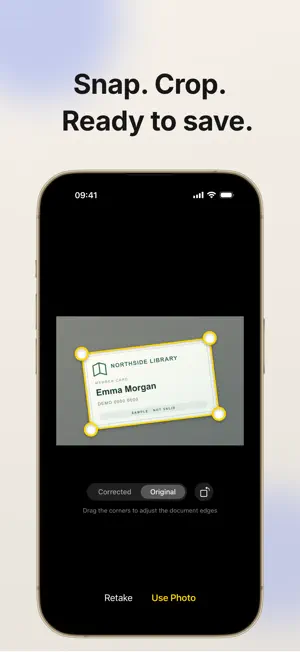

About 随身卡包 - 证件扫描与管理
CardBox · Your documents stay on your phone Keep your family's ID cards, bank cards, household registers and passports in one place. Find them when filling out forms, preparing copies or applying for a visa. Scan and recognize documents, export PDFs or images, and get expiry reminders. Organization and recognition run on your device. No account, automatic uploads or cloud sync. FEATURES Scan and recognize Photograph, crop and straighten documents. Automatically extract names, document or card numbers, and expiry dates from supported ID cards, bank cards and passports. Prepare copies and print Arrange document photos, including both sides of an ID card, on A4 and other paper sizes. Save as a PDF or images, share files or use system printing. Text and date watermarks Add text or date patterns to the background of exported pages. Adjust the content and opacity without changing your original document photos. Organize the whole family's documents Group documents by person or type. Associate shared documents, such as household registers, with multiple people. Multiple document types Store ID cards, bank cards, household registers, passports, driver's licenses, social security cards, residence permits, membership cards and more. Photo slots adapt to the type: front, back or multiple pages. Expiry reminders See documents expiring soon or already expired. Choose how many days in advance to be reminded and at what time. Search, copy and view Search by person, document type or notes. Copy details such as document numbers with one tap. Zoom in or swipe between photos in full screen. Encrypted backups and restore Protect exported backups with a password and choose where to save them. Import a backup manually to restore your documents when changing devices. Appearance and themes Use light mode, dark mode or your system appearance. Premium unlocks additional home screen color themes. PRIVACY FIRST Stored on your device Document photos and details stay on your device and do not pass through our servers. We cannot access your documents. System encryption Document photos use iOS Data Protection for encryption while your device is locked. Face ID / Touch ID app lock Enable app lock to authenticate with your face or fingerprint. CardBox locks automatically when it moves to the background. Photos excluded from iCloud backups Photos saved within CardBox are excluded from automatic iCloud backups. Create an encrypted backup to move them. No account or ad tracking We collect no personal information and use no advertising or analytics SDKs. Organization and recognition work offline. Apple handles in-app purchases and verification. WHEN YOU NEED IT · Prepare ID copies for renting a home, starting a job or submitting expenses. · Find passport details for travel, studying abroad or visa applications. · Keep your family's ID cards, household registers and other documents together. · Organize document photos separately from your photo library and keep them private. FREE AND PREMIUM The free version stores up to 3 documents and includes scanning and recognition, app lock, expiry reminders, printing and export, and encrypted backups. CardBox Premium unlocks: · Unlimited document storage · Additional home screen themes Two purchase options: · Monthly subscription: renews automatically; cancel in system settings at any time. · Lifetime unlock: a one-time purchase for permanent access to Premium features. Subscriptions are charged to your Apple ID and renew automatically unless auto-renewal is turned off at least 24 hours before the current period ends. Manage subscriptions in iPhone Settings > your name > Subscriptions. CONTACT Questions or suggestions? Email us: [email protected] Privacy Policy: https://ujaze9odwg.feishu.cn/wiki/KL5bwUwthiENV0krLkfcE3Cln7g Terms of Use (EULA): https://www.apple.com/legal/internet-services/itunes/dev/stdeula/
What’s new
Version 0.5.0 · Updated October 9, 2026
• Create custom document types for work IDs, access cards, and more. • Improved add and edit screens make choosing document types, owners, and photos easier.
App privacy
The developer, 娣 张, reported these privacy practices to Apple.
Data Not Collected
The developer does not collect any data from this app.
Alternatives to 随身卡包 - 证件扫描与管理
Looking for apps like 随身卡包 - 证件扫描与管理? Here are 6 similar apps on the App Store. The highest rated is Manio (5.0/5), and all 6 are free to download.
-
 MeTok - Life Shorts
-
 TKTalent show Admin
-
 直达Go
直达Go
-
 Just Remote: TV Remote Control
-
 Vusic - Lossless Player
4.0
Vusic - Lossless Player
4.0
-
 Manio
5.0
Manio
5.0
| App | Rating | Price | Last updated | Compare |
|---|---|---|---|---|
| 随身卡包 - 证件扫描与管理 | – | Free | October 9, 2026 | |
| MeTok - Life Shorts | – | Free | Oct 21, 2026 | Compare |
| TKTalent show Admin | – | Free | Oct 6, 2026 | Compare |
| 直达Go | – | Free | Oct 10, 2025 | Compare |
| Just Remote: TV Remote Control | – | Free | Oct 20, 2026 | Compare |
| Vusic - Lossless Player | 4.0 / 5 (1) | Free | May 28, 2026 | Compare |
| Manio | 5.0 / 5 (2) | Free | Oct 26, 2026 | Compare |
Compare 随身卡包 - 证件扫描与管理 with the top alternatives: ratings, updates, ASO score and keyword gaps →