

Unscroll: AI Screen Time Focus
Furkan ERKORKMAZ Productivity iPhoneiPadiPod touch
Unscroll: AI Screen Time Focus is a free Productivity app for iPhone and iPad by Furkan ERKORKMAZ. Requires iOS 17.0. Updated May 22, 2026.
- Price
- Free
- on the App Store
- Size
- 12 MB
- Age 12+
- Updated
- May 22
- 2026 · v1.0.0
Screenshots



About Unscroll: AI Screen Time Focus
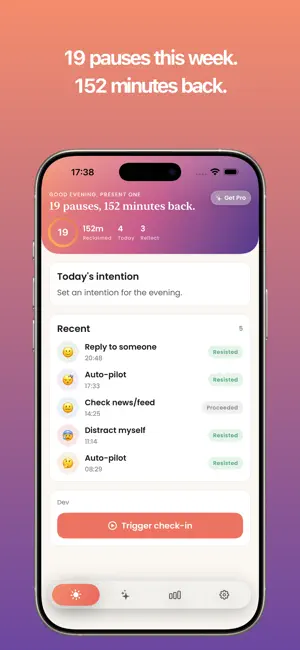
You pick up your phone to check one thing. Twenty minutes later, you're still scrolling, unsure how you got there. Unscroll is for that moment, and every moment before it. --- THE FEELING Most screen-time apps feel punishing. They count your minutes, flash red warnings, and leave you feeling surveilled. Unscroll is different. It's not about guilt. It's about giving you a pause long enough to remember what you actually wanted to do. --- WHAT UNSCROLL DOES Unscroll helps you block the apps and websites that pull you into mindless scrolling: social media, news feeds, short-form video — whatever your particular black hole happens to be. You set the rules. Unscroll holds them. When you reach for a blocked app, Unscroll creates a small moment of friction: a breath, a quiet reminder of your own intention. It doesn't force anything. It just asks: is this what you meant to do? --- HOW IT WORKS - Choose the apps you want to block or limit - Set schedules, session limits, or one-tap Focus modes - When you try to open a blocked app, Unscroll pauses you — gently - Over time, the urge fades. The habit changes. There's no shaming, no streaks, no gamification. Just a quieter relationship with your phone. --- WHO IT'S FOR Unscroll fits anyone who has noticed the pull of the feed and wants something different. You might be someone who checks social media first thing in the morning and wishes you didn't. Or someone whose work keeps bleeding into the hours that were supposed to be yours. Or a parent who wants to model a healthier relationship with technology for their kids. Whatever brought you here — the screen time report that surprised you, the feeling that your attention isn't entirely your own — Unscroll is a quiet tool for getting it back. --- PRIVACY Unscroll does not sell your data. It does not track which apps you use for advertising purposes. Your usage data stays on your device. --- Start with one blocked app. See how it feels. --- Privacy policy: https://unscroll.nifugames.com/privacy Terms of use: https://unscroll.nifugames.com/terms
App privacy
The developer, Furkan ERKORKMAZ, reported these privacy practices to Apple.
Data Used to Track You
The following data may be used to track you across apps and websites owned by other companies:
- Identifiers: Device ID
Data Linked to You
The following data, which may be collected and linked to your identity, may be used for the following purposes:
- Purchases: Purchase History
- User Content: Other User Content
- Identifiers: Device ID
Used for: App Functionality
Alternatives to Unscroll: AI Screen Time Focus
Looking for apps like Unscroll: AI Screen Time Focus? Here are 6 similar apps on the App Store. The highest rated is Yohaku: Stop Doomscrolling Now (5.0/5), and all 6 are free to download.
-
 Pixel Habit Tracker & Streak
-
 Yohaku: Stop Doomscrolling Now
5.0
Yohaku: Stop Doomscrolling Now
5.0
-
 Unscroll - No Reels & Shorts
-
 Fryze - App Blocker & Focus
-
 TaskGate: Focus & App Blocker
-
 Circuit: Focus & App Blocker
| App | Rating | Price | Last updated | Compare |
|---|---|---|---|---|
| Unscroll: AI Screen Time Focus | – | Free | May 22, 2026 | |
| Pixel Habit Tracker & Streak | – | Free | Aug 17, 2026 | Compare |
| Yohaku: Stop Doomscrolling Now | 5.0 / 5 (1) | Free | Aug 19, 2026 | Compare |
| Unscroll - No Reels & Shorts | – | Free | Sep 8, 2026 | Compare |
| Fryze - App Blocker & Focus | – | Free | Oct 12, 2026 | Compare |
| TaskGate: Focus & App Blocker | – | Free | Jul 6, 2026 | Compare |
| Circuit: Focus & App Blocker | – | Free | Oct 21, 2026 | Compare |