

MAX IPTV
Naser Chorake Yekshahve Entertainment iPhoneiPadiPod touchMac
MAX IPTV is a free Entertainment app for iPhone and iPad by Naser Chorake Yekshahve. Rated 5.0/5 from 2 ratings. Requires iOS 26.0.
- Rating
- 5.0
- 2 ratings
- Price
- Free
- on the App Store
- Size
- 59 MB
- Age 4+
- Updated
- Sep 28
- 2026 · v1.2.0
Screenshots
About MAX IPTV
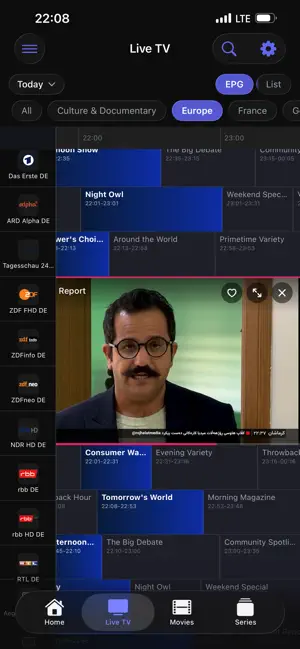
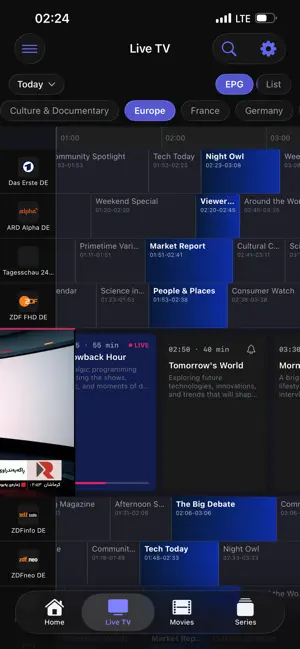
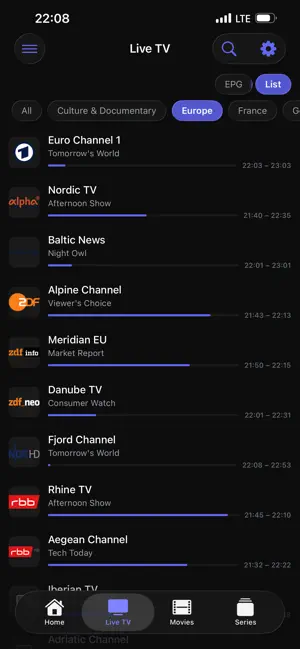
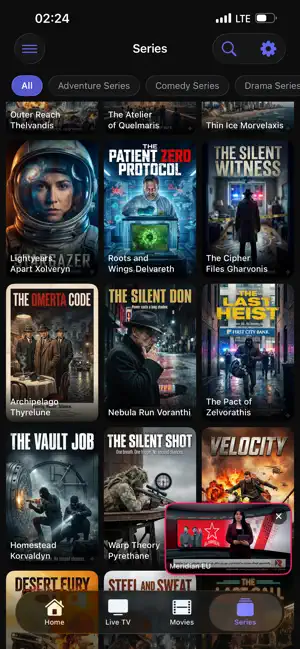
MAX IPTV is a premium IPTV player for Apple TV. Load your own playlist and enjoy your live TV, movies, and series on the big screen — with a fast, beautiful interface built for tvOS. IMPORTANT: MAX IPTV is a media player only. It does not provide, include, or sell any channels, streams, or content. You bring your own playlist from your own IPTV provider. SUPPORTS YOUR PLAYLIST • Xtream Codes — server, username, and password • M3U / M3U8 — paste a playlist URL • Stalker Portal — portal URL and MAC address LIVE TV • Full channel list with categories • Electronic Program Guide — NOW/NEXT and a full time-grid guide • Watch Recorded — replay a programme that already aired - catch-up. • Channel logos, info banner, quick zapping • Reminders for upcoming programs MOVIES & SERIES • Browse your movies and series by category • Subtitles from OpenSubtitles — Find subtitles for any movie or episode direct in player. • Rich detail pages — plot, cast, director, genre, rating, trailers • Continue Watching — pick up where you left off • Season and episode browsing MAKE IT YOURS • Favorites for channels, movies, and series • Create your own custom channel lists • Search across everything • Multiple playlists — switch anytime EVERYWHERE YOU WATCH • One account works across your devices • Playlists, favorites, and settings sync automatically • Back up and restore your setup • Available in 20 languages SUBSCRIPTION MAX IPTV is free to use for the first 7 days. After the trial, an annual subscription is required to keep using the app. Choose from three auto-renewable plans: • Silver — 2 devices — $9.99/year (USD) • Gold — 5 devices, Web Player, Cloud Backup & Restore — $14.99/year (USD) • Diamond — 10 devices, Web Player, Cloud Backup & Restore, all premium features — $19.99/year (USD) Payment is charged to your Apple Account at purchase confirmation. Subscriptions renew automatically at the same price unless cancelled at least 24 hours before the end of the current period. You can manage or cancel anytime in Settings → Apple Account → Subscriptions. Privacy Policy: https://maxiptv.app/privacy Terms of Use: https://maxiptv.app/terms Bring your playlist to your pocket.
What’s new
Version 1.2.0 · Updated September 28, 2026
• Pair Device: sign in by entering a code at maxiptv.app/link. Copy or share the code in one tap. • Pull down in any Movies or Series category to refresh just that category. • Google and Apple sign-in now sit side by side, with Pair Device below. • Categories now appear in your playlist's own order. • Better playback for movies in formats the built-in player can't open. • Stability and performance improvements.
App privacy
The developer, Naser Chorake Yekshahve, reported these privacy practices to Apple.
Data Linked to You
The following data, which may be collected and linked to your identity, may be used for the following purposes:
- Purchases: Purchase History
- Contact Info: Email Address
- Identifiers: User ID, Device ID
- Usage Data: Other Usage Data
- Diagnostics: Other Diagnostic Data
- Other Data: Other Data Types
Used for: App Functionality
Alternatives to MAX IPTV
Looking for apps like MAX IPTV? Here are 6 similar apps on the App Store. The highest rated is DringTV: IPTV Player & EPG (5.0/5), and all 6 are free to download.
-
 DringTV: IPTV Player & EPG
5.0
DringTV: IPTV Player & EPG
5.0
-
 Fast IPTV Player
5.0
Fast IPTV Player
5.0
-
 Crivid IPTV Player: M3U Xtream
3.0
Crivid IPTV Player: M3U Xtream
3.0
-
 Aerial TV: IPTV Player
2.0
Aerial TV: IPTV Player
2.0
-
 iBench Player Pro
5.0
iBench Player Pro
5.0
-
 Streama: IPTV Player & M3U
| App | Rating | Price | Last updated | Compare |
|---|---|---|---|---|
| MAX IPTV | 5.0 / 5 (2 ratings) | Free | September 28, 2026 | |
| DringTV: IPTV Player & EPG | 5.0 / 5 (2) | Free | Oct 8, 2026 | Compare |
| Fast IPTV Player | 5.0 / 5 (1) | Free | Jul 21, 2026 | Compare |
| Crivid IPTV Player: M3U Xtream | 3.0 / 5 (2) | Free | Oct 10, 2026 | Compare |
| Aerial TV: IPTV Player | 2.0 / 5 (1) | Free | Aug 24, 2026 | Compare |
| iBench Player Pro | 5.0 / 5 (1) | Free | May 21, 2026 | Compare |
| Streama: IPTV Player & M3U | – | Free | Jul 17, 2026 | Compare |
Compare MAX IPTV with the top alternatives: ratings, updates, ASO score and keyword gaps →