

Replyly AI: Keyboard & Writing
Sri Appala Adatrao Productivity iPhoneiPadiPod touch
Replyly AI: Keyboard & Writing is a free Productivity app for iPhone and iPad by Sri Appala Adatrao. Rated 5.0/5 from 3 ratings. Requires iOS 18.0.
- Rating
- 5.0
- 3 ratings
- Price
- Free
- on the App Store
- Size
- 8 MB
- Age 9+
- Updated
- Oct 12
- 2026 · v2.0
Screenshots



About Replyly AI: Keyboard & Writing
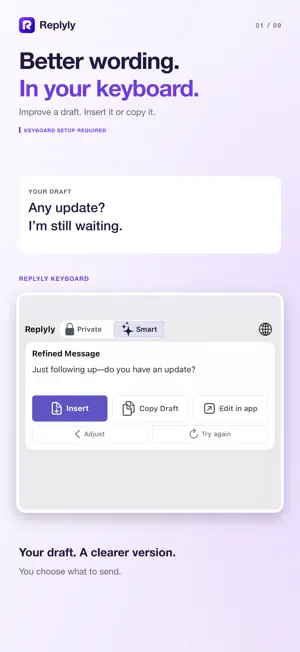
Stop overthinking texts. Replyly helps you rewrite messages, generate better replies, and communicate more confidently across every app on your iPhone. Whether you’re texting your boss, replying on a dating app, messaging friends, or handling important conversations, Replyly helps your messages sound clearer, more natural, and more like you. Use the keyboard extension directly inside your favorite apps or open the full Replyly experience for profiles, history, insights, and advanced communication tools. FEATURES • AI-powered message rewrites Improve awkward drafts instantly with natural, polished responses. • Keyboard extension Rewrite messages directly inside iMessage, WhatsApp, Instagram, Gmail, Slack, Notes, and more. • Relationship Profiles Create profiles for work, dating, family, friends, and recurring conversations to personalize tone automatically. • Tone Controls Choose from tones like Friendly, Professional, Confident, Calm, Casual, Flirty, and more. • Private Mode On supported devices, Private Mode uses Apple Intelligence on-device for supported rewrites so your data stays private. • Smart AI Mode Use cloud AI for richer rewrites, advanced suggestions, and more powerful communication assistance. • History & Insights Browse saved rewrites, favorite responses, and understand your communication patterns over time. • Built for real conversations From quick replies to important messages, Replyly helps reduce overthinking and improve confidence while texting. REPLYLY PRO Upgrade to Replyly Pro for: • Unlimited Smart AI rewrites • Advanced tones • Relationship profiles • Advanced insights • Long-form workflows • Priority new features Replyly is designed to help you communicate clearly, confidently, and naturally — everywhere you type. Terms of Use: https://rullit.com/replyly/terms/ Privacy Policy: https://rullit.com/replyly/privacy/
What’s new
Version 2.0 · Updated October 12, 2026
Replyly 2.0 helps you find the right words—and sound like yourself. • A simpler writing screen: rewrite a draft, reply to someone, or check a message before sending. • Tell Replyly what you want your reply to say. • An improved keyboard with easier Insert, Copy, and Edit in App actions. • General and Professional profiles for everyone, plus custom relationship profiles with Pro. • Edit your results, compare with your original, and refine the wording. • Undo changes and recover unfinished drafts. • Search and reuse saved messages. • A refreshed look and clearer Private and Smart mode choices.
App privacy
The developer, Sri Appala Adatrao, reported these privacy practices to Apple.
Data Linked to You
The following data, which may be collected and linked to your identity, may be used for the following purposes:
- Purchases: Purchase History
Used for: App Functionality
Data Not Linked to You
The following data, which may be collected but is not linked to your identity, may be used for the following purposes:
- User Content: Emails or Text Messages
Used for: App Functionality
Alternatives to Replyly AI: Keyboard & Writing
Looking for apps like Replyly AI: Keyboard & Writing? Here are 6 similar apps on the App Store. The highest rated is Aiko Echo: AI Keyboard (5.0/5), and all 6 are free to download.
-
 Aiko Echo: AI Keyboard
5.0
Aiko Echo: AI Keyboard
5.0
-
 Conquer Your Interview
-
 Memoral
5.0
Memoral
5.0
-
 Houhao
-
 Replyly: Replies in Your Voice
-
 Reelmark: Bookmark for Reels
| App | Rating | Price | Last updated | Compare |
|---|---|---|---|---|
| Replyly AI: Keyboard & Writing | 5.0 / 5 (3 ratings) | Free | October 12, 2026 | |
| Aiko Echo: AI Keyboard | 5.0 / 5 (4) | Free | Aug 11, 2026 | Compare |
| Conquer Your Interview | – | Free | Mar 18, 2026 | Compare |
| Memoral | 5.0 / 5 (1) | Free | May 9, 2026 | Compare |
| Houhao | – | Free | Jun 26, 2026 | Compare |
| Replyly: Replies in Your Voice | – | Free | May 24, 2026 | Compare |
| Reelmark: Bookmark for Reels | – | Free | Aug 10, 2026 | Compare |