

EditMe: Negative Converter
Ferdinand Drobik Photo & Video iPhoneiPadiPod touch
EditMe: Negative Converter is a free Photo & Video app for iPhone and iPad by Ferdinand Drobik. Requires iOS 26.0. Updated October 29, 2026.
- Price
- Free
- on the App Store
- Size
- 9 MB
- Age 4+
- Updated
- Oct 29
- 2026 · v1.6
Screenshots


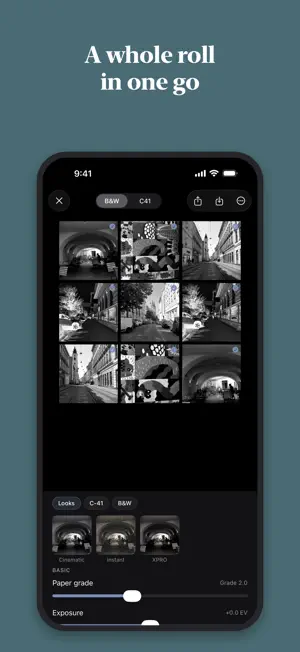

About EditMe: Negative Converter
Turn film negatives into photos, and give any photo the look of film. EditMe inverts your color and black and white negatives right on your iPhone or iPad and balances them like a lab would. Shot it on your phone instead? Pick a film look and share. No subscription, no ads, no account. NEGATIVE TO POSITIVE Photograph a negative with your phone and EditMe inverts it, color or black and white. The orange mask of C-41 is taken care of. No light box at hand? Your screen becomes one, and EditMe walks you through viewing old negatives with what you already own. DUST AND SCRATCHES EditMe looks for dust, lint and scratches on your negatives and shows you every spot it found. Nothing changes until you decide how much to clean up. A WHOLE ROLL AT ONCE Select a roll, set the look once and save every frame as a new photo. Your originals stay untouched. When the roll is done, you get a contact sheet to keep or share. PATINA, ROLLED FOR EVERY FRAME Light leak, vignette and the burnt end of a roll, decided by a roll of the dice. The leak sits on the same edge across a roll and changes a little from frame to frame, like a camera with a tired back. ONE TAP, THEN AS DEEP AS YOU WANT Start with a finished film look, including four new autumn looks. Stay there, or open the controls: exposure, contrast, highlights, curves, grain, color, glow and frames. BUILT AROUND REAL FILM The looks are not filters dropped on top. EditMe is a film pipeline. The way highlights roll off, how grain settles into the shadows. It behaves like film because it is modeled on film. A REAL DARKROOM IN YOUR POCKET For the rolls you develop yourself: a development timer, a times database across films and developers, dilution, push and pull, and reciprocity calculators, plus a log and an inventory for your chemistry and stock. WORKS WHERE YOU ARE Edit straight from the Photos app with the EditMe extension. Or ask Siri and Shortcuts to invert a negative, apply a look or process a whole roll. PRIVATE BY DESIGN No sign-in. No account. No data collection. Your photos never leave your device. If you like, your presets, logs and inventory sync between your devices through your own iCloud, never through us. Made in Denmark. ONE PHOTOGRAPHER, NO ADS Every tool and every look, with no in-app purchases. EditMe is made by one photographer.
What’s new
Version 1.6 · Updated October 29, 2026
• Frames now always show the color you pick, also on negatives and with grading, glow or patina. • Sliders respond more smoothly. • EditMe asks before work would be lost.
App privacy
The developer, Ferdinand Drobik, reported these privacy practices to Apple.
Data Not Collected
The developer does not collect any data from this app.
Alternatives to EditMe: Negative Converter
Looking for apps like EditMe: Negative Converter? Here are 6 similar apps on the App Store.


| App | Rating | Price | Last updated | Compare |
|---|---|---|---|---|
| EditMe: Negative Converter | – | Free | October 29, 2026 | |
| DigiNega | – | Free | Sep 7, 2026 | Compare |
| Negatives to Pixels | – | Free | Oct 27, 2026 | Compare |
| Morefilm - Digicam & Film Cam | – | Free | Oct 24, 2026 | Compare |
| Picory | – | Free | May 26, 2026 | Compare |
| Dearstill | – | Free | Sep 28, 2026 | Compare |
| yurayura | – | Free | Oct 20, 2026 | Compare |