

GhostFrame
All Things AI, Inc Photo & Video iPhoneiPadiPod touchApple Watch
GhostFrame is a free Photo & Video app for iPhone and iPad by All Things AI, Inc. Rated 3.0/5 from 2 ratings. Requires iOS 17.0. Updated October 23, 2026.
- Rating
- 3.0
- 2 ratings
- Price
- Free
- on the App Store
- Size
- 8 MB
- Age 4+
- Updated
- Oct 23
- 2026 · v2.1
Screenshots

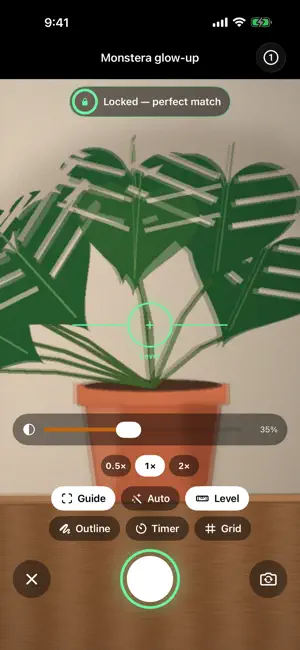


About GhostFrame
GhostFrame turns one photo a day into a timelapse that actually holds still. Pick a subject — your face, a bump, a baby, a plant, a room mid-renovation — and the camera fades yesterday's shot over the live view. New in 2.0, GhostFrame reads the ghost and the live picture on your iPhone and guides you in: when you're lined up it locks with a tap you can feel, and Auto can take the photo for you. WHAT'S NEW IN 2.0 • Live ghost guide: face tracking for selfie-style projects, scene alignment for everything else, a match score, one plain hint, and a haptic lock. • Auto-shoot and a level line. • Apple Watch: today's frames and streaks, Then vs Now on the Digital Crown, and a remote shutter for the iPhone camera. • Home Screen widget: your streak and latest frame for the project that still needs today's photo — tap to shoot. • Then vs Now: wipe, fade, flicker or side by side between any two frames, plus a share card. • Memory Lane: the photo from a month, 100 days or a year ago today. • Insights: streaks, a calendar of every day you showed up, milestones, your usual shooting time, your ghost-match score. • Export studio: a live storyboard of your video, auto-align steadies every frame; opening title and closing stats; 9:16, 1:1, 4:5, 16:9, 4K and GIF. • A living home where every project plays its own timelapse, a new icon and a new animated tour. ALSO INCLUDED Templates for Face, Bump (week cards), Baby (month cards), Fitness (front/side/back), Plant, Renovation and Anything; import photos you already have on their real dates; ghost from the previous, first or a pinned frame; outline mode; 0.5×/1×/2× lenses; reminders with quiet days that open straight into the camera; zip backups; captions for any video, transcribed on device. PRIVACY Photos and projects stay on your device; alignment runs on device. No account. Anonymous usage stats (never photos or names) can be turned off in Settings. Every feature is included. No subscription, no ads.
What’s new
Version 2.1 · Updated October 23, 2026
GhostFrame 2.1: your photos, out in one tap. Thank you to everyone who wrote in; this update is built from your reports. • Save to Photos: save one frame, any frames you select, a whole project or every frame you've shot. They land on the dates they were taken. • Select: tap Select in any project to share, save, rotate or delete many frames at once. • Save to Files: your original photos as dated, clearly named JPEGs, ready for a client folder or a Mac. • Bigger, faster imports: bring in up to 500 photos at once, with live progress and a Stop button. Each one lands on its capture date. • Landscape shots are now saved upright, and the ghost turns to match however you hold your phone. • Rotate: fix any frame that came out sideways, one at a time or in bulk. • Fixed: the share sheet could open and close by itself in a loop. • Fixed: "Back up all projects" failed when two projects had the same name. Backups now save straight to Files. • Fixed: importing many photos at once could crash the app.
App privacy
The developer, All Things AI, Inc, reported these privacy practices to Apple.
Data Not Linked to You
The following data, which may be collected but is not linked to your identity, may be used for the following purposes:
- Identifiers: Device ID
- Usage Data: Product Interaction
Used for: Analytics
Alternatives to GhostFrame
Looking for apps like GhostFrame? Here are 6 similar apps on the App Store. The highest rated is Cami: Photo Overlay Camera (5.0/5), and 5 of the 6 are free to download.
-
 GhostFrame: Recreate Any Photo
1.0
-
 AfterImage: Daily Timelapse
-
 Cami: Photo Overlay Camera
5.0
-
 Shadow Camera: Recreate Poses
-
 Face Morph Video: Baby Growth
-
 Totteco
| App | Rating | Price | Last updated | Compare |
|---|---|---|---|---|
| GhostFrame | 3.0 / 5 (2 ratings) | Free | October 23, 2026 | |
| GhostFrame: Recreate Any Photo | 1.0 / 5 (1) | Free | Sep 26, 2026 | Compare |
| AfterImage: Daily Timelapse | – | Free | Aug 4, 2026 | Compare |
| Cami: Photo Overlay Camera | 5.0 / 5 (1) | Free | Aug 26, 2026 | Compare |
| Shadow Camera: Recreate Poses | – | Free | Oct 10, 2026 | Compare |
| Face Morph Video: Baby Growth | – | 4.99 USD | Sep 14, 2026 | Compare |
| Totteco | – | Free | Jul 8, 2026 | Compare |
Compare GhostFrame with the top alternatives: ratings, updates, ASO score and keyword gaps →