
DocuFire
Roger Thorpe Productivity iPadMac
DocuFire is a free Productivity app for iPad and Mac by Roger Thorpe. Rated 4.7/5 from 6 ratings. Requires iOS 17.0. Updated October 9, 2026.
- Rating
- 4.7
- 6 ratings
- Price
- Free
- on the App Store
- Size
- 34 MB
- Age 4+
- Updated
- Oct 9
- 2026 · v4.4.0
Screenshots

About DocuFire
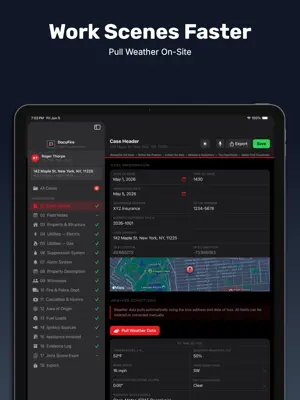
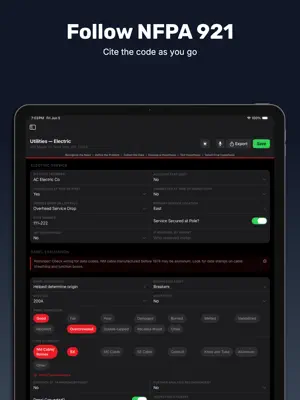
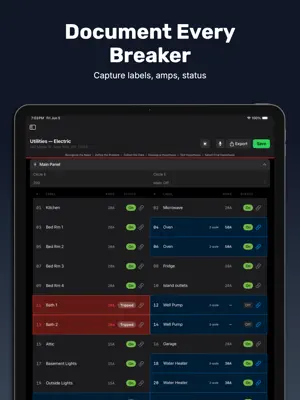
DocuFire is the most complete field documentation tool ever built for fire investigators. Designed from the ground up by an IAAI-CFI certified investigator, DocuFire follows the full NFPA 921 origin and cause workflow, so nothing gets missed on scene or in your report. Whether you're a private sector investigator, public fire marshal, or working for a carrier, DocuFire keeps your documentation thorough, defensible, and fast. BUILT FOR THE FULL ORIGIN & CAUSE WORKFLOW Every section follows NFPA 921 methodology from scene arrival through cause determination. Document origin, fuel loads, ignition sources, fire patterns, and cause classification with structured inputs that guide you through the process without slowing you down. 18 STRUCTURED SECTIONS Structure cases cover Case Header, Property & Structure, Utilities Electric & Gas, Suppression System, Alarm System, Property Description, Witnesses, Fire & Police Dept., Casualties & Injuries, Area of Origin, Fuel Loads, Ignition Sources, Appliance Involved, Evidence Log, Joint Scene Exam, Field Notes, Weather, Compliance Checklist, and Export. Vehicle and vessel cases include dedicated sections for ownership, maintenance, recalls, and vehicle diagram annotation. BREAKER PANEL DOCUMENTATION The most detailed electrical panel documentation tool available. Document every breaker by label, amperage, and status. Double-pole breakers are automatically linked. Tripped breakers are flagged. Everything exports cleanly to your PDF report. AUTO-POPULATED WEATHER Enter the loss address and date and DocuFire pulls historical weather conditions automatically. Temperature, humidity, wind speed, direction, precipitation, and sky conditions populate instantly and can be corrected manually. NHTSA & USCG RECALL LOOKUP For vehicle and vessel cases, look up active safety recalls by VIN or HIN directly inside the app. Results are documented automatically in the case record. AI-ASSISTED ANALYSIS Optional AI analysis powered by your own Anthropic API key. All personally identifiable information is automatically stripped before any data leaves your device. AI is off by default and always under your control. PROFESSIONAL PDF EXPORT Export a complete, professionally formatted Field Documentation Report with full control over which sections to include. Your name, certifications, and company appear on every report. Add your company logo in Settings. SHORT REPORT GENERATOR Generate a concise investigator summary report auto-populated from your case data. Add your own narrative and export as PDF or Word, ready to deliver directly to a carrier or client. BUILT FOR iPAD AND MAC Full Apple Pencil support for annotations and signatures. iCloud sync keeps your cases up to date across all your devices. Native iPad and Mac experience, not just an phone app stretched to fit. PRICING First 5 cases free. $16.99/month or $169.99/year — two months free on the annual plan. Billed through Apple. Terms of Use: https://docufire.app/terms Privacy Policy: https://docufire.app/privacy
Ratings & reviews
4.7
6 ratings
What’s new
Version 4.4.0 · Updated October 9, 2026
Voice recorder. Tap the microphone to record interviews and notes. Minimize it and keep working while it records, even with the screen locked. Name each recording (who was talking) and find it under Attachments > All Recordings. Transcripts. Make a transcript after you stop, on your iPad, or with Whisper if you add your own OpenAI key. Play back with a slider and 15-second skip buttons. Record Interview button on every witness card, pre-filled with the witness’s name. Transcript export. Choose which recordings to export as a PDF or Word file from the Export screen. Transcripts are never printed in the Scene Summary. Word export redesigned to match the PDF. New Structure Type option: Mixed Use / Residential over Commercial (Tax Payer). Date Collected on evidence items is now a date picker. Fixes: Choose Folder button, section completion status flipping back, and several stability fixes. Requires iOS 17 / macOS 14 or later.
App privacy
The developer, Roger Thorpe, reported these privacy practices to Apple.
Data Not Linked to You
The following data, which may be collected but is not linked to your identity, may be used for the following purposes:
- Diagnostics: Performance Data, Crash Data
Used for: Analytics, App Functionality
Alternatives to DocuFire
Looking for apps like DocuFire? Here are 6 similar apps on the App Store. The highest rated is Echospectra (5.0/5), and all 6 are free to download.
-
 FireForge InfernoIntelAI
4.0
FireForge InfernoIntelAI
4.0
-
 Echospectra
5.0
Echospectra
5.0
-
 NJIAAI
-
 Emergent Fire and EMS Software
4.3
Emergent Fire and EMS Software
4.3
-
 Sprink Ai
5.0
Sprink Ai
5.0
-
 NC/SC IAAI Events
| App | Rating | Price | Last updated | Compare |
|---|---|---|---|---|
| DocuFire | 4.7 / 5 (6 ratings) | Free | October 9, 2026 | |
| FireForge InfernoIntelAI | 4.0 / 5 (4) | Free | Sep 27, 2026 | Compare |
| Echospectra | 5.0 / 5 (4) | Free | Aug 13, 2026 | Compare |
| NJIAAI | – | Free | Sep 2, 2026 | Compare |
| Emergent Fire and EMS Software | 4.3 / 5 (6) | Free | Sep 21, 2026 | Compare |
| Sprink Ai | 5.0 / 5 (6) | Free | Feb 23, 2026 | Compare |
| NC/SC IAAI Events | – | Free | May 29, 2026 | Compare |
Compare DocuFire with the top alternatives: ratings, updates, ASO score and keyword gaps →