

PocketDAW: Mobile Studio
MICHAEL DWAYNE WILLIAMS Music iPhoneiPadiPod touch
PocketDAW: Mobile Studio is a free Music app for iPhone and iPad by MICHAEL DWAYNE WILLIAMS. Requires iOS 18.0. Updated September 22, 2026.
- Price
- Free
- on the App Store
- Size
- 47 MB
- Age 9+
- Updated
- Sep 22
- 2026 · v1.2.2
Screenshots


About PocketDAW: Mobile Studio
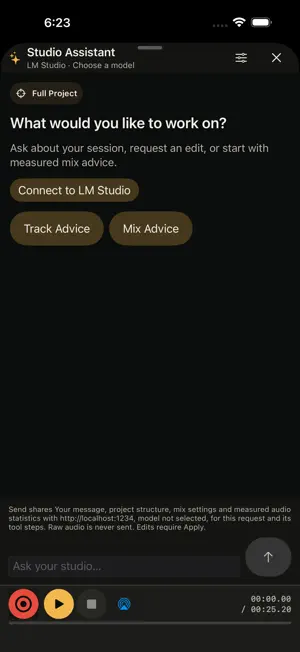
PocketDAW brings vocal recording, arrangement, mixing, lyric writing, and export into one local-first workspace for iPhone and iPad. BUILD A VOCAL SESSION Import a beat into project-owned storage, record vocals while existing tracks play, and arrange up to 32 audio tracks. Keep the playhead centered while clips move behind it, zoom or fit the timeline, and choose a comfortable track height. Tap tracks and clips for contextual controls. Move, duplicate, precisely trim, split, fade, and crossfade clips. Shape tracks with gain, pan, mute, and solo, with project Undo and Redo. MIX WITH CONTROL Use built-in Studio EQ and Vocal Compressor, adjustable sends, Aux returns, delay, subgroup routing, Master EQ and compression, peak limiting, and peak, RMS, LUFS, and true-peak metering. Preview evidence-backed local gain and mix recommendations before applying or rejecting them. WRITE BESIDE YOUR MUSIC Create lyric documents and sections with offline exact, slant, internal, compound, and multisyllabic rhyme cues. Explore deterministic suggestions, syllable and stress facts, an offline dictionary and thesaurus, project pronunciations, search, custom themes, draft history, timeline links, and a transport-aware teleprompter. DELIVER YOUR WORK Export a 24-bit Mix WAV, choose from three loudness and true-peak-aware Mastered WAV profiles, or create aligned dry, wet, Aux, and subgroup stem packages with reconstruction metadata. LOCAL-FIRST BY DEFAULT Projects and core analysis stay on your device. PocketDAW has no account, ads, analytics, or social feed. Optional Studio Assistant chat connects to a server you choose and control on a reachable local or private network. Before Send, the app shows the destination, model, and shared context. Names, saved lyrics, and conversation history require separate sharing choices; any text you enter in a message is part of that message. Raw audio and file paths are never sent. Supported project edits require review and Apply, and local chat history can be cleared.
What’s new
Version 1.2.2 · Updated September 22, 2026
A redesigned studio gives your music more room: compact transport controls, track and clip tap menus, a centered playhead, timeline zoom and Fit, adjustable track height, and precise trimming. Mix controls now show gain in decibels. Lyrics and export controls are easier to reach. Studio Assistant brings local mix advice and optional LM Studio chat into one project conversation, with reviewable supported edits and Undo.
App privacy
The developer, MICHAEL DWAYNE WILLIAMS, reported these privacy practices to Apple.
Data Not Collected
The developer does not collect any data from this app.
Alternatives to PocketDAW: Mobile Studio
Looking for apps like PocketDAW: Mobile Studio? Here are 6 similar apps on the App Store. The highest rated is Audio Object (5.0/5), and all 6 are free to download.
-
 Wave Slicer — Sample Editor
-
 Audio Object
5.0
Audio Object
5.0
-
 Cantus - Voicing Lab
5.0
Cantus - Voicing Lab
5.0
-
 Tonkro
-
 RasterFX: Multi-Effects
5.0
RasterFX: Multi-Effects
5.0
-
 DoReMix
5.0
DoReMix
5.0
| App | Rating | Price | Last updated | Compare |
|---|---|---|---|---|
| PocketDAW: Mobile Studio | – | Free | September 22, 2026 | |
| Wave Slicer — Sample Editor | – | Free | Sep 28, 2026 | Compare |
| Audio Object | 5.0 / 5 (1) | Free | Aug 25, 2026 | Compare |
| Cantus - Voicing Lab | 5.0 / 5 (1) | Free | Jun 1, 2026 | Compare |
| Tonkro | – | Free | Oct 7, 2026 | Compare |
| RasterFX: Multi-Effects | 5.0 / 5 (1) | Free | Sep 10, 2026 | Compare |
| DoReMix | 5.0 / 5 (2) | Free | Jun 19, 2026 | Compare |