

Capkaive - Screenshot to Text
Kang Ju Wee Productivity iPhoneiPadiPod touch
Capkaive - Screenshot to Text is a free Productivity app for iPhone and iPad by Kang Ju Wee. Requires iOS 17.0. Updated September 13, 2026.
- Price
- Free
- on the App Store
- Size
- 11 MB
- Age 4+
- Updated
- Sep 13
- 2026 · v1.0.5
Screenshots


About Capkaive - Screenshot to Text
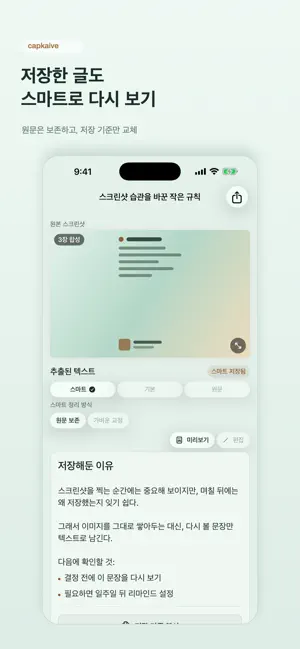
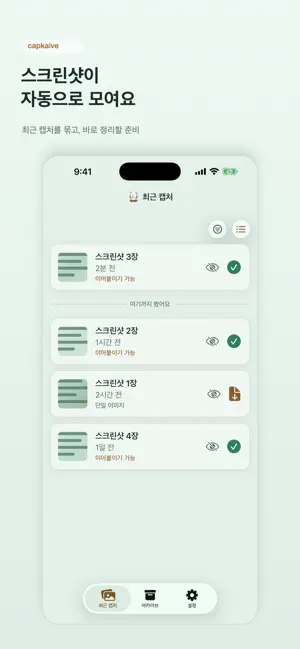
capkaive is an app for organizing text information saved in screenshots. Open screenshots of webpages, documents, conversations, order details, or reference materials you captured to check again later. capkaive extracts the text inside the image and lets you save it as a readable record. Screenshots are easy to save, but hard to find again once they pile up in your photo library. capkaive helps you organize important sentences and information from your screenshots as text, so you can return to them when you need them. Screenshots captured across multiple images, such as long pages or long conversations, can also be reviewed as one continuous flow. Before saving, you can edit the extracted title and body. Saved items can be viewed again together with the original screenshots. For important items, you can set reminders and receive a notification when you need to check them again. Key Features * Extract text from screenshots * Edit the title and body before saving * Organize continuous screenshots * Save original screenshots with extracted text * Manage saved items in an archive * Copy and share extracted text * Set reminders for items you need to revisit Useful For * Organizing articles or text you captured to read later * Finding order details, notices, or instructions again * Reviewing long conversations or long pages captured across multiple screenshots * Copying or sharing text from screenshots * Getting reminded to check important screenshots at a specific time
What’s new
Version 1.0.5 · Updated September 13, 2026
Organizing screenshots is now faster and more intuitive. • Archive a single screenshot directly from the detail view. • Share from the top navigation while keeping the content in focus. • The Archive button stays within easy reach, even on long screenshots. • Improved spacing and layout make archive cards easier to browse. • General usability and stability improvements.
App privacy
The developer, Kang Ju Wee, reported these privacy practices to Apple.
Data Used to Track You
The following data may be used to track you across apps and websites owned by other companies:
- Location: Coarse Location
- Identifiers: Device ID
- Usage Data: Product Interaction, Advertising Data
- Diagnostics: Performance Data
Data Linked to You
The following data, which may be collected and linked to your identity, may be used for the following purposes:
- Location: Coarse Location
- Identifiers: Device ID
- Usage Data: Product Interaction, Advertising Data
- Diagnostics: Performance Data
Used for: Third-Party Advertising, Analytics, App Functionality
Data Not Linked to You
The following data, which may be collected but is not linked to your identity, may be used for the following purposes:
- Diagnostics: Crash Data
Used for: Analytics, App Functionality
Alternatives to Capkaive - Screenshot to Text
Looking for apps like Capkaive - Screenshot to Text? Here are 6 similar apps on the App Store.


| App | Rating | Price | Last updated | Compare |
|---|---|---|---|---|
| Capkaive - Screenshot to Text | – | Free | September 13, 2026 | |
| Snaap: Screenshot to Text | – | Free | Jun 9, 2026 | Compare |
| Makernote | – | Free | Aug 20, 2025 | Compare |
| MemoJet | – | Free | Dec 24, 2025 | Compare |
| PROduce Crew | – | Free | Sep 29, 2026 | Compare |
| 오늘치 | – | Free | Aug 6, 2026 | Compare |
| FarmersHands | – | Free | Oct 26, 2026 | Compare |