

ByteFast: Fasting Tracker 168
ByteSeed Health & Fitness iPhoneiPadiPod touchApple Watch
ByteFast: Fasting Tracker 168 is a free Health & Fitness app for iPhone and iPad by ByteSeed. Rated 5.0/5 from 1 ratings. Requires iOS 18.0.
- Rating
- 5.0
- 1 ratings
- Price
- Free
- on the App Store
- Size
- 11 MB
- Age 4+
- Updated
- Nov 11
- 2026 · v4.1
Screenshots
Save to Pinterest


About ByteFast: Fasting Tracker 168
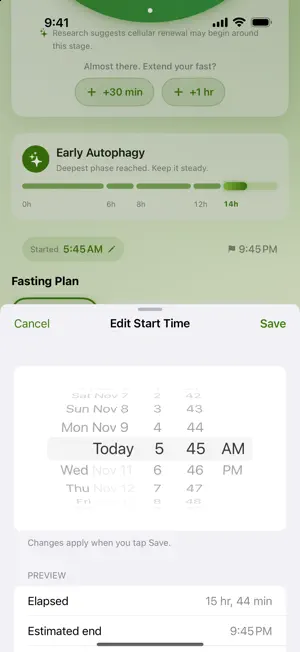
ByteFast is a simple, beautiful intermittent fasting tracker. No account and no login: just open it and start your fast. Pick a plan — 14:10, 16:8, 20:4, OMAD (24h), 36h — or set your own from 4 to 72 hours. ByteFast shows where you are in your fast, how long is left, and what's next. OPTIMIZED FOR IPHONE DUO AND IPAD • Unfolded, see your fast on one side and your statistics and goals on the other. STAY ON TRACK • A live timer shown as a ring, a bar or an hour-by-hour grid • A fasting-phase timeline that shows each phase and how long until the next one • Extend a fast by 30 minutes or an hour, from the app or the notification • Started late? Fix your start time at any point during a fast GOALS AND STREAKS • Set a goal for total hours or for consecutive days, and add a reward • See which goals you achieved and when, and how far you got on the rest STATISTICS • Charts for fasting hours, fast length, outcomes and break reasons • Week, month or all-time views, with streaks, averages and your longest fast EVERYWHERE YOU ARE • Live Activities on the Lock Screen, Dynamic Island, Apple Watch Smart Stack and CarPlay • Home Screen and Lock Screen widgets • An Apple Watch app with complications • Siri, Shortcuts and a Control Center toggle: "Start a fast", "End my fast" PRIVATE BY DESIGN • No account needed. Your data stays on your devices and syncs through your own iCloud. • Export your history as CSV or JSON. Fasting phases are general estimates for information only and are not medical advice. Talk to your doctor before starting a fasting plan, especially if you are pregnant, have diabetes or another medical condition.
What’s new
Version 4.1 · Updated November 11, 2026
ByteFast 4.1 is optimized for iPhone Duo. BUILT FOR IPHONE DUO • Open up your iPhone Duo and ByteFast uses the extra space: your fast and progress ring on one side, your statistics and goals on the other. • Folded, you get the familiar one-screen layout. • The same side-by-side view works on iPad. EXTEND YOUR FAST • Feeling good near the end? Add 30 minutes or an hour with one tap, right under the progress ring or from the notification. FIX YOUR START TIME • Forgot to start on time? Tap the start time to correct it at any point during your fast. You'll see the new end time before you save, and fixing the time no longer jumps straight to the success screen. GOALS • Edit or delete any goal with a swipe or a long press, or from the goal editor. • Your goal history now shows which goals you achieved and when, and how far you got on the ones you missed. • A fast that's already running when you set a goal now counts in full. • Streak goals are recorded correctly, even if the streak broke later. SMALLER IMPROVEMENTS • Typed goal numbers are now saved correctly. • Bug fixes and polish throughout.
App privacy
The developer, ByteSeed, reported these privacy practices to Apple.
Data Not Collected
The developer does not collect any data from this app.
Alternatives to ByteFast: Fasting Tracker 168
Looking for apps like ByteFast: Fasting Tracker 168? Here are 6 similar apps on the App Store.
-
 Glow: Fasting & Nutrition
-
 Fastual: Fasting Phase Tracker
-
 Fasting Hours Tracker
-
 Faste – Intermittent Fasting
-
 Breena: Breathwork & Calm
-
 Climb — Fasting Tracker
| App | Rating | Price | Last updated | Compare |
|---|---|---|---|---|
| ByteFast: Fasting Tracker 168 | 5.0 / 5 (1 rating) | Free | November 11, 2026 | |
| Glow: Fasting & Nutrition | – | Free | Jul 12, 2026 | Compare |
| Fastual: Fasting Phase Tracker | – | Free | Oct 24, 2026 | Compare |
| Fasting Hours Tracker | – | Free | Jul 7, 2026 | Compare |
| Faste – Intermittent Fasting | – | Free | Aug 20, 2026 | Compare |
| Breena: Breathwork & Calm | – | Free | Nov 4, 2026 | Compare |
| Climb — Fasting Tracker | – | Free | Aug 6, 2026 | Compare |