

Notivo: Voice Notes & AI
Hasan Karli Productivity iPhoneiPadiPod touch
Notivo: Voice Notes & AI is a free Productivity app for iPhone and iPad by Hasan Karli. Requires iOS 15.0. Updated September 20, 2026.
- Price
- Free
- on the App Store
- Size
- 544 MB
- Age 12+
- Updated
- Sep 20
- 2026 · v1.0.1
Screenshots


About Notivo: Voice Notes & AI
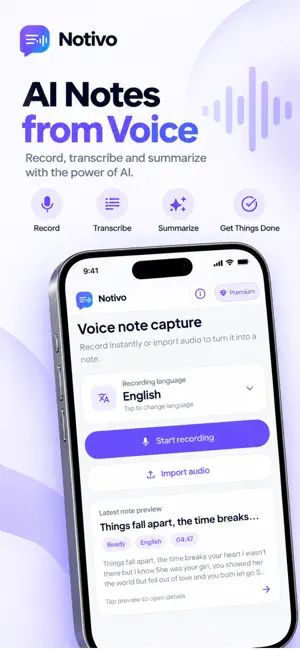
Notivo turns voice memos into clear, searchable notes. Record ideas, meetings, and everyday thoughts — or import audio files — and get transcripts with AI-generated titles and summaries. Transcribe on your device or in the cloud, then ask your notes anything. PERFECT FOR • Professionals capturing meetings, decisions, and follow-ups on the go • Students turning lectures and study recaps into searchable text • Creators and writers who think out loud and hate losing good ideas • Founders dumping voice notes without manual cleanup • Anyone who prefers speaking first and organizing second KEY FEATURES Quick Capture • Start recording in seconds from Home • Import existing audio from your device • Choose your transcription language before you process Transcribe Voice to Text • On-device transcription powered by local AI (Whisper / SenseVoice) — works offline • Cloud transcription when you need longer or higher-quality results • Clean transcripts you can read, copy, and search AI-Structured Notes • Automatic titles and summaries so you can skim your library fast • Full transcript view with audio playback • Text notes alongside voice notes in one place Your Voice Library • All notes saved in your library for replay and review • Collections to group projects, topics, or seasons • Search across transcripts, titles, and summaries AI Assistant • Chat with your notes — ask questions and get answers from your own recordings • Great for recaps, follow-ups, and pulling details you do not want to re-listen for Built for Real Life • Focused interface around capture and review • Available in 13 languages • Sync and account features when signed in POPULAR USE CASES Meetings & Work Capture agendas, decisions, and next steps. Search later for the exact wording — not just another waveform in Voice Memos. Study & Learning Turn spoken recaps and class audio into text you can search. Review summaries before exams without replaying full recordings. Ideas & Creative Work Use Notivo as a dictation inbox: outlines, hooks, and messy first drafts — then refine elsewhere. Everyday Productivity Hands full? Walking? Speak the task, name, or reminder — then find it with search instead of digging through recordings. WHY NOTIVO • Voice-first capture with structure — not just a recorder • Offline transcription on-device; cloud when you need it • AI titles, summaries, and a chat assistant built around your notes • Import audio, organize in collections, search everything • Privacy-aware design — see our Privacy Policy for details SUBSCRIPTIONS Notivo is free to start with transcription credits included. Upgrade to Pro for expanded limits: Free • 30 transcription credits (lifetime, per device) • Up to 30 minutes per recording Pro • 300 credits every 30 days • Up to 120 minutes per recording • Premium AI credits for assistant features Credit packs available for extra transcription. Subscriptions renew automatically unless cancelled at least 24 hours before the end of the current period. Manage or cancel in your App Store account settings. Use Restore Purchases after reinstalling or switching devices. GET STARTED 1. Allow microphone access when prompted 2. Tap record and speak — or import an audio file 3. Choose on-device or cloud transcription 4. Review your title, summary, and full transcript 5. Organize into collections and search anytime Privacy: https://hasankarli.dev/mobile-apps/notivo/privacy Terms: https://hasankarli.dev/mobile-apps/notivo/terms
What’s new
Version 1.0.1 · Updated September 20, 2026
Your first session is for recording. Start a voice memo before any paywall, and an unfinished recording stays saved so you can finish it later. New • A tip on Home when your notebook is empty, so your first memo is one tap away • Unfinished voice memos stay on your device if you leave mid-recording Improved • The app opens faster, so you can record or play audio back sooner • Stop and save turns a voice memo into a transcript when you have credits • Premium and credit packs share one clear paywall, with the price before you subscribe • Trial plans say Start free trial • Onboarding is shorter, and you can skip it • Summaries and first-session text now appear in your language Fixed • Stopping a recording saves the memo in the same session when credits allow • The paywall still opens if you tap it right after launch • Restore shows a clear message when there is nothing to restore
App privacy
The developer, Hasan Karli, reported these privacy practices to Apple.
Data Used to Track You
The following data may be used to track you across apps and websites owned by other companies:
- Health & Fitness: Health
- Purchases: Purchase History
- Location: Coarse Location
- Contact Info: Email Address, Name
- User Content: Photos or Videos, Audio Data, Other User Content
- Identifiers: User ID, Device ID
- Usage Data: Product Interaction, Advertising Data
- Diagnostics: Crash Data, Performance Data, Other Diagnostic Data
Data Linked to You
The following data, which may be collected and linked to your identity, may be used for the following purposes:
- Location: Coarse Location
- Identifiers: Device ID, User ID
- Usage Data: Product Interaction, Advertising Data
- Purchases: Purchase History
- Contact Info: Email Address, Name
- User Content: Audio Data, Other User Content, Photos or Videos
- Diagnostics: Crash Data, Performance Data, Other Diagnostic Data
- Health & Fitness: Health
Used for: Developer’s Advertising or Marketing, Analytics, Product Personalization, App Functionality
Alternatives to Notivo: Voice Notes & AI
Looking for apps like Notivo: Voice Notes & AI? Here are 6 similar apps on the App Store. The highest rated is Deny: Screen Time Lock (5.0/5), and all 6 are free to download.
-
 Notivo: Memory Layer
-
 Dictation & Notes – Vermerk
-
 Deny: Screen Time Lock
5.0
-
 RENOV-IA
-
 Portal Zafir
-
 Vext: Screen Time Control
| App | Rating | Price | Last updated | Compare |
|---|---|---|---|---|
| Notivo: Voice Notes & AI | – | Free | September 20, 2026 | |
| Notivo: Memory Layer | – | Free | Aug 13, 2026 | Compare |
| Dictation & Notes – Vermerk | – | Free | Sep 23, 2026 | Compare |
| Deny: Screen Time Lock | 5.0 / 5 (1) | Free | Jun 18, 2026 | Compare |
| RENOV-IA | – | Free | Sep 8, 2026 | Compare |
| Portal Zafir | – | Free | Jan 4, 2026 | Compare |
| Vext: Screen Time Control | – | Free | Aug 15, 2025 | Compare |