

Forms: Google Forms Maker
Ilona Dantsevich Utilities iPhoneiPadiPod touch
Forms: Google Forms Maker is a free Utilities app for iPhone and iPad by Ilona Dantsevich. Requires iOS 13.0. Updated August 14, 2026.
- Price
- Free
- on the App Store
- Size
- 66 MB
- Age 4+
- Updated
- Aug 14
- 2026 · v1.0.1
Screenshots


About Forms: Google Forms Maker
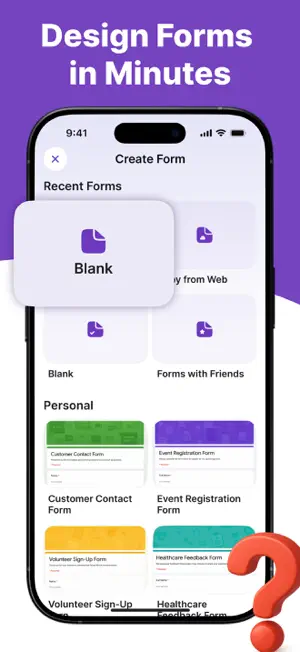
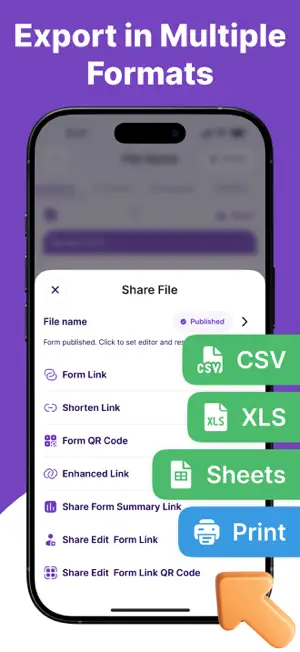
Create professional Google Forms, surveys and quizzes right from your iPhone — no laptop needed. Build a form in seconds with AI, collect responses anywhere, and watch results update live in clean charts. The fastest, simplest way to design, share and analyze forms on the go. WHY YOU'LL LOVE IT - AI form generator — type a topic, get a ready-to-send form instantly - Scan any paper form or photo and turn it into a digital form (OCR) - Dozens of ready-made templates: surveys, quizzes, sign-ups, feedback, RSVP - Real-time responses with automatic charts and summaries - Full control: response limits, schedules, and notifications on every new reply CREATE ANY FORM - Multiple question types: multiple choice, checkboxes, dropdowns, text, rating, date - Add images and videos to questions - Quizzes with point values, correct answers and auto-grading - Custom themes — fonts, colors and backgrounds to match your brand SHARE & COLLECT - Share via link, email, QR code or social - Edit and manage your forms across iPhone and iPad - Open any existing form and keep editing where you left off ANALYZE RESULTS - Live analytics with bar, pie and line charts - Filter responses by date, answer or score - Export to CSV or Excel for deeper analysis Perfect for teachers, students, event organizers, small businesses and anyone who collects answers. — SUBSCRIPTION — Some features require a paid subscription. Payment is charged to your Apple Account at confirmation of purchase. Subscriptions renew automatically unless auto-renew is turned off at least 24 hours before the end of the current period. Manage or cancel anytime in your Account Settings. Terms of Use: https://developer.apple.com/documentation/appstoreconnectapi/end-user-license-agreements-eula Disclaimer: This is an independent third-party app and is not affiliated with, endorsed by, or sponsored by Google. All trademarks are property of their respective owners.
What’s new
Version 1.0.1 · Updated August 14, 2026
Create professional Google Forms, surveys and quizzes right from your iPhone — no laptop needed.
App privacy
The developer, Ilona Dantsevich, reported these privacy practices to Apple.
Data Used to Track You
The following data may be used to track you across apps and websites owned by other companies:
- Search History: Search History
- Identifiers: User ID
Data Linked to You
The following data, which may be collected and linked to your identity, may be used for the following purposes:
- Identifiers: Device ID
Used for: Analytics
Data Not Linked to You
The following data, which may be collected but is not linked to your identity, may be used for the following purposes:
- Identifiers: User ID
- Search History: Search History
- Usage Data: Product Interaction, Other Usage Data
- Diagnostics: Crash Data, Performance Data
Used for: Third-Party Advertising, Analytics, Product Personalization, App Functionality
Alternatives to Forms: Google Forms Maker
Looking for apps like Forms: Google Forms Maker? Here are 6 similar apps on the App Store. The highest rated is AddItUp ScoreSheet (5.0/5), and all 6 are free to download.
-
 MarinePro
-
 AddItUp ScoreSheet
5.0
AddItUp ScoreSheet
5.0
-
 RedDot Rentals
-
 Forms & Docs for Google Forms
-
 Veesky X
-
 QR Code Maker - QR Generator
| App | Rating | Price | Last updated | Compare |
|---|---|---|---|---|
| Forms: Google Forms Maker | – | Free | August 14, 2026 | |
| MarinePro | – | Free | May 15, 2026 | Compare |
| AddItUp ScoreSheet | 5.0 / 5 (1) | Free | May 25, 2026 | Compare |
| RedDot Rentals | – | Free | Jan 8, 2024 | Compare |
| Forms & Docs for Google Forms | – | Free | Jan 14, 2026 | Compare |
| Veesky X | – | Free | Sep 16, 2026 | Compare |
| QR Code Maker - QR Generator | – | Free | May 7, 2026 | Compare |