

China Visa ID Photo 1-Tap
JIAJUN ZHANG Utilities iPhoneiPadiPod touch
China Visa ID Photo 1-Tap is a free Utilities app for iPhone and iPad by JIAJUN ZHANG. Rated 5.0/5 from 5 ratings. Requires iOS 17.0.
- Rating
- 5.0
- 5 ratings
- Price
- Free
- on the App Store
- Size
- 4 MB
- Age 4+
- Updated
- Sep 10
- 2026 · v1.0.4
Screenshots



About China Visa ID Photo 1-Tap
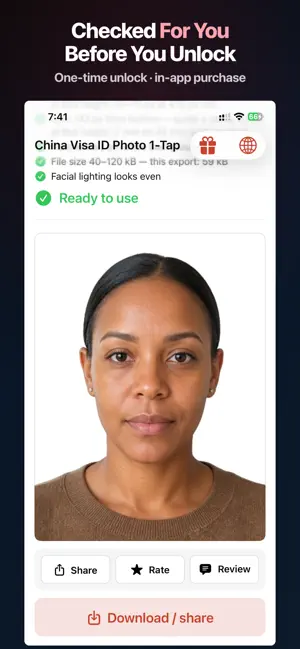
$1.99 per photo. No subscription. Stop fighting manual face sliders — China Visa ID Photo 1-Tap turns any front-facing shot into a compliant China digital visa-style photo — right on your iPhone. WHAT IT DOES • One tap, no dragging — camera or Photos to a finished, correctly cropped photo in seconds. • Automatic background removal — Replaces any backdrop with a clean white background suitable for China's common digital visa photo window. • Smart China digital crop — Exports up to 420×560 px within the commonly cited embassy 354-420 x 472-560 px portrait window, maximizing clarity wherever allowed. • Live export checklist — After a successful preview, a checklist walks through canvas/window compliance, measured eye-from-bottom scaling, head height band, face width and interpupillary distance references, hairline/chin guidance, white background, JPEG size band, and our no-face-reshaping policy. • COVA upload guidance — After export, in-app guidance for uploading through common China online visa / COVA-style flows, including using the portal's own crop tool correctly. • Free to download — Photo processing, live preview, and the full compliance checklist are free to use, with unlimited retries before you buy. Exporting the final full-resolution photo requires a one-time in-app purchase (one export per purchase). INPUT & LANGUAGE • Take a new picture with the camera, or pick from your photo library. • In-app language switcher: English, 简体中文, 繁體中文, Español, 日本語, Deutsch, Français. WHY CHOOSE CHINA VISA ID PHOTO 1-TAP • 100% private — Processing uses Apple's Vision framework on-device. No photo upload for editing. No accounts. No analytics SDKs. • Save money & time — Reprocess as many times as you like before purchasing; one-time unlock per exported photo. No subscription. • Confidence before you pay — the export checklist shows measured numbers against the digital window before you ever unlock. SAVED PHOTOS • After a successful purchase, the exported image can be kept in the app's on-device "Saved Photos" list (this device only). Share or delete anytime. WORKS FOR • China digital visa-style photo uploads via CVASC/VFS portals and similar online visa flows. • Note: final acceptance rests with the relevant embassy, consulate, or portal — always verify current official instructions. HOW IT WORKS 1. Tap Take Photo or Choose from Photos. 2. Tap process — the app detects your face, crops to the digital window, and removes the background automatically. 3. Review the preview and export checklist. 4. Unlock with a one-time in-app purchase, then save or share the JPEG. Find past exports under Saved Photos. TECHNICAL NOTES • iOS 17+. iPhone. Core processing does not require internet; App Store / StoreKit needs connectivity for purchases. • We do not reshape head, face, or neck contours for biometric fixes; export uses your natural geometry on a white plate. Your photos are not sent to our servers for processing. Final acceptance of any photo remains with the relevant embassy, consulate, or portal. Official guideline links in the app are provided for reference only. This app only prepares your photo. It does not produce any official document and is not affiliated with any government. You submit the photo yourself through the official application channels.
Ratings & reviews
5.0
5 ratings
What’s new
Version 1.0.4 · Updated September 10, 2026
• Redeemed offer-code exports now remain available until you choose to use them on the unlock screen. • Clearer available-export information before payment. • More reliable saving and sharing of exported photos.
App privacy
The developer, JIAJUN ZHANG, reported these privacy practices to Apple.
Data Not Collected
The developer does not collect any data from this app.
Alternatives to China Visa ID Photo 1-Tap
Looking for apps like China Visa ID Photo 1-Tap? Here are 6 similar apps on the App Store. The highest rated is EQLink+ (5.0/5), and all 6 are free to download.
-
 Clevetura App
3.0
Clevetura App
3.0
-
 EQLink+
5.0
EQLink+
5.0
-
 ReadToMe: Paper to Audio
4.2
ReadToMe: Paper to Audio
4.2
-
 USA Lottery Results Checker
4.6
USA Lottery Results Checker
4.6
-
 FlutterTime Timezone Converter
4.9
FlutterTime Timezone Converter
4.9
-
 Screening Eagle Inspect
4.8
Screening Eagle Inspect
4.8
| App | Rating | Price | Last updated | Compare |
|---|---|---|---|---|
| China Visa ID Photo 1-Tap | 5.0 / 5 (5 ratings) | Free | September 10, 2026 | |
| Clevetura App | 3.0 / 5 (2) | Free | Apr 15, 2024 | Compare |
| EQLink+ | 5.0 / 5 (1) | Free | Aug 21, 2026 | Compare |
| ReadToMe: Paper to Audio | 4.2 / 5 (6) | Free | Feb 7, 2024 | Compare |
| USA Lottery Results Checker | 4.6 / 5 (10) | Free | Oct 1, 2026 | Compare |
| FlutterTime Timezone Converter | 4.9 / 5 (30) | Free | Jun 29, 2026 | Compare |
| Screening Eagle Inspect | 4.8 / 5 (25) | Free | Oct 9, 2026 | Compare |