

Expense Tracker - Timdo
Kamran Ahmed Finance iPhoneiPadiPod touch
Expense Tracker - Timdo is a free Finance app for iPhone and iPad by Kamran Ahmed. Requires iOS 15.1. Updated June 4, 2026.
- Price
- Free
- on the App Store
- Size
- 57 MB
- Age 4+
- Updated
- Jun 4
- 2026 · v1.0
Screenshots

About Expense Tracker - Timdo
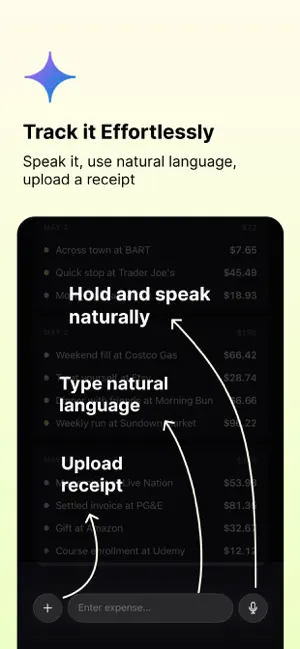
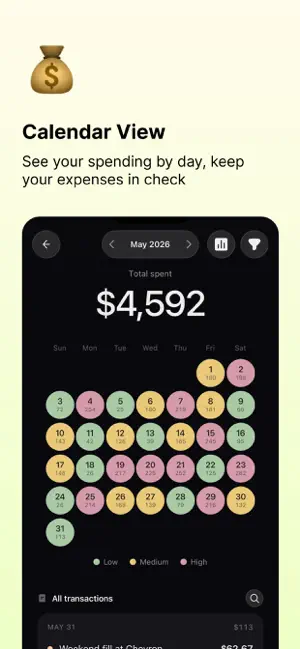
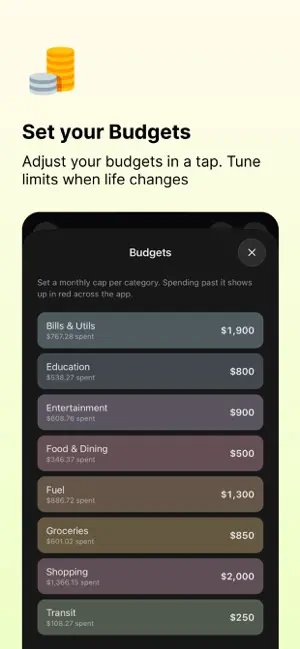
Tracking expenses should not feel like another task. This app makes it quick to record your spending, understand where your money is going, and stay on top of your budgets. You can add expenses in the way that feels easiest: • Speak into the mic • Type naturally, like “£12 lunch at Nando’s yesterday” • Take a photo of a receipt • Add it manually The app can automatically detect the amount, category, description, date and other details, so you do not have to fill everything yourself. You can see your spending for the whole month, broken down by day and category. This makes it easier to understand your habits, spot where money is going, and make better decisions. You can also set budgets for different categories and get notified when you are close to going over or have already gone over your limit. There is also an AI chat built in. You can ask questions like: “Where did I spend the most this month?” “Set my food budget to £300” “How much did I spend on coffee last week?” “Show me my recurring expenses” You can manage expenses, budgets, categories and insights using natural language. The app also supports recurring expenses, so things like rent, subscriptions, bills and memberships can be tracked automatically. Main features: • Add expenses by voice • Add expenses using natural language • Scan receipts with your camera • Add expenses manually • Auto-detect amount, date, category and description • View monthly spending by day • See spending by category • Set budgets • Get budget overage notifications • Track recurring expenses • Ask AI questions about your money • Manage expenses and budgets through AI chat A simple, AI-first expense tracker for people who want to know where their money is going without spending too much time tracking it.
App privacy
The developer, Kamran Ahmed, reported these privacy practices to Apple.
Data Linked to You
The following data, which may be collected and linked to your identity, may be used for the following purposes:
- Purchases: Purchase History
- Identifiers: User ID
- Financial Info: Other Financial Info
- Contact Info: Email Address, Name
- User Content: Photos or Videos, Other User Content
Used for: Analytics, App Functionality
Alternatives to Expense Tracker - Timdo
Looking for apps like Expense Tracker - Timdo? Here are 6 similar apps on the App Store. The highest rated is Spendlio – Expense Tracker (5.0/5), and all 6 are free to download.
-
 Spendlio – Expense Tracker
5.0
Spendlio – Expense Tracker
5.0
-
 Sana Money: AI Expense Tracker
-
 WalletWise: Expense Tracker
-
 FinPilot: Expense Tracker
-
 Zently - AI Expense Tracker
5.0
Zently - AI Expense Tracker
5.0
-
 SwiftSpend — Expense Tracker
| App | Rating | Price | Last updated | Compare |
|---|---|---|---|---|
| Expense Tracker - Timdo | – | Free | June 4, 2026 | |
| Spendlio – Expense Tracker | 5.0 / 5 (1) | Free | Sep 8, 2026 | Compare |
| Sana Money: AI Expense Tracker | – | Free | Sep 15, 2026 | Compare |
| WalletWise: Expense Tracker | – | Free | Jun 6, 2026 | Compare |
| FinPilot: Expense Tracker | – | Free | Oct 7, 2026 | Compare |
| Zently - AI Expense Tracker | 5.0 / 5 (2) | Free | Mar 28, 2026 | Compare |
| SwiftSpend — Expense Tracker | – | Free | Oct 9, 2026 | Compare |