

Organizy: AI Planner
Bulat Khaziev Productivity iPhoneiPadiPod touch
Organizy: AI Planner is a free Productivity app for iPhone and iPad by Bulat Khaziev. Requires iOS 18.0. Updated October 15, 2026.
- Price
- Free
- on the App Store
- Size
- 22 MB
- Age 12+
- Updated
- Oct 15
- 2026 · v1.1.1
Screenshots


About Organizy: AI Planner
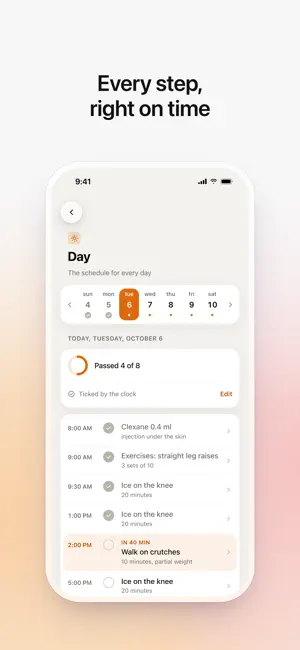
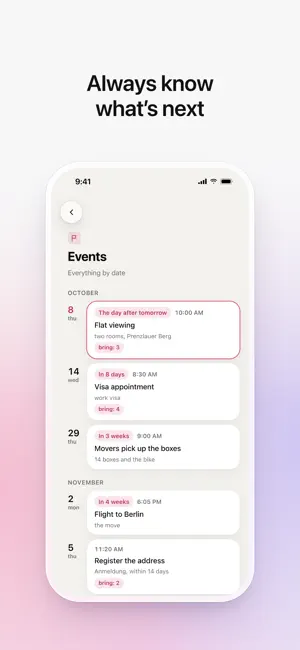
HOW IT WORKS Snap a photo of a document, ticket, or schedule - or just describe it in words. AI sorts everything into: • STAGES - major phases with start and end dates. • DAILY - what to do today and every day. • EVENTS - key dates, deadlines, appointments, milestones. • METRICS - numbers to track (spending, weight, blood pressure). • CONTACTS - people and organizations involved. WHO IT'S FOR • Planning a trip? Drop in your tickets and bookings - get a day-by-day plan with tours, flights, and addresses. • Following a training program? Photograph it - Organizy maps out sets and timelines. • On a prescribed treatment? Upload the prescription - get reminders for medication and follow-ups. • Renovating? Add the estimate and plan - get phased timelines and contractor contacts. PRIVACY Your plans are stored on your device and in your own private account, so they are there on a new iPhone. AI processing runs through a proxy with no data retained for model training. ORGANIZY PRO Your first plan is free. New plans and changes by AI come with Organizy Pro — monthly or yearly, with a 7-day free trial for new subscribers. The plans you already have keep working without it. Payment is charged to your Apple ID. The subscription renews automatically unless it is cancelled at least 24 hours before the end of the current period; manage or cancel it in your Apple ID settings. Terms of Use (EULA): https://www.apple.com/legal/internet-services/itunes/dev/stdeula/ Privacy Policy: https://www.organizy.org/privacy GOOD TO KNOW Organizy is an organizer, not a medical or professional app. AI helps structure information but doesn't replace a doctor, lawyer, or other specialist. Always confirm health and important decisions with a qualified professional. Supports text notes, photos of documents, schedule screenshots, and files from iCloud Drive, Google Drive, and other cloud storage.
What’s new
Version 1.1.1 · Updated October 15, 2026
Bug fixes and performance improvements.
App privacy
The developer, Bulat Khaziev, reported these privacy practices to Apple.
Data Linked to You
The following data, which may be collected and linked to your identity, may be used for the following purposes:
- Health & Fitness: Health
- Purchases: Purchase History
- Contact Info: Email Address, Name
- User Content: Audio Data, Photos or Videos, Other User Content
- Identifiers: User ID
Used for: Analytics, App Functionality
Alternatives to Organizy: AI Planner
Looking for apps like Organizy: AI Planner? Here are 6 similar apps on the App Store. The highest rated is Sebastian Assistant (5.0/5), and all 6 are free to download.
-
 Saverything
-
 Sebastian Assistant
5.0
Sebastian Assistant
5.0
-
 HyBran: Notes, Agent, Notebook
5.0
HyBran: Notes, Agent, Notebook
5.0
-
 Carbon: Minimalist To Do List
5.0
Carbon: Minimalist To Do List
5.0
-
 AI Brief: AI Prompt from Files
-
 Tably: Hold Now, Decide Later
5.0
Tably: Hold Now, Decide Later
5.0
| App | Rating | Price | Last updated | Compare |
|---|---|---|---|---|
| Organizy: AI Planner | – | Free | October 15, 2026 | |
| Saverything | – | Free | Apr 16, 2026 | Compare |
| Sebastian Assistant | 5.0 / 5 (1) | Free | Oct 17, 2026 | Compare |
| HyBran: Notes, Agent, Notebook | 5.0 / 5 (1) | Free | Aug 7, 2026 | Compare |
| Carbon: Minimalist To Do List | 5.0 / 5 (3) | Free | May 11, 2026 | Compare |
| AI Brief: AI Prompt from Files | – | Free | Oct 9, 2026 | Compare |
| Tably: Hold Now, Decide Later | 5.0 / 5 (1) | Free | Aug 25, 2026 | Compare |