

Shoot Chop Drop
HANDSUM.INC Music iPhoneiPadiPod touch
Shoot Chop Drop is a free Music app for iPhone and iPad by HANDSUM.INC. Requires iOS 17.0. Updated September 24, 2026.
- Price
- Free
- on the App Store
- Size
- 4 MB
- Age 4+
- Updated
- Sep 24
- 2026 · v1.5.2
Screenshots


About Shoot Chop Drop
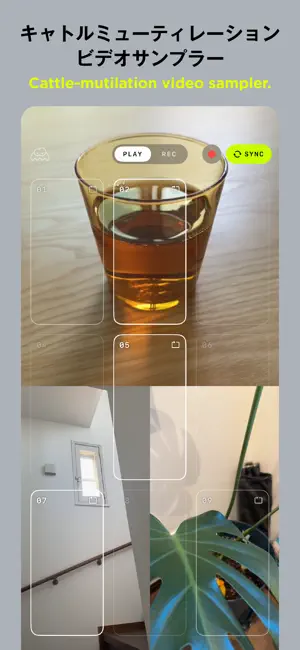
Shoot it. Chop it. Drop it. A 9-pad video sampler: load what you filmed, tap the pads, and play it. Stack any of 13 effects — they hit the audio as hard as they hit the video. Cattle-mutilation video sampler — Shoot Chop Drop, or SCD. A street corner, your kitchen, an instrument, a friend's laugh — everything in sight becomes an instrument. ▸ Features ・3×3 multi-touch pad grid ・Three playback modes per pad: GATE / ONE / LOOP ・13 A/V effects — every one hits the audio and the video together ・TAPE slows everything down while you hold it ・HYPER CHOP / AUTO CHOP — slice one clip into 9, with the slice points lined up to the hits automatically ・BPM SNAP keeps loops in sync ・Speed (varispeed) and gain per pad ・Save 9 pads as a SET — recall the whole kit anytime ・Record your performance — clean footage with no UI in the frame ▸ Use it for ・Capture → trim → perform, all in one app ・Turn room noise, street sounds, voices — anything — into instruments ・A companion for live performance and impromptu sessions ・Jamming with friends, rhythm play with kids ▸ Privacy ・All recording, editing, and playback happen on-device ・Clips are never uploaded ・No account, no email, no analytics ・No ads, no subscription, no in-app purchase — completely free
What’s new
Version 1.5.2 · Updated September 24, 2026
Stack it up, more chaos. ●Stack effects● Combine any of the 13 effects at the same time. Each effect remembers its own amount. The slider controls the last effect you touched. ●Easier-to-hit effect buttons● The buttons are now bigger, in two rows. Tap a lit button to point the slider at it. Tap the button the slider is on to turn it off. Hold still works as before: the effect is on only while you press. CLR turns everything off at once. ●Easier import from Camera Roll● The import button is now bigger. Imported clips start at the first strong hit. Hits are marked on the timeline, and ◀ ▶ jumps to the previous or next one. ●Other improvements● - Moved the buttons away from the bottom edge to reduce accidental taps - Stacked effects are less likely to distort the sound - STUTTER repeats now start on the beat - AUTO CHOP slice points now line up more precisely with each hit
App privacy
The developer, HANDSUM.INC, reported these privacy practices to Apple.
Data Not Collected
The developer does not collect any data from this app.
Alternatives to Shoot Chop Drop
Looking for apps like Shoot Chop Drop? Here are 6 similar apps on the App Store. The highest rated is PixiTracker 1Bit (5.0/5), and 3 of the 6 are free to download.
-
 Matby
Matby
-
 Daily Beat: One Day. One Beat.
-
 PixiTracker 1Bit
5.0
PixiTracker 1Bit
5.0
-
 SpellSynth: Retro Vocal Synth
3.2
SpellSynth: Retro Vocal Synth
3.2
-
 NovaClick
5.0
NovaClick
5.0
-
 GrimoHex
5.0
GrimoHex
5.0
| App | Rating | Price | Last updated | Compare |
|---|---|---|---|---|
| Shoot Chop Drop | – | Free | September 24, 2026 | |
| Matby | – | Free | Nov 16, 2025 | Compare |
| Daily Beat: One Day. One Beat. | – | Free | Sep 14, 2026 | Compare |
| PixiTracker 1Bit | 5.0 / 5 (47) | 2.99 USD | Oct 3, 2025 | Compare |
| SpellSynth: Retro Vocal Synth | 3.2 / 5 (11) | 2.99 USD | Oct 2, 2026 | Compare |
| NovaClick | 5.0 / 5 (1) | Free | May 6, 2026 | Compare |
| GrimoHex | 5.0 / 5 (1) | 12.99 USD | Jul 7, 2026 | Compare |
Compare Shoot Chop Drop with the top alternatives: ratings, updates, ASO score and keyword gaps →