

Seacat Photo Layout
超 付 Utilities iPhoneiPadiPod touch
Seacat Photo Layout is a free Utilities app for iPhone and iPad by 超 付. Requires iOS 16.0. Updated June 26, 2026.
- Price
- Free
- on the App Store
- Size
- 3 MB
- Age 4+
- Updated
- Jun 26
- 2026 · v1.0.1
Screenshots


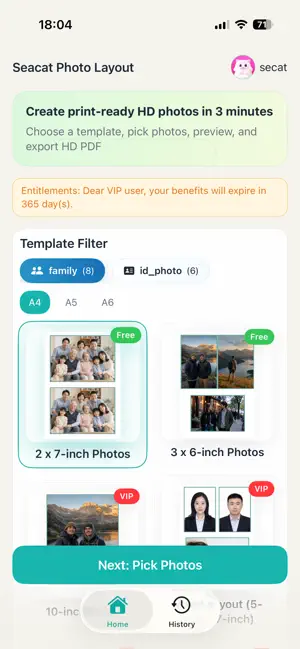
About Seacat Photo Layout
A professional photo layout tool for A4, 6-inch, 7-inch, and all sizes from 1 to 10 inches. Supports passport/ID photo background change, mixed photo collage to save paper, and free family photo templates. One-tap automatic layout, export fixed-size high-resolution PDFs for printing. Simple enough for anyone in the family to use. Key Features: 1. Full-size layout and mixed collage Supports A4, A5, A6, and sizes from 1 to 10 inches. Mix ID photos and daily life photos on one sheet to save paper and cost. 2. One-tap background change for ID photos Easily change backgrounds to white, red, blue, or other common colors. Perfect for passport, visa, and other ID photo needs. 3. Photo editing and free templates Basic editing tools for quick touch-ups before layout. Family photo templates are permanently free with unlimited use, no subscription required. 4. Fixed-size PDF export Export high-resolution PDFs with locked print dimensions. No stretching, distortion, or size errors when you send them to a print shop or connect to a printer. 5. Smart layout preview and history Preview layout results and paper usage before exporting. Export history is automatically saved for later re-download or reuse. 6. Account and cloud management Sign in to manage your export records across devices. Perfect for: ID photo printing, white/red/blue background photo processing, family photo collages, daily photo print layouts, self-service print preparation, US visa photo layouts, and more. SeaCat Photo Layout is designed to provide a simple, intuitive, and stable photo layout experience, making print preparation for both ID photos and everyday photos more efficient. Terms of Use: English: https://photo-layout.gnusoft.cn/privacy/terms-of-use.html Chinese: https://photo-layout.gnusoft.cn/privacy/terms-of-use-zh.html Apple Standard EULA: https://www.apple.com/legal/internet-services/itunes/dev/stdeula/
What’s new
Version 1.0.1 · Updated June 26, 2026
1. Improved login state persistence so in most cases you won’t need to sign in again after reopening the app. 2. Improved template display and thumbnail loading on the Home page for faster first launch and less waiting when opening the app again. 3. Improved the layout preview experience so templates with multiple photos and multiple slots display faster.
App privacy
The developer, 超 付, reported these privacy practices to Apple.
Data Linked to You
The following data, which may be collected and linked to your identity, may be used for the following purposes:
- Purchases: Purchase History
- Contact Info: Email Address
- User Content: Photos or Videos
- Identifiers: User ID
Used for: App Functionality
Alternatives to Seacat Photo Layout
Looking for apps like Seacat Photo Layout? Here are 6 similar apps on the App Store. The highest rated is Passport Photo Maker - Visa ID (5.0/5), and all 6 are free to download.
-
 PDF Lighter
-
 Passport Photo Maker - Visa ID
5.0
-
 Photo Print Layout
-
 Post Matrix Scan
-
 NativeID: ID & Passport Photo
-
 TuneBeat Ultra
4.9
| App | Rating | Price | Last updated | Compare |
|---|---|---|---|---|
| Seacat Photo Layout | – | Free | June 26, 2026 | |
| PDF Lighter | – | Free | Jul 22, 2026 | Compare |
| Passport Photo Maker - Visa ID | 5.0 / 5 (1) | Free | May 24, 2025 | Compare |
| Photo Print Layout | – | Free | Oct 11, 2026 | Compare |
| Post Matrix Scan | – | Free | Oct 10, 2026 | Compare |
| NativeID: ID & Passport Photo | – | Free | Sep 30, 2026 | Compare |
| TuneBeat Ultra | 4.9 / 5 (12) | Free | Jul 16, 2025 | Compare |