

Chato — Live AI Interpreter
YiLin Wen Productivity iPhoneiPadiPod touch
Chato — Live AI Interpreter is a free Productivity app for iPhone and iPad by YiLin Wen. Requires iOS 17.6. Updated October 18, 2026.
- Price
- Free
- on the App Store
- Size
- 42 MB
- Age 4+
- Updated
- Oct 18
- 2026 · v4.0.2
Screenshots



About Chato — Live AI Interpreter
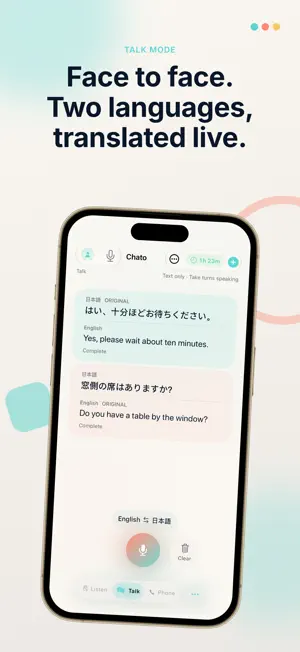
Follow conversations across languages and keep what matters with Chato. Listen and talk face to face Choose a translation language and follow along with captions and translated speech. In Listen, you can select the spoken language and show the original text. Talk uses a two-sided layout so each person can communicate in a familiar language. Call restaurants in Japan Share a Google Maps or Apple Maps restaurant link to request a reservation, change or cancellation. The AI assistant introduces itself and speaks Japanese with the restaurant. Follow translated captions, respond with choices or messages, and review the outcome in call history. Calls continue when you leave the app; enable notifications for decisions that need your attention. Reservations are not guaranteed. Host or join multilingual events Create an event and share its invitation. Participants can join through the web, Chato or a supported App Clip entry. See the event name and public host information, choose a caption language, and turn audio off or listen to original or available translated audio. Standard events offer translated audio in the primary translation language; multilingual-audio events offer the languages available in that event's configuration. Hosts can review event history, results and attendee feedback. Keep useful notes Save content from Listen, Talk or events as notes. Read the original text, review key points and edit your own content. AI organization is available to eligible users after consent; automatic organization does not overwrite content you have edited. Notes are stored on your device and do not automatically sync across devices. Translate text where you need it Set up the Chato keyboard or, on supported iOS versions, choose Chato as your default translation app to translate selected text from the text menu. Keyboard Full Access and AI data-sharing consent are separate settings. Choose what you share Before using AI features, Chato explains the data sent and the service providers involved. The main app uses a shared AI data-sharing consent for speech translation, events, note organization and phone assistance. You can review or withdraw it in Manage Account. The keyboard and system text translation have separate consent. Declining AI consent does not prevent reading or editing local notes. Some languages are offered as Beta; Beta languages are not available for events. Speech translation requires an internet connection and available time. Listen/Talk, event and phone time are separate. Phone allowances and optional time-pack availability are shown in the app. Personal subscriptions do not include phone time. Features vary by language, event plan and system support. The app offers additional time purchases and auto-renewing personal subscriptions. Existing personal subscriptions do not include event time. See the purchase screen for prices, allowances and renewal details, and manage subscriptions in your App Store account settings. Privacy Policy: https://getchato.app/privacy Terms of Use: https://getchato.app/terms
What’s new
Version 4.0.2 · Updated October 18, 2026
This update improves reliability in Listen and personal events. - When you stop or cancel Listen, microphone capture stops before follow-up processing. - Fixed an issue where a connection that finished later could reconnect a personal event after it had been stopped. - Improved how saved event data on your device is handled when switching accounts, resuming personal events, or deleting an account. Upgrade note: Some events saved by older versions cannot resume automatically if their account cannot be verified. Follow the on-screen prompt to remove the saved invitation data from this device. This does not end the event or delete data on the server.
App privacy
The developer, YiLin Wen, reported these privacy practices to Apple.
Data Linked to You
The following data, which may be collected and linked to your identity, may be used for the following purposes:
- Identifiers: User ID
- Usage Data: Product Interaction
- Diagnostics: Other Diagnostic Data
- Purchases: Purchase History
- Contact Info: Email Address, Name
- User Content: Photos or Videos, Customer Support, Other User Content
Used for: Analytics, App Functionality
Data Not Linked to You
The following data, which may be collected but is not linked to your identity, may be used for the following purposes:
- User Content: Audio Data
- Diagnostics: Crash Data, Performance Data
Used for: App Functionality
Alternatives to Chato — Live AI Interpreter
Looking for apps like Chato — Live AI Interpreter? Here are 6 similar apps on the App Store.
-
 CoreTalk: Live Interpreter
-
 Grasp: Live Meeting Translator
-
 永住 DIY - 日本永住權申請工具
-
 Voxter Live Translation
-
 Easy2Say
-
 TypeHelper
| App | Rating | Price | Last updated | Compare |
|---|---|---|---|---|
| Chato — Live AI Interpreter | – | Free | October 18, 2026 | |
| CoreTalk: Live Interpreter | – | Free | Sep 8, 2026 | Compare |
| Grasp: Live Meeting Translator | – | Free | Aug 27, 2026 | Compare |
| 永住 DIY - 日本永住權申請工具 | – | Free | Oct 4, 2026 | Compare |
| Voxter Live Translation | – | Free | Apr 24, 2026 | Compare |
| Easy2Say | – | Free | Oct 1, 2026 | Compare |
| TypeHelper | – | Free | Sep 26, 2026 | Compare |