

PDF Scanner | Scan PDF & Docs
Conteza LLC Business iPhoneiPadiPod touch
PDF Scanner | Scan PDF & Docs is a free Business app for iPhone and iPad by Conteza LLC. Rated 5.0/5 from 1 ratings. Requires iOS 17.6.
- Rating
- 5.0
- 1 ratings
- Price
- Free
- on the App Store
- Size
- 46 MB
- Age 4+
- Updated
- Oct 23
- 2026 · v1.6
Screenshots


About PDF Scanner | Scan PDF & Docs
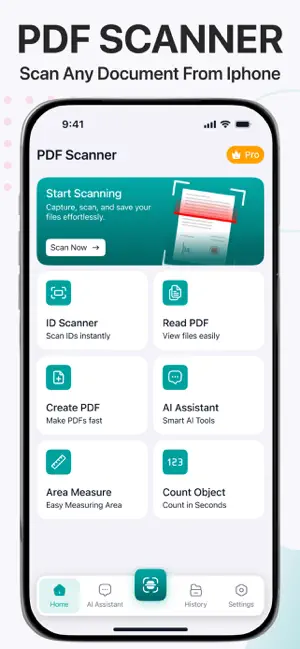
Make scanning and document management easy with our PDF Scanner. PDF Scanner is a powerful all-in-one app, aiming to simplify how users capture, manage, and interact with documents in both personal and professional life. Instead of using multiple tools for scanning, reading, converting, and analyzing content, this app brings everything to one forum. With advanced scanning technology, intelligent AI features, and smart measurement tools, PDF Scanner helps users save time, improve accuracy, and boost productivity in everyday tasks. Smart Document Scanner The built-in scanner transforms your mobile device into a high-quality digital scanner. It allows users to capture a wide range of documents with precision and clarity.It can also work as a dedicated book scanner, letting you scan multiple book pages into a single, clean PDF. The scanner also includes a QR code feature for quick access to information and links. In addition, it offers translation support, making it easier to understand documents in different languages instantly. Advanced ID Scanner Our PDF Scanner makes it effortless for individuals to manage their identity documents. The app allows users to accurately scan their official documents, such as: ID Card Driver’s License Passport The app also works as an ID photo maker that helps users generate properly formatted photos for official use. This feature ensures users always have ready-to-use identity documents without the need for external services Built-in PDF Tools Besides scanning, you can also use this PDF Scanner to: Read PDF: The PDF Reader provides a smooth and easy viewing experience for all types of PDF files, allowing users to open and review documents anytime. Create PDF: The PDF Creator enables users to convert scanned files, images, or content into professional PDF documents in just a few taps. AI-Powered Assistance At the core of the app is a smart AI Assistant designed to provide instant help and guidance. You can use it to get help on any kind of queries, such as: Answer general knowledge questions instantly Paraphrase, summarize, or improve documents and text Assist with translation of words, phrases, or content Offer suggestions for improving productivity and workflow Smart Area Measurement One of the most advanced features of PDF Scanner is its camera-based area measurement tool. Users can simply point their camera at a room or space, and the app intelligently calculates dimensions such as length, width, and total area. Object Counting with AI Vision The object counting feature uses intelligent visual recognition to detect and count multiple items in an image or real-world view. Whether it’s inventory tracking, classroom materials, or everyday objects, the app provides accurate counts instantly. Download PDF Scanner Today From smart scanning and AI assistance to advanced visual tools like area measurement and object counting, the PDF Scanner app is designed to make everyday tasks faster, simpler, and more accurate. Download it now to experience a smarter way to scan, create, and manage files! Note: The payments for in-app purchases are directly charged from your iTunes account after the confirmation stage. The subscription to our service will be automatically renewed unless the auto-renewal option is turned off 24 hours before the expiration of the current subscription period. Your iTunes account will be charged for the renewed subscription within a 24-hour time period prior to the expiration of the current subscription. The users can manage their subscriptions and turn off the auto-renewal of their purchase by going to the settings of their account on the App Store. Privacy Policy: https://conteza.com/privacy-policy.html Terms of Use: https://conteza.com/terms-and-conditions.html
What’s new
Version 1.6 · Updated October 23, 2026
In this version, you'll find: - Enhanced app performance - Improved scanning experience Enjoying the app? Leave us a review-it helps us improve.
App privacy
The developer, Conteza LLC, reported these privacy practices to Apple.
Data Not Collected
The developer does not collect any data from this app.
Alternatives to PDF Scanner | Scan PDF & Docs
Looking for apps like PDF Scanner | Scan PDF & Docs? Here are 6 similar apps on the App Store. The highest rated is Smart Printer App iPrint Scan (5.0/5), and all 6 are free to download.
-
 PDF Converter:Scanner & Reader
-
 Smart Printer App iPrint Scan
5.0
-
 ClearPDF - Scan Docs, Edit PDF
-
 PDF Editor, Converter - Reader
5.0
-
 Cubalo: Recargas a Cuba
5.0
-
 IMV AI
| App | Rating | Price | Last updated | Compare |
|---|---|---|---|---|
| PDF Scanner | Scan PDF & Docs | 5.0 / 5 (1 rating) | Free | October 23, 2026 | |
| PDF Converter:Scanner & Reader | – | Free | Feb 19, 2026 | Compare |
| Smart Printer App iPrint Scan | 5.0 / 5 (1) | Free | Aug 27, 2026 | Compare |
| ClearPDF - Scan Docs, Edit PDF | – | Free | Sep 24, 2026 | Compare |
| PDF Editor, Converter - Reader | 5.0 / 5 (1) | Free | Aug 18, 2026 | Compare |
| Cubalo: Recargas a Cuba | 5.0 / 5 (1) | Free | May 19, 2026 | Compare |
| IMV AI | – | Free | Aug 14, 2026 | Compare |