

IA Voice Notes
Liangyou Chen Productivity iPhoneiPadiPod touch
IA Voice Notes is a free Productivity app for iPhone and iPad by Liangyou Chen. Requires iOS 17.0. Updated October 24, 2026.
- Price
- Free
- on the App Store
- Size
- 5 MB
- Age 4+
- Updated
- Oct 24
- 2026 · v1.5
Screenshots



About IA Voice Notes
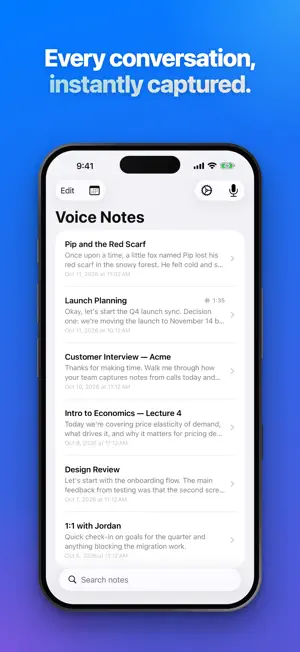
Capture every word, hands-free. IA Voice Notes transcribes your meetings, lectures, and conversations in real time with Apple's speech engine, on your device whenever your language supports it. Recording, transcription, the calendar, and AI features are all free to use. AI works right out of the box, with no key or account required. QUIZ YOURSELF, OUT LOUD Turn any lecture, meeting, or story into a spoken quiz. IA Voice Notes asks the questions, you answer by voice, and each answer is graded with feedback and a link to the moment in the recording that covers it. Quizzes adapt as you go, offer hints and practice rounds, and build on what you missed last time. Kid, Student, and Professional modes set the tone, and voice commands like "repeat", "hint", and "skip" keep it hands-free. TALK TO YOUR NOTES Ask a note anything, out loud, and hear the answer, with a link to the part of the recording it came from. Prefer typing? Ask follow-up questions in a thread, or even while you're still recording. A CALENDAR THAT STARTS RECORDING FOR YOU See your events laid out by day and time, with a live now-line, or as a simple list. Set one up and IA Voice Notes starts recording on its own when the time comes, using the mode you picked for it. Arm a recurring meeting once and it's covered every week. Works with Siri Shortcuts for full automation. TURN ANY MENTION INTO AN EVENT Scan a flyer, pick a photo, paste an invitation, or just mention a meeting while recording. The AI reads out the date, time, location, and who's coming, and drops it into a review tray for you to approve, linked back to the exact moment it came from. Your iOS Calendar can sit alongside it too, read-only, so you can arm any real meeting for recording in a tap. AI THAT WORKS WHILE YOU RECORD Choose a recording mode (Meeting, Interview, Lecture, Sales Call, and more) and let the built-in AI detect action items, flag key terms, and surface what matters as you speak. A summary is ready the moment you stop. 10 BUILT-IN RECORDING MODES General, Meeting, 1:1, Sales Call, Interview, Customer Research, Lecture, Brainstorm, Podcast, Journal, each pre-configured with the right AI features for that context. Build your own custom modes too. REAL-TIME TRANSCRIPTION Watch your words appear as you speak. Transcripts are saved with timestamps so you can jump to any moment in the recording. ATTACH AS YOU GO Snap a photo of a whiteboard, scan a document, sketch a diagram with Apple Pencil or your finger, or jot a quick text note, all attached to your recording at the exact moment they were captured. TIMELINE VIEW See your transcript, photos, scans, sketches, and AI results laid out in order, with natural spacing that reflects the rhythm of your conversation. EXPORT ANYWHERE Share your notes as Markdown or self-contained HTML, bundled with the audio file. Open in Obsidian, Notion, or any editor that handles Markdown. PRIVACY FIRST Your recordings stay on your phone. AI features send only the text they need, never your audio. Every install includes free AI calls to try; subscribe to AI Plan any time for a monthly allowance (or AI Plan Plus if you need more), or add your own Anthropic Claude / OpenAI API key and send requests straight to the provider you choose at your own cost. Quiz reports and conversations are saved on your device. Requires iOS 17. Transcription quality depends on Apple's speech recognition for your language. AI Plan and AI Plan Plus are auto-renewing monthly subscriptions billed through your Apple ID; manage or cancel anytime in Settings → [your name] → Subscriptions. Terms of Use (EULA): https://www.apple.com/legal/internet-services/itunes/dev/stdeula/ — Privacy Policy: https://ianotes.net/privacy.html
What’s new
Version 1.5 · Updated October 24, 2026
Learn from your recordings, out loud. • Quiz Me: your iPhone asks you questions about a lecture, meeting, or story, listens to your spoken answers, and grades each one, pointing you to the moment in the recording that covers it. It adapts as you go, with hints, practice rounds, and Kid, Student, and Professional modes, and each quiz builds on what you missed last time. • Talk: ask a note anything, hands-free, and hear the answer, with a link to where it came from. • Ask a question while you're still recording. • Sketch on a note with Apple Pencil or your finger, and edit the sketch later. • Long notes: jump buttons to move through them quickly, and AI now handles much longer recordings. • A refreshed app icon, plus fixes and improvements.
App privacy
The developer, Liangyou Chen, reported these privacy practices to Apple.
Data Not Linked to You
The following data, which may be collected but is not linked to your identity, may be used for the following purposes:
- User Content: Other User Content
Used for: App Functionality
Alternatives to IA Voice Notes
Looking for apps like IA Voice Notes? Here are 6 similar apps on the App Store. The highest rated is BisonNotes AI – Voice Notes (4.2/5), and all 6 are free to download.
-
 Nia: AI Assistant
-
 Readerr: RSVP Speed Reader
1.0
-
 Amazing Notes: Lecture & PDF
-
 ConfSnap - Audio & Notes
-
 Study Timer - Simple Tracker
-
 BisonNotes AI – Voice Notes
4.2
| App | Rating | Price | Last updated | Compare |
|---|---|---|---|---|
| IA Voice Notes | – | Free | October 24, 2026 | |
| Nia: AI Assistant | – | Free | Oct 6, 2026 | Compare |
| Readerr: RSVP Speed Reader | 1.0 / 5 (1) | Free | Oct 11, 2026 | Compare |
| Amazing Notes: Lecture & PDF | – | Free | Jun 25, 2026 | Compare |
| ConfSnap - Audio & Notes | – | Free | Jan 26, 2026 | Compare |
| Study Timer - Simple Tracker | – | Free | Jan 8, 2026 | Compare |
| BisonNotes AI – Voice Notes | 4.2 / 5 (15) | Free | Sep 10, 2026 | Compare |
Compare IA Voice Notes with the top alternatives: ratings, updates, ASO score and keyword gaps →