

Logbird
Tuomo Ojala Productivity iPhoneiPadiPod touchApple Watch
Logbird is a free Productivity app for iPhone and iPad by Tuomo Ojala. Requires iOS 16.0. Updated September 20, 2026.
- Price
- Free
- on the App Store
- Size
- 9 MB
- Age 4+
- Updated
- Sep 20
- 2026 · v1.6
Screenshots

About Logbird
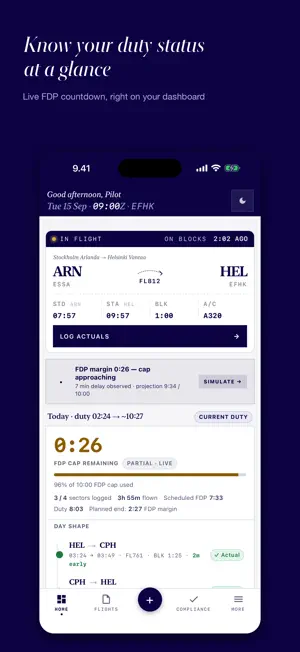
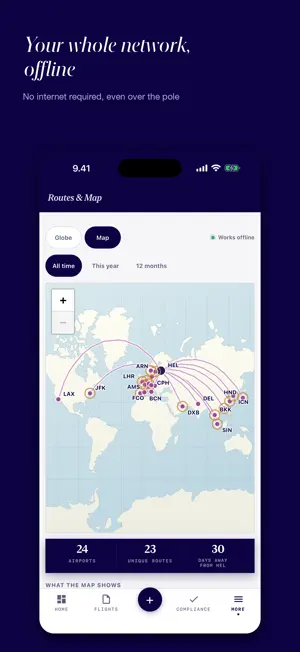
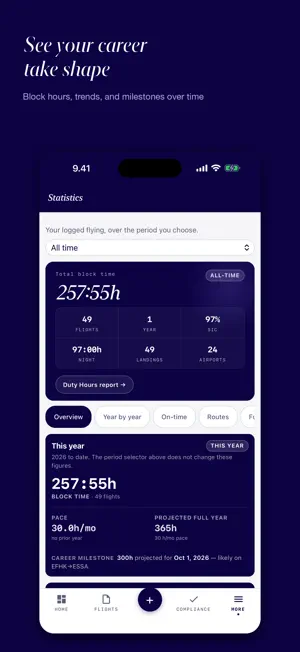
YOUR LOGBOOK, YOUR DATA A personal pilot logbook for commercial, private, and student pilots who want full control of their flight data — no account, no server, no subscription you can't escape. Every flight stays on your iPhone or iPad; optional iCloud sync goes through YOUR Apple ID, never ours. LOG IN SECONDS • Quick log or detailed form, aircraft type auto-detected from registration • Roster import: photo OCR, text, ICS or CSV; crew names autocomplete • FMS times from the live camera or a photo, confirmed before they're written • Today's Sectors — where you are in the duty day DUTY HOURS • Duty, night and block time per month, allowances alongside — your own figures, not an airline's • Compare a month against your airline's duty report: paste the text, or photograph it • MyFlight roster (.ics) import for duty times; month export as .ics or plain text for a pay-check tool FDP SIMULATOR A delay rolls in — slide it 0–8 hours and watch the projection update live against three budgets: under cap, commander's discretion, hard ceiling. • Real published tables — EASA Tables 2/13–15, CS-FTL.1.205(b) augmented crew, FAA Part 117 Tables B & C • Acclimatisation worked out from your rotation, not assumed — confirmable per duty • Auto-detects long-haul 3-pilot crew; operator-specific report-before-STD TRACK WHAT MATTERS • Rolling 7/28/90/365-day flight time vs FTL caps — EASA ORO.FTL and 14 CFR Part 117 built-in • Customisable currency — landings, IFR approaches, type recency, MFF cross-fleet • Day Shape visualises your duty arc; day/night landings auto-counted by sunset/sunrise • Cargo, combi and belly-cargo logged apart, kg/lbs/tonnes converted in one place • Instructor/examiner duty kept separate from PIC credit; a roster training code asks rather than guesses • A globe and a flat World Map, drawn on-device — offline, no signal needed KNOW YOUR CAREER • Career totals, projections, year-on-year comparison, an animated Year in Review with a shareable card • Circadian Fingerprint (on-time rate by hour), top airports/routes/crew, fleet recency THE CREW YOU FLY WITH — everyone you've flown with: flights and hours together, route history, "what I remember" notes, pinned regulars. APPLE WATCH — current duty, FDP cap countdown and duty-elapsed timer on your wrist, plus a Live Activity on the Lock Screen and Dynamic Island. EXPORT — EASA PDF, FAA PDF, Excel, CSV, JSON backup, restorable on any device. DOCUMENTS — medical, licence, passport, English proficiency, type ratings, line checks, 30/7/1-day expiry alerts, daily log reminder. PRIVATE BY DESIGN • On-device only — no tracking, no ads, no analytics, no email or account required • No external network requests at all — even the World Map is drawn on-device, no tile server, no API key • Privacy Manifest declares zero data collection. Works in airplane mode. PRICING 14-day free evaluation — full access, starts when you log your first flight. Nothing auto-charges. After that: Free (up to 50 flights total), Yearly Premium (4.99 EUR/year, auto-renews unless cancelled at least 24 hours before renewal — manage in Settings → Apple ID → Subscriptions), or Lifetime (19.99 EUR one-time). Premium unlocks unlimited flights, the FDP simulator, all export formats, iCloud sync, full statistics, the World Map, and future updates. Prices in EUR are the developer's reference; Apple sets the actual regional charge. DISCLAIMER Logbird is not certified by any aviation authority and must not be used as the sole official record for regulatory compliance. The FDP simulator and FTL tracker are guidance only — they model published EASA and FAA tables but do not model split duty, standby reductions, reduced-rest schemes, WOCL sector caps, or rest-frequency limits. Your operator's OM-A is the binding authority. The commander remains responsible for FDP compliance. LEGAL Privacy Policy: https://logbird-e7j.pages.dev/privacy.html Terms of Use: https://logbird-e7j.pages.dev/terms.html
What’s new
Version 1.6 · Updated September 20, 2026
The biggest release yet: duty hours you can check against your airline's own report, cargo and training logging, and an app that starts faster. DUTY HOURS • A new Duty Hours page tracks duty, night and block time per month, and keeps your allowances beside them. Your own figures, entered by you — nothing is taken from any airline's system. • Compare a month against your airline's duty report: paste the text, or photograph it. A duty the report prints as two rows is compared as the one duty it is, and rows the photograph broke are read where they can be dated with certainty from your own logbook. • A MyFlight roster (.ics) can be pasted in as well. Duty times only, and nothing is saved from it — a roster is not the official report. • Export a month as MyFlight's own .ics, or as plain text for a pay-check tool. CARGO AND PAYLOAD • Cargo, combi and belly-cargo sectors are logged and counted apart. Empty is not zero: a weight you never entered, a confirmed zero and a legacy blank are three different answers, and the app says which it has. • Units are converted in one place — kg, lbs and tonnes. INSTRUCTING AND TRAINING • Instructor and examiner duty is logged as what it is: the seat you occupied, the job you did and the PIC credit you may claim are three separate things. • A training code on a roster asks you what it means instead of deciding for you. • Statistics gained a Training and checking section, and simulator sessions never mix with aircraft hours. STATISTICS • Figures report block time, and count flights you actually flew — a rostered leg you have not flown yet no longer inflates your year. • Year in Review, with an animated player and a shareable card. FDP AND COMPLIANCE • Acclimatisation is worked out from your rotation rather than assumed, and each duty's assumptions can be confirmed for that duty. • The delay simulator opens from the duty it belongs to. WORLD MAP • A globe you can spin and a flat map, both drawn by the app from coastlines that ship inside it. Nothing is fetched, so the map is as complete on a plane, on the first run, with no signal, as it is at home. • The map follows the app's light and dark themes, and map tiles cached by earlier versions are deleted the first time you open it. FMS TIMES • Read OUT / OFF / ON / IN from the live camera, a new photo, or a photo you took earlier — so a quick snap during a busy turnaround is enough, and devices without live scanning can read the FMS too. You confirm the times before anything is written, and the photo never leaves your device. FASTER, SMOOTHER • Spreadsheet, PDF, chart and map libraries load when you first need them instead of at every launch — the app opens noticeably faster, especially on a fresh install. • Scrolling the flights list stays smooth, and a page-load repaints only what changed. FIXES • The map no longer arrives stamped "API KEY REQUIRED": it reaches no tile server at all. • Airport codes from an import can no longer be interpreted as anything but text. • Plus the 1.5.2 fixes, and a long list of smaller corrections across import, roster and export.
App privacy
The developer, Tuomo Ojala, reported these privacy practices to Apple.
Data Not Collected
The developer does not collect any data from this app.
Alternatives to Logbird
Looking for apps like Logbird? Here are 6 similar apps on the App Store. The highest rated is DaPilot: AI Logbook for Pilots (5.0/5), and all 6 are free to download.
-
 Pilot FlightLog
-
 DaPilot: AI Logbook for Pilots
5.0
DaPilot: AI Logbook for Pilots
5.0
-
 Flight Time & FDP: Avion Calc
-
 Flight Recency
-
 Hinfact App
-
 Hinfact Training
| App | Rating | Price | Last updated | Compare |
|---|---|---|---|---|
| Logbird | – | Free | September 20, 2026 | |
| Pilot FlightLog | – | Free | Aug 30, 2026 | Compare |
| DaPilot: AI Logbook for Pilots | 5.0 / 5 (13) | Free | Sep 1, 2026 | Compare |
| Flight Time & FDP: Avion Calc | – | Free | Jun 5, 2026 | Compare |
| Flight Recency | – | Free | Sep 26, 2024 | Compare |
| Hinfact App | – | Free | Sep 25, 2026 | Compare |
| Hinfact Training | – | Free | Sep 25, 2026 | Compare |
Compare Logbird with the top alternatives: ratings, updates, ASO score and keyword gaps →