

Photo Cleaner:AI Smart Cleanup
凌峰 高 Utilities iPhoneiPadiPod touch
Photo Cleaner:AI Smart Cleanup is a free Utilities app for iPhone and iPad by 凌峰 高. Requires iOS 17.0. Updated October 18, 2026.
- Price
- Free
- on the App Store
- Size
- 18 MB
- Age 4+
- Updated
- Oct 18
- 2026 · v2.6.5
Screenshots
About Photo Cleaner:AI Smart Cleanup
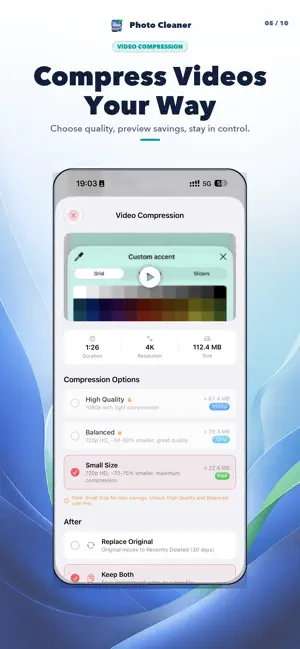
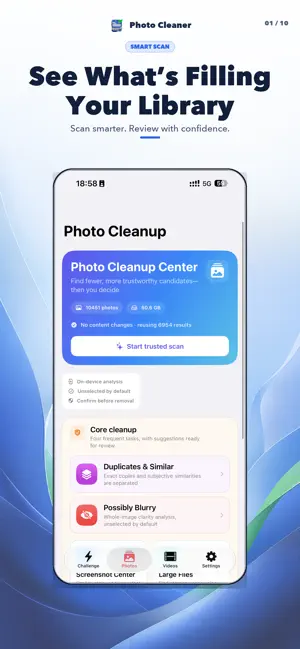
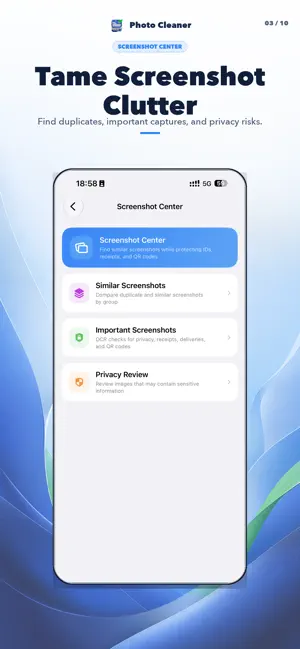
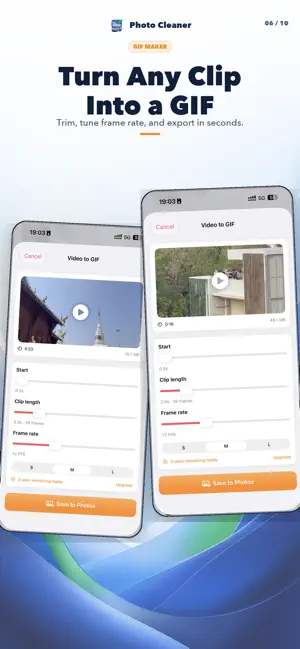
Clean up your library without giving up control. Find clutter, compress media, and review every deletion—all with on-device analysis. DESCRIPTION (1248/4000) Your photo library should feel useful, not overwhelming. Photo Cleaner helps you find items worth reviewing, reclaim storage, and protect important memories—without uploading your media. SMART PHOTO CLEANUP • Group duplicate and visually similar shots for quick review • Spot possibly blurry photos by severity • Organize screenshots and separate important captures • Find the photos and videos taking up the most storage PHOTO & VIDEO TOOLS • Compress photos and videos with clear quality choices • Preview estimated savings before processing • Convert clips to GIF with trim, duration, frame-rate, and size controls • Convert HEIC and Live Photos when you need a more flexible format REDISCOVER YOUR LIBRARY • Browse photos by year and month on a visual timeline • Explore location footprints, trips, people, pets, and yearly recaps • Track cleanup activity, storage trends, and protected memories • Build a cleanup habit with the 60-second swipe challenge PRIVATE BY DESIGN Analysis runs on your device. Photo Cleaner never deletes items automatically. You review and confirm every deletion, and removed items remain recoverable in Photos > Recently Deleted for 30 days. AI helps you find the candidates. You always make the final decision. Minimalist: No ads, no background tasks, just cleaning. Terms of Use :https://www.yuque.com/bashert/oq6dir/ualsq0ixd7ewti2y?singleDoc# Privacy Policy:https://www.yuque.com/bashert/oq6dir/pobf9sg24zybxaxn?singleDoc#
What’s new
Version 2.6.5 · Updated October 18, 2026
• Refined the photo home screen with clearer tool groups and easier-to-read names and descriptions. • Improved layouts for smaller screens, larger text, and iPad in portrait and landscape. • Improved Dark Mode and added clearer feedback when tapping cards. • Made video compression and GIF creation easier to tell apart, helping prevent accidental taps. • Added a clearer video loading state and easier sorting when using larger text.
App privacy
The developer, 凌峰 高, reported these privacy practices to Apple.
Data Not Collected
The developer does not collect any data from this app.
Alternatives to Photo Cleaner:AI Smart Cleanup
Looking for apps like Photo Cleaner:AI Smart Cleanup? Here are 6 similar apps on the App Store. The highest rated is ClusterSwipe: free up space (5.0/5), and 5 of the 6 are free to download.
-
 ClusterSwipe: free up space
5.0
ClusterSwipe: free up space
5.0
-
 FlipMate: Flip & Desk Clock
5.0
FlipMate: Flip & Desk Clock
5.0
-
 TalkScreen-Phone show heart
-
 PickUp - Package Code Manager
-
 BlurBefore - Redact & Pixelate
-
 Time Grid: Life in Dots
5.0
Time Grid: Life in Dots
5.0
| App | Rating | Price | Last updated | Compare |
|---|---|---|---|---|
| Photo Cleaner:AI Smart Cleanup | – | Free | October 18, 2026 | |
| ClusterSwipe: free up space | 5.0 / 5 (1) | Free | Sep 16, 2026 | Compare |
| FlipMate: Flip & Desk Clock | 5.0 / 5 (1) | Free | Oct 10, 2026 | Compare |
| TalkScreen-Phone show heart | – | 0.99 USD | Feb 23, 2025 | Compare |
| PickUp - Package Code Manager | – | Free | Sep 19, 2026 | Compare |
| BlurBefore - Redact & Pixelate | – | Free | Oct 12, 2026 | Compare |
| Time Grid: Life in Dots | 5.0 / 5 (1) | Free | Oct 17, 2026 | Compare |