

Editify: PDF Editor & Scanner
Sefa Beker Productivity iPhoneiPadiPod touch
Editify: PDF Editor & Scanner is a free Productivity app for iPhone and iPad by Sefa Beker. Requires iOS 17.0. Updated October 15, 2026.
- Price
- Free
- on the App Store
- Size
- 8 MB
- Age 4+
- Updated
- Oct 15
- 2026 · v1.2
Screenshots


About Editify: PDF Editor & Scanner
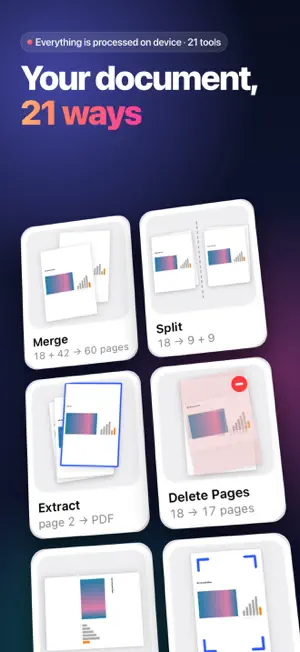
Editify puts 21 PDF tools in one app, and every one of them works right on your iPhone or iPad. Edit, sign, scan and convert PDFs without uploading anything. No account. No ads. YOUR DOCUMENT, 21 WAYS Pick a document and the Home tab shows it after each tool: rotated, signed, locked, compressed. Each tile tells you what will change, such as “42 → 41 pages” or the estimated file size. PDF tools open with that document already loaded, and your recent documents sit in a film strip at the top. ASK THE DOCUMENT Summarize a document and ask it questions with Apple Intelligence, entirely on device: “How much is the deposit?” Every answer shows the page it comes from. Free on devices that support Apple Intelligence. ORGANIZE • Merge PDFs: combine two or more files into one • Split PDF: every page, every few pages or your own ranges • Extract Pages: save the pages you choose as a new PDF • Delete Pages, Rotate Pages, Crop Pages • Compress PDF (Pro): three quality levels, with the size before and after CONVERT TO PDF • Image to PDF: JPG, PNG and HEIC • Document to PDF: TXT, RTF and Word (DOCX) • Web Page to PDF: save a web page as a PDF • Camera Scanner: scan paper documents with your camera CONVERT FROM PDF • PDF to Word (Pro): a Word file with each page placed as an image. The layout looks the same; the text is not editable. • PDF to Image (Pro): JPG or PNG, all pages or the ones you pick • Text Recognition (OCR) (Pro): turn scanned pages into a PDF you can search and copy text from SIGN & SECURITY • Sign PDF (Pro): draw, type or add your signature from an image, or sign with your certificate (.p12/.pfx) • Protect PDF: add a password and choose whether printing and copying are allowed • Add Watermark: text or image, on every page or on one VIEW & EDIT • Edit PDF (Pro): add text, images, drawings and shapes, or replace a block of text or an image • Add Page Numbers • Edit Metadata: title, author, subject and keywords • Annotate PDF: highlight, underline, strike through, add notes and text FREE AND PRO You can open and try every tool for free and see the result before you decide. • 15 tools are free. Files you save or share from them carry a small “Edited by Editify” watermark. • The 6 Pro tools are Compress PDF, PDF to Word, PDF to Image, Text Recognition, Sign PDF and Edit PDF. Saving or sharing their results needs Editify Pro. • Pro also removes the watermark from every tool. PRIVATE BY DESIGN • Your documents are processed on your device and never sent to a server or an AI service. • The only tool that goes online is Web Page to PDF, to load the page you enter. • No account, no ads, no tracking. • Open PDFs from Files, Mail and other apps. ABOUT EDITIFY PRO Pro is available as an auto-renewing subscription or as a one-time lifetime purchase. Plans, prices and any free trial are shown in the app before you buy. Payment is charged to your Apple Account when you confirm the purchase. A subscription renews automatically unless it is canceled at least 24 hours before the end of the current period, and the renewal is charged within the 24 hours before the period ends. You can manage and cancel subscriptions in your App Store account settings. Terms of Use (EULA): https://sefabkr.github.io/editify-web/terms-of-use.html Privacy Policy: https://sefabkr.github.io/editify-web/privacy-policy.html
What’s new
Version 1.2 · Updated October 15, 2026
Editify 1.2 is our biggest update yet. • Ask the Document: summarize your document and ask it questions on device with Apple Intelligence; every answer shows its page. Free (on devices that support Apple Intelligence). • Your PDFs now show up in Spotlight search. • Widgets and a Control Center button: Scan to PDF and favorite tools in one tap. • New Home: every tool is a live tile that shows your document after that tool, with hints such as “42 → 41 pages” or the estimated size. • Your recent documents sit in a film strip. Pick one and all 21 tiles update. • Fewer taps: PDF tools open with your document already loaded. • Try every tool for free: Pro tools now show you the result first. Saving or sharing it needs Pro. • One result screen for every tool: compare before and after, then share or save. • A fresh design for iOS 27 and Liquid Glass. • Ready for iPhone Duo: full screen on both the inner and the outer display. • Better VoiceOver support: every tool is labeled and easy to reach. Fixes • Protect PDF: saved files are always password-protected with every page intact, and your printing and copying choices are applied. • Edit Metadata and Annotate PDF: your changes are kept in the saved file. • Text Recognition (OCR): the searchable PDF now really contains text you can search and copy. • Add Watermark: with “Apply to All Pages” off, the page in the preview gets the watermark. • PDF to Image: images come out at the resolution you pick. • Sign PDF: draw, type or use an image of your signature, or sign with your certificate (.p12/.pfx). Certificate signatures now work reliably and keep earlier signatures valid.
App privacy
The developer, Sefa Beker, reported these privacy practices to Apple.
Data Not Collected
The developer does not collect any data from this app.
Alternatives to Editify: PDF Editor & Scanner
Looking for apps like Editify: PDF Editor & Scanner? Here are 6 similar apps on the App Store. The highest rated is PDF Toolkit: PDF Editor & Scan (5.0/5), and all 6 are free to download.
-
 OnePDF: Scanner & Editor
-
 PDF Toolkit: PDF Editor & Scan
5.0
-
 PDF Toolkit: Edit Sign Redact
-
 PDF Editor & Scanner Pro
-
 PDF Properties Toolbox
-
 Document Scan & Edit
| App | Rating | Price | Last updated | Compare |
|---|---|---|---|---|
| Editify: PDF Editor & Scanner | – | Free | October 15, 2026 | |
| OnePDF: Scanner & Editor | – | Free | Jun 16, 2026 | Compare |
| PDF Toolkit: PDF Editor & Scan | 5.0 / 5 (1) | Free | May 28, 2026 | Compare |
| PDF Toolkit: Edit Sign Redact | – | Free | Jun 18, 2026 | Compare |
| PDF Editor & Scanner Pro | – | Free | Jul 23, 2026 | Compare |
| PDF Properties Toolbox | – | Free | Jun 19, 2026 | Compare |
| Document Scan & Edit | – | Free | Jul 27, 2026 | Compare |