

PassSnap
Cnnex Limited Company Photo & Video iPhoneiPadiPod touch
PassSnap is a free Photo & Video app for iPhone and iPad by Cnnex Limited Company. Rated 5.0/5 from 3 ratings. Requires iOS 17.0. Updated June 8, 2026.
- Rating
- 5.0
- 3 ratings
- Price
- Free
- on the App Store
- Size
- 3 MB
- Age 4+
- Updated
- Jun 8
- 2026 · v2.1.7
Screenshots



About PassSnap
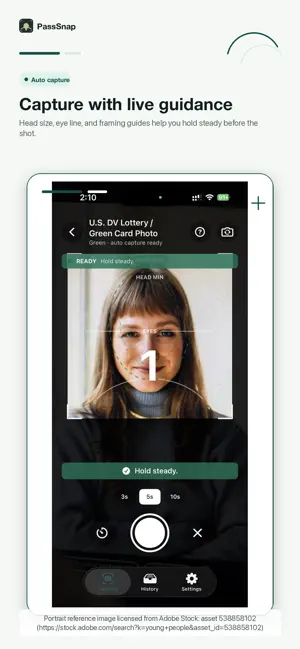
PassSnap helps you create official-size passport, visa, immigration, and ID-style photo packages from your iPhone. Choose a supported photo type, follow the guided camera frame, and PassSnap prepares the required digital upload JPEG, single photo, 4 x 6 print layout, and print instructions when supported by that document type. PassSnap 2.0 supports photo packages for selected United States, Hong Kong SAR, Canada, United Kingdom, Australia, and New Zealand document workflows, including passport, visa, immigration, citizenship, PR card, and applicant-supplied photo formats where supported. Core features: - Guided capture for supported ID photo types. - Official-size digital upload JPEGs where applicable. - Single-photo exports for supported document specs. - 4 x 6 inch print layouts when printing is supported. - Print instructions PDF for photo shops and home printing. - Local History with package files and download status. - iCloud backup and restore for saved packages. - Original, AI white-background, and AI beautified package file groups when available. - Optional AI verify for a final risk review of glasses, expression, background, framing, and file metadata. - Optional AI white-background add-on that creates separate white-background files. - Optional AI beauty add-on that creates a separate polished copy without replacing the original package. - Package-bound download unlock for repeat save and share. PassSnap is not a government service and cannot guarantee acceptance by any passport office, immigration authority, embassy, consulate, licensing agency, or other receiving organization. The receiving authority always makes the final decision. AI features are optional. AI verify is a risk review only. AI white-background and AI beauty files are separate generated copies and do not replace the original package.
What’s new
Version 2.1.7 · Updated June 8, 2026
This update improves AI photo output quality and reliability across supported ID photo types. 1. Refined AI Beautify with brighter skin tone, light smoothing, and better detail preservation. 2. Improved AI background generation to better follow each photo standard’s allowed background color. 3. Fixed crop consistency so original, AI background, and AI Beautify outputs keep the same canvas, face position, and document framing. 4. Strengthened validation for supported passport, visa, immigration, and citizenship photo specs. 5. Improved backend recovery sync reliability for paid AI runs and generated package files. 6. Fixed several UI and history-management issues, including record deletion behavior and package file states.
App privacy
The developer, Cnnex Limited Company, reported these privacy practices to Apple.
Data Linked to You
The following data, which may be collected and linked to your identity, may be used for the following purposes:
- Purchases: Purchase History
- User Content: Photos or Videos
- Identifiers: User ID
Used for: App Functionality, Other Purposes
Alternatives to PassSnap
Looking for apps like PassSnap? Here are 6 similar apps on the App Store. The highest rated is US Visa & DV Lottery Photo (5.0/5), and all 6 are free to download.
-
 MaxAIStudios: AI Photo Video
-
 US Visa & DV Lottery Photo
5.0
US Visa & DV Lottery Photo
5.0
-
 Creator Pro: AI Product Videos
5.0
Creator Pro: AI Product Videos
5.0
-
 Posterize Effects Photo
3.3
Posterize Effects Photo
3.3
-
 Travel Map Video: Route Maker
5.0
Travel Map Video: Route Maker
5.0
-
 Miraga
2.0
Miraga
2.0
| App | Rating | Price | Last updated | Compare |
|---|---|---|---|---|
| PassSnap | 5.0 / 5 (3 ratings) | Free | June 8, 2026 | |
| MaxAIStudios: AI Photo Video | – | Free | Jul 29, 2026 | Compare |
| US Visa & DV Lottery Photo | 5.0 / 5 (2) | Free | Aug 26, 2026 | Compare |
| Creator Pro: AI Product Videos | 5.0 / 5 (4) | Free | Aug 27, 2026 | Compare |
| Posterize Effects Photo | 3.3 / 5 (3) | Free | Jul 16, 2026 | Compare |
| Travel Map Video: Route Maker | 5.0 / 5 (6) | Free | Oct 7, 2026 | Compare |
| Miraga | 2.0 / 5 (2) | Free | Jul 10, 2026 | Compare |
Compare PassSnap with the top alternatives: ratings, updates, ASO score and keyword gaps →