

Noogat – Voice Notes
DayJobDevelopment LLC Productivity iPhoneiPadiPod touch
Noogat – Voice Notes is a free Productivity app for iPhone and iPad by DayJobDevelopment LLC. Rated 5.0/5 from 2 ratings. Requires iOS 17.0.
- Rating
- 5.0
- 2 ratings
- Price
- Free
- on the App Store
- Size
- 15 MB
- Age 4+
- Updated
- Jun 23
- 2026 · v1.3
Screenshots

About Noogat – Voice Notes
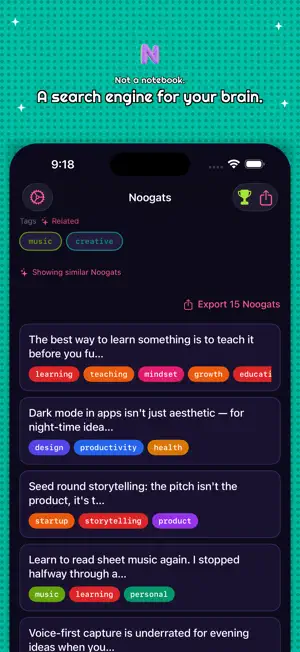
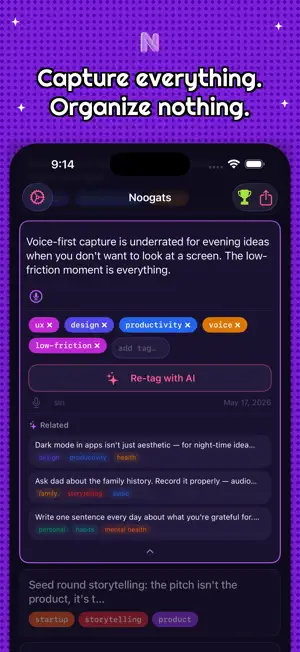
Your mind moves fast. Now your notes can keep up. Say "Hey Siri, I have a Noogat" — your thought is captured, AI-tagged, and searchable before you finish the sentence. No app to open. No screen to unlock. Capture anything, from anywhere. Whether you're driving, mid-workout, or in the middle of a meeting — Noogat captures your thought the instant you have it. Native Siri integration, the way Apple intended. AI that organizes for you. Every idea you capture is automatically categorized with AI-generated tags. No folders to manage, no manual sorting. Noogat reads your idea and figures out where it belongs — so when you need it later, it's already organized. Find anything in seconds. Full-text search across every idea you've ever saved. Filter by topic, project, or theme with a single tap. Your ideas are only as useful as your ability to find them. Noogat makes sure you always can. Zero friction is the feature. Most capture tools require you to open an app, tap a button, then figure out where to file it. Noogat removes every one of those steps. Speak → saved. That's it. What you get: • Native Siri capture — "Hey Siri, I have a Noogat" • AI auto-tagging with searchable labels • Full-text search across all your ideas • Semantic search — finds ideas even when you can't remember the exact words • Works hands-free, screen-off, anytime Free & Pro: Noogat is free to use — capture unlimited ideas at no cost. Upgrade to Noogat Pro for advanced AI features including semantic search. Built for people whose best thinking happens away from a desk. ADHD professionals who lose ideas between thought and screen. Commuters who can't type while driving. Creatives who need to capture inspiration on the spot. Anyone who's ever said "I had such a good idea earlier — what was it?" Terms of Use (EULA): https://www.apple.com/legal/internet-services/itunes/dev/stdeula/ Privacy Policy: https://noogat.app/privacy/
What’s new
Version 1.3 · Updated June 23, 2026
Interactive Checklists Convert any Noogat into a checklist. Long-press a card and choose "Convert to Checklist," or use the checklist icon in the detail view. AI parses your captured text into individual action items automatically. Tap any item to check it off — checked items move to the bottom. Toggle checklist mode off at any time to restore the original text; your items are preserved if you re-enable it.
App privacy
The developer, DayJobDevelopment LLC, reported these privacy practices to Apple.
Data Linked to You
The following data, which may be collected and linked to your identity, may be used for the following purposes:
- Contact Info: Email Address
- User Content: Other User Content, Customer Support
- Identifiers: User ID
Used for: Developer’s Advertising or Marketing, Product Personalization, App Functionality
Data Not Linked to You
The following data, which may be collected but is not linked to your identity, may be used for the following purposes:
- Diagnostics: Crash Data
Used for: App Functionality
Alternatives to Noogat – Voice Notes
Looking for apps like Noogat – Voice Notes? Here are 6 similar apps on the App Store. The highest rated is David: Transcribe Voice Notes (5.0/5), and 5 of the 6 are free to download.
-
 Your Dates
-
 Jin Mobile
-
 OneTap for Notion
-
 David: Transcribe Voice Notes
5.0
David: Transcribe Voice Notes
5.0
-
 Talk2Notion : Second Brain
4.0
Talk2Notion : Second Brain
4.0
-
 Dictly — On‑device dictation
3.5
Dictly — On‑device dictation
3.5
| App | Rating | Price | Last updated | Compare |
|---|---|---|---|---|
| Noogat – Voice Notes | 5.0 / 5 (2 ratings) | Free | June 23, 2026 | |
| Your Dates | – | Free | Sep 26, 2026 | Compare |
| Jin Mobile | – | 24.99 USD | Oct 21, 2026 | Compare |
| OneTap for Notion | – | Free | Sep 24, 2026 | Compare |
| David: Transcribe Voice Notes | 5.0 / 5 (3) | Free | Aug 24, 2026 | Compare |
| Talk2Notion : Second Brain | 4.0 / 5 (1) | Free | Oct 19, 2026 | Compare |
| Dictly — On‑device dictation | 3.5 / 5 (4) | Free | Apr 7, 2026 | Compare |