

Daypart: Simple Scheduling
Ghostwood Software LLC Business iPhoneiPadiPod touch
Daypart: Simple Scheduling is a free Business app for iPhone and iPad by Ghostwood Software LLC. Rated 5.0/5 from 1 ratings. Requires iOS 17.0.
- Rating
- 5.0
- 1 ratings
- Price
- Free
- on the App Store
- Size
- 7 MB
- Age 4+
- Updated
- Jul 2
- 2026 · v1.0.6
Screenshots
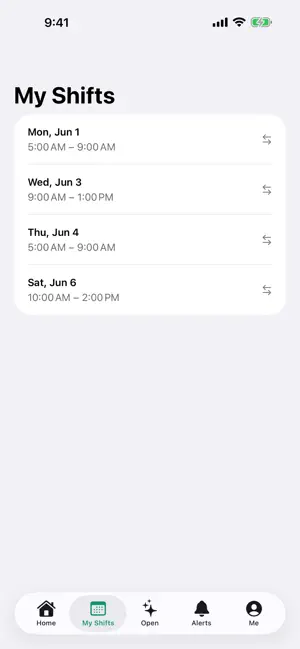


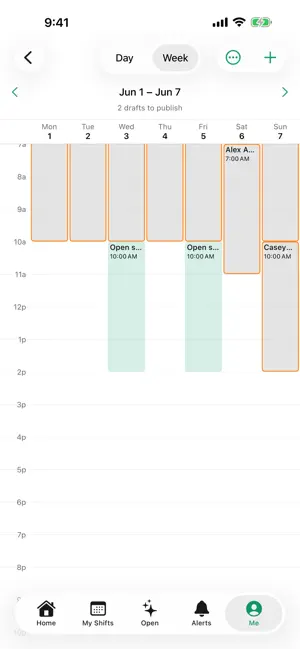
About Daypart: Simple Scheduling
Daypart is the easiest way to schedule a small team — built for owners and managers who are done juggling spreadsheets, group texts, and screenshots. Answer the four questions that actually matter, fast: • Who's working? • Who's available? • What shifts are open? • What changed? WHAT YOU CAN DO • Build the week — create shifts on a clean day editor or a draggable week grid, then publish to the whole team at once. • Fill open shifts — post a shift and let staff claim it from their phone. • Handle swaps — employees request a trade; managers approve or deny with a full audit trail. • Time off — collect requests and approve them in a tap, with history kept. • Availability — everyone sets when they can work, so you schedule it right the first time. • Stay in sync — in-app alerts and push for new schedules, swaps, time-off decisions, and open shifts. Tap an alert to jump straight to it. MADE FOR SMALL BUSINESSES Bars and restaurants, cafés, food trucks, salons and barbershops, cleaning crews, retail shops, fitness studios, event staff, and small service teams. SCHEDULING WITHOUT THE HR BLOAT The big platforms bundle scheduling with payroll, hiring, onboarding, and compliance. Daypart does one thing well: get the schedule built, filled, and out to your team — simply. PLANS Start free with one location and up to five teammates. Upgrade to Team for shift swaps, time-off approvals, multiple managers, and role colors. Business adds more locations and CSV/payroll exports. Pairs with the Daypart web dashboard for owners and admins.
What’s new
Version 1.0.6 · Updated July 2, 2026
What's new in 1.0.6: • Events on the Team schedule — holidays, closures, promo days, and manager notes now show up right in your agenda, so "why's it dead Monday?" answers itself. Tap any event for the details. Working across locations? Each shift now tells you where. • A brand-new week for managers — the Build-schedule Week view is now a clean, day-by-day agenda that matches what your crew sees. Add a shift, drop in an event, or leave a note for the day — all without leaving the week. Per-person hours and open shifts stay right where you need them. • A few little joys — claim your first-ever shift and Daypart throws a tiny bit of confetti (you earned it). Every claim gets a gentle nod, empty screens greet you a little warmer, and… there may or may not be a thank-you hidden in the Me tab. Tap around. • Right time, every time — shift times now always read in your business's timezone, so nobody shows up an hour early (or late) because their phone was set somewhere else. Thanks for using Daypart! Questions or ideas? Email [email protected].
App privacy
The developer, Ghostwood Software LLC, reported these privacy practices to Apple.
Data Linked to You
The following data, which may be collected and linked to your identity, may be used for the following purposes:
- Contact Info: Email Address, Name
- User Content: Other User Content
- Identifiers: Device ID
Used for: App Functionality
Alternatives to Daypart: Simple Scheduling
Looking for apps like Daypart: Simple Scheduling? Here are 6 similar apps on the App Store. The highest rated is Zipply — Crew Scheduling (5.0/5), and all 6 are free to download.
-
 Zipply — Crew Scheduling
5.0
Zipply — Crew Scheduling
5.0
-
 RosterRocket - Shift Planner
-
 Glance: Calendar & Day Planner
5.0
Glance: Calendar & Day Planner
5.0
-
 Dime.Scheduler
-
 Daily Planner - Couchday
3.8
Daily Planner - Couchday
3.8
-
 Pomodoro Focus - Study Timer
4.9
Pomodoro Focus - Study Timer
4.9
| App | Rating | Price | Last updated | Compare |
|---|---|---|---|---|
| Daypart: Simple Scheduling | 5.0 / 5 (1 rating) | Free | July 2, 2026 | |
| Zipply — Crew Scheduling | 5.0 / 5 (1) | Free | Aug 4, 2026 | Compare |
| RosterRocket - Shift Planner | – | Free | May 24, 2026 | Compare |
| Glance: Calendar & Day Planner | 5.0 / 5 (2) | Free | Oct 25, 2026 | Compare |
| Dime.Scheduler | – | Free | Jan 27, 2026 | Compare |
| Daily Planner - Couchday | 3.8 / 5 (6) | Free | Oct 20, 2026 | Compare |
| Pomodoro Focus - Study Timer | 4.9 / 5 (61) | Free | Oct 26, 2026 | Compare |