

RF Fresnel Calculator
Devvrat Kalia Utilities iPhoneiPadiPod touch
RF Fresnel Calculator is a free Utilities app for iPhone and iPad by Devvrat Kalia. Requires iOS 17.0. Updated October 15, 2026.
- Price
- Free
- on the App Store
- Size
- 69 MB
- Age 4+
- Updated
- Oct 15
- 2026 · v3.2.2
Screenshots


About RF Fresnel Calculator
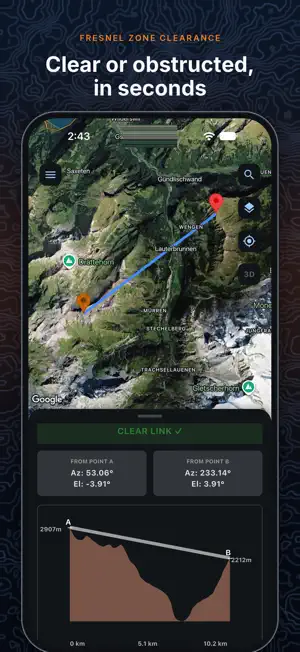
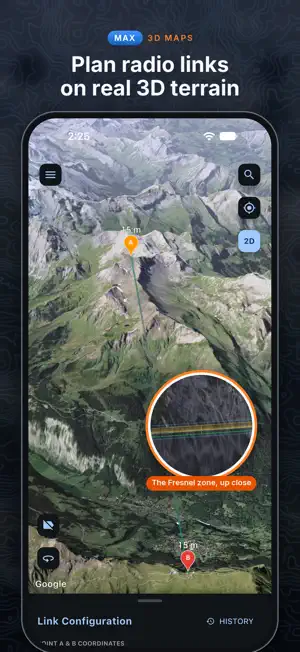
RF Fresnel Calculator tells you whether a radio link will work before anyone climbs a tower. Place two sites, set the frequency and mast heights, and see the terrain between them, the first Fresnel zone and the 60% clearance check, worked out from real elevation data. With Max, the map becomes photorealistic 3D terrain. Your masts, the line of sight, the Fresnel zone and every place the ground cuts into it are drawn right on the hills. FRESNEL ZONE ANALYSIS • Clear or obstructed, judged on 60% of the first Fresnel zone, with 4/3 earth curvature • Terrain profile chart with the line of sight and both masts • Azimuth and elevation from each end • When a link is blocked: how much higher to raise A, B, or both • Frequencies from 30 MHz to 10 GHz, masts up to 1000 m • Set points by tapping the map, typing coordinates or searching for a place 3D MAPS (MAX) • Zoom in and tap 3D: the map rises into photorealistic 3D terrain, on all four map screens • Your link, its Fresnel zone and the 60% zone drawn over the terrain • View in 3D: each obstruction marked, with its distance from A, how far the ground rises into the 60% zone, and its coordinates • Tap the 3D map to place A and B, then analyse the link right there • Coverage, routes and transmitter plans in 3D too RADIO COVERAGE • Place a transmitter and see where its signal reaches over real terrain, shaded Excellent, Good or Marginal • ITU-R P.526 diffraction over terrain, with a correction for surroundings from open ground to city centre • Coverage summary: area covered, best, average and worst range, EIRP TX PLANNER (MAX) • Mark the area you need to serve by tracing, box, circle, typed corners or a KML/KMZ boundary • The planner reads the terrain and ranks transmitter sites inside the area, on its edge or on high ground just outside • Each plan shows how much of the area it covers, and each site what extra mast height would add ADVANCED ROUTE PLANNING (MAX) • Import a route as GPX, KML or KMZ and add up to five transmitters • Signal along the route and a corridor either side, which transmitter serves each stretch, handovers and dead stretches REPORTS AND FILES • HD link report image, saved to Photos or shared • PDF reports for coverage, routes and transmitter plans • KMZ export for Google Earth, including a 3D view of the link • Import KML or KMZ files as map layers, and open GPX, KML and KMZ files from other apps • Satellite, terrain and standard maps, with contour, trail, cycle-route and sea-mark overlays • Portrait and landscape on iPhone, and a side-by-side layout on iPad TERRAIN DATA Heights come from SRTM, GMTED2010, 3DEP and ETOPO1 elevation data through AWS Terrain Tiles, with other elevation services as a fallback. Analyses need an internet connection. PLANS • Free: three link analyses to start, then one short ad per analysis. Coverage scans run after one short ad each. • Pro: no ads, unlimited link analyses and coverage scans. • Max: everything in Pro, plus 3D maps, View in 3D, the Tx Planner and Advanced Route Planning. Pro and Max are auto-renewing subscriptions, billed monthly or yearly. Payment is charged to your Apple Account when you confirm the purchase. Subscriptions renew automatically unless cancelled at least 24 hours before the end of the current period. Manage or cancel them in your Apple Account settings. Terms of Use: https://www.apple.com/legal/internet-services/itunes/dev/stdeula/ Privacy Policy: https://devvratkalia.github.io/privacy_policy_rffresnelcalculator
What’s new
Version 3.2.2 · Updated October 15, 2026
3D MAPS (MAX) • Zoom in and tap 3D: the map rises into photorealistic 3D terrain, on all four map screens • Your link, its Fresnel zone and the 60% zone drawn over the terrain • View in 3D: each obstruction marked, with its distance from A, how far the ground rises into the 60% zone, and its coordinates • Tap the 3D map to place A and B, then analyse the link right there • Coverage, routes and transmitter plans in 3D too
App privacy
The developer, Devvrat Kalia, reported these privacy practices to Apple.
Data Used to Track You
The following data may be used to track you across apps and websites owned by other companies:
- Identifiers: Device ID
Data Not Linked to You
The following data, which may be collected but is not linked to your identity, may be used for the following purposes:
- Identifiers: Device ID
- Usage Data: Advertising Data
- Location: Precise Location
Used for: Third-Party Advertising, App Functionality
Alternatives to RF Fresnel Calculator
Looking for apps like RF Fresnel Calculator? Here are 6 similar apps on the App Store. The highest rated is VHF & UHF Radio Field Planner+ (5.0/5), and all 6 are free to download.
-
 RF Link — Signal Strength, LOS
-
 Microwave Link Calculator
-
 RF Toolbox: Ham Radio Tools
-
 AntWave: Antenna & Microwave
-
 VHF & UHF Radio Field Planner+
5.0
VHF & UHF Radio Field Planner+
5.0
-
 Dipole calculator
4.2
Dipole calculator
4.2
| App | Rating | Price | Last updated | Compare |
|---|---|---|---|---|
| RF Fresnel Calculator | – | Free | October 15, 2026 | |
| RF Link — Signal Strength, LOS | – | Free | Sep 18, 2026 | Compare |
| Microwave Link Calculator | – | Free | Oct 11, 2026 | Compare |
| RF Toolbox: Ham Radio Tools | – | Free | Jun 2, 2026 | Compare |
| AntWave: Antenna & Microwave | – | Free | Oct 27, 2026 | Compare |
| VHF & UHF Radio Field Planner+ | 5.0 / 5 (1) | Free | Oct 24, 2026 | Compare |
| Dipole calculator | 4.2 / 5 (6) | Free | Oct 4, 2025 | Compare |