

FairLedger: Expenses & Custody
FAIRLEDGER LLC Productivity iPhoneiPadiPod touch
FairLedger: Expenses & Custody is a free Productivity app for iPhone and iPad by FAIRLEDGER LLC. Rated 5.0/5 from 2 ratings. Requires iOS 15.0.
- Rating
- 5.0
- 2 ratings
- Price
- Free
- on the App Store
- Size
- 22 MB
- Age 4+
- Updated
- Oct 21
- 2026 · v1.8
Screenshots


About FairLedger: Expenses & Custody
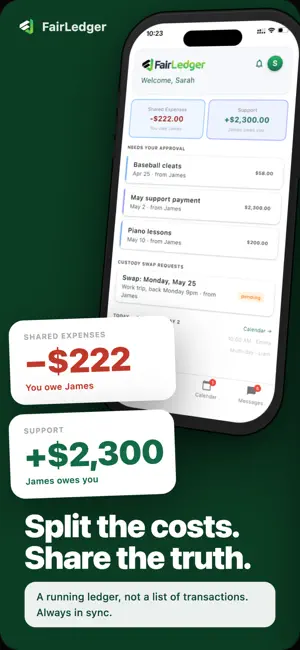
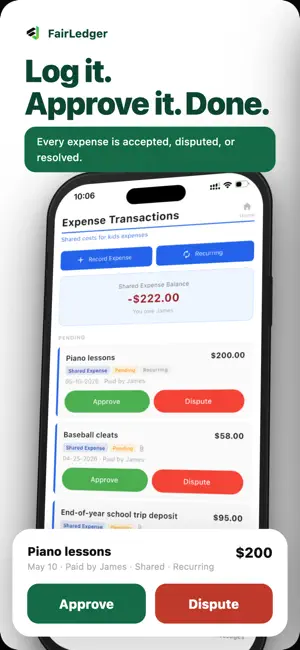
FairLedger brings co-parent expenses, child support, alimony, custody schedules, children's events, and communications together in one clear, shared record. Unlike expense-sharing apps that settle one transaction at a time, FairLedger maintains separate running ledgers for shared expenses and support payments. Expenses and obligations accumulate naturally over time, so you settle when it makes sense - not after every transaction. Every approval, payment, dispute, and conversation is timestamped, creating a clear financial history when it matters most. SHARED EXPENSE LEDGER Submit shared child-related expenses, including medical, school, activities, childcare, and more. The other parent approves or disputes each expense before it affects either parent's balance. Attach receipts, customize expense splits, and maintain a clear running total of who owes what. SUPPORT LEDGER Track child support and alimony separately from shared expenses. Support obligations accrue automatically each month, while payments require confirmation from the receiving parent - because one parent saying they paid isn't enough. MUTUAL VERIFICATION No shared financial transaction affects both parents' ledger balances without participation from both sides. Shared expenses require approval. Support payments require recipient verification. Every action is timestamped and recorded. CUSTODY SCHEDULE & CALENDAR Build your custody schedule visually instead of trying to picture a rotation from pattern names and dates. Choose a schedule, try different start dates, and preview several weeks of the rotation as you make adjustments. Nothing changes until you save. Once your schedule is set, FairLedger displays color-coded custody days for each parent. Track children's events, appointments, and activities, and request custody swaps for one or more days - all while preserving the history of changes and requests. CONVERSATIONS IN CONTEXT Every expense, payment, custody swap, and calendar event has its own dedicated discussion. Conversations stay attached to the record they belong to, reducing the need to reconstruct decisions from scattered text messages and email chains months later. MESSAGE REVIEW Before sending a message, use Message Review to check whether the wording may escalate conflict. Built around principles from the BIFF method - Brief, Informative, Friendly, and Firm - Message Review can identify potentially inflammatory language, flag messages that may be unnecessarily long, and suggest a calmer, more focused rewrite. You decide whether to use the suggestion or send your original message. MESSAGE HUB See conversations and pending items requiring your attention in one place. The Message Hub highlights unread discussions and outstanding actions so you know what needs a response. DETAILED REPORTING Generate comprehensive reports for any date range, including separate expense and support ledgers, receipts, approvals, disputes, balances, and conversation history. Create a clear, chronological record that can be useful when working with a mediator, attorney, or other family-law professional. SOLO MODE Start using FairLedger on your own - no co-parent required. Track expenses, support, custody, events, and notes independently, then invite your co-parent whenever you're ready to activate shared ledgers and mutual verification. FREE TRIAL Start with a free 30-day trial, no credit card required. One subscription includes both parents, so you're never charged twice for the same family. Subscription available for $9.99/month or $99.99/year through the App Store. Cancel anytime.
What’s new
Version 1.8 · Updated October 21, 2026
A clearer shared record. Only the parent who added an event can edit or delete it. Events added by your co-parent clearly show who can make changes. Deleting an event keeps its conversation intact. Both parents can still read the messages from the calendar and in Messages. Expenses and payments now identify who submitted them and who approved, verified, or disputed them. Message and activity timestamps now display in your local time zone. Sponsored membership details now appear in Plan & Billing. Families whose access has ended now see clearer limits on actions that require an active membership.
App privacy
The developer, FAIRLEDGER LLC, reported these privacy practices to Apple.
Data Linked to You
The following data, which may be collected and linked to your identity, may be used for the following purposes:
- Financial Info: Other Financial Info
- Contact Info: Email Address, Name
- User Content: Emails or Text Messages, Photos or Videos, Other User Content
- Identifiers: User ID
- Usage Data: Product Interaction
Used for: App Functionality