

Pictan — English with Images
tatsuya ikeyama Education iPhoneiPadiPod touch
Pictan — English with Images is a free Education app for iPhone and iPad by tatsuya ikeyama. Requires iOS 15.1. Updated October 15, 2026.
- Price
- Free
- on the App Store
- Size
- 545 MB
- Age 4+
- Updated
- Oct 15
- 2026 · v5.0.0
Screenshots


About Pictan — English with Images
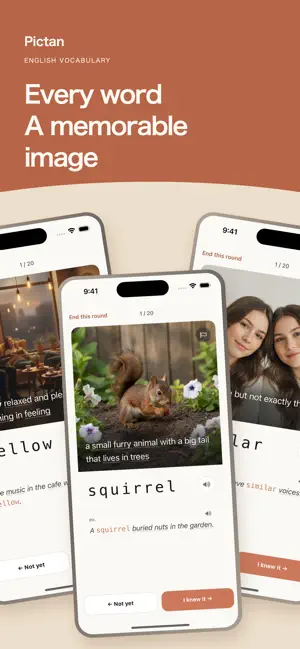
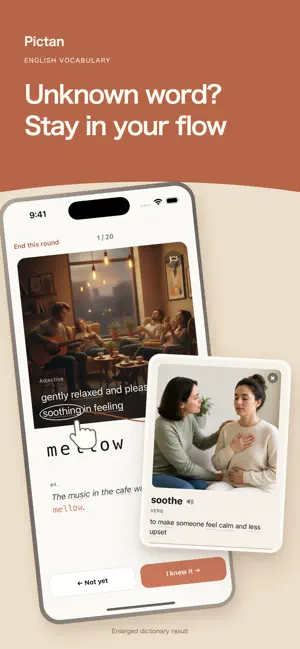
Images make vocabulary stick. Build English vocabulary with a picture for every one of 8,000 words. Pictan pairs images with English meanings and recall practice, helping you move from recognizing a word to remembering it for yourself. Choose the language of meanings Choose Japanese, Simplified Chinese, Korean or Spanish to see a short meaning of each of the 8,000 words in that language, with the English definition below it. Example sentences stay in English, with a translation after you see the answer. Find English-only definitions hard at first? Start with meanings in one of these languages and switch to English only when you're ready, or stay in English from day one. Choose at first launch and change anytime in Settings > Meaning language. See the image. Recall the word. Use the picture, definition and letter hints before revealing the answer. Instead of simply reading a card, practice bringing the word to mind. Letter hints adapt to how well you know it, with extra clues for words you have not yet learned. The images and cards are ready for you. No deck-building needed. Stay in English, even when a word stops you Want to learn in English, but get stuck on unfamiliar words inside a definition? Tap a word with a dotted underline to open its image and meaning on the same card. It works in English definitions and in examples, so you can check what you need without switching to a dictionary or translation app. Leave the review schedule to Pictan No need to decide what to review or when. Pictan uses each word's answer history to estimate when you are likely to forget it and adjusts its next review. Tap Start learning for due reviews first, then new words to fill the round. Each round has up to 20 cards. Stop early and your answers are saved, so a spare moment is enough to make a start. See how far you've come A road of 40 levels shows where you are and how close the next milestone is. On the home screen, see how well the words you have met are sticking, grouped by how long you keep each one without forgetting: Under 1 day, Under 1 week, 1 week+ or 1 month+. Check what changed after each round, and look back at your daily activity over the last four weeks and in the Learning record calendar. Start at your level Know some English and want to understand more words without translating? Explore everyday objects, actions and states across 40 levels, from Beginner to Expert. Your first 20 answers set your starting level, and you can move to another level anytime from the Level road. Start for free and try recalling words with images. Pricing and availability Premium is an auto-renewable monthly subscription that unlocks all 8,000 words. You can cancel anytime in your iPhone's Settings. Learning content is stored on the device. Launch checks, purchases and restores, and iCloud sync require internet access. The interface supports 7 languages. Terms of Use: https://pictan.corita.jp/terms Privacy Policy: https://pictan.corita.jp/privacy
What’s new
Version 5.0.0 · Updated October 15, 2026
Pictan 5.0 • Choose the language of word meanings Choose Japanese, Simplified Chinese, Korean or Spanish to see a short meaning in that language, with the English definition below it, on cards, in word details and in the popup for a dotted-underlined word. All 8,000 words are covered. Choose English to keep English definitions only, as before. • Translations for example sentences Example sentences stay in English, and a translation in your chosen language appears once you see the answer. • Change it anytime in Settings > Meaning language • More languages are coming very soon • A new app icon The icon is now a learning card with a picture on top. • Easier-to-read definitions on cards The definition over the image is bolder with a stronger shadow, and the part-of-speech label has a colored dot for each part of speech. Your learning history and review schedule carry over.
App privacy
The developer, tatsuya ikeyama, reported these privacy practices to Apple.
Data Not Linked to You
The following data, which may be collected but is not linked to your identity, may be used for the following purposes:
- Purchases: Purchase History
- Identifiers: Device ID, User ID
- Usage Data: Product Interaction
Used for: Analytics, App Functionality
Alternatives to Pictan — English with Images
Looking for apps like Pictan — English with Images? Here are 6 similar apps on the App Store. The highest rated is Speak & Learn English – Glite (4.9/5), and all 6 are free to download.
-
 Shadowing English With Video
4.5
Shadowing English With Video
4.5
-
 fondi:Talk in a virtual space
4.3
fondi:Talk in a virtual space
4.3
-
 Speak & Learn English – Glite
4.9
Speak & Learn English – Glite
4.9
-
 Language Reactor - PlayLingo
4.5
Language Reactor - PlayLingo
4.5
-
 BookCast: 15-Minute Insights
4.7
BookCast: 15-Minute Insights
4.7
-
 Widget Vocabulary: Learn Words
4.7
Widget Vocabulary: Learn Words
4.7
| App | Rating | Price | Last updated | Compare |
|---|---|---|---|---|
| Pictan — English with Images | – | Free | October 15, 2026 | |
| Shadowing English With Video | 4.5 / 5 (64) | Free | Oct 16, 2026 | Compare |
| fondi:Talk in a virtual space | 4.3 / 5 (64) | Free | Oct 4, 2026 | Compare |
| Speak & Learn English – Glite | 4.9 / 5 (15) | Free | Oct 8, 2026 | Compare |
| Language Reactor - PlayLingo | 4.5 / 5 (783) | Free | Oct 11, 2026 | Compare |
| BookCast: 15-Minute Insights | 4.7 / 5 (311) | Free | Aug 6, 2026 | Compare |
| Widget Vocabulary: Learn Words | 4.7 / 5 (429) | Free | Oct 11, 2026 | Compare |